- What is the difference between extruding a bone and adding a bone from the same point?
Answer: I just added an armature and then E a bone, then added a bone. The extruded bone has a parent and the added bone does not. But they are still part of the same armature…
When you give the added bone a parent to bone, it will not be scaled when you move the parent bone, unlike the extruded bone which is scaled in the direction of the moved parent. The extruded bone is linked or in the chain?
- Whats a vector pole? Are they used only in the armatures? Are they the top and bottom of the bones?
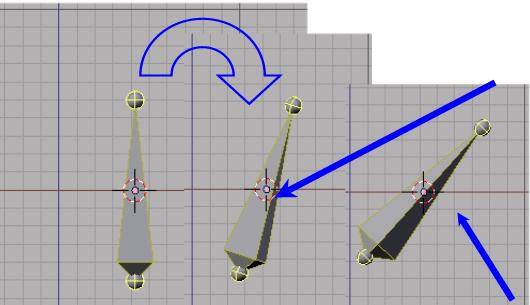
When I add a bone and press r to rotate it, it rotates in all directions? comparing it to rotating a mesh object which requires you to press r twice to get full freedom of rotation.
-
Why does it do that? Is that to maintain the poles? or what? its fun to watch though.
-
Are we still required to add an armature only from top view? I added one from front and the axis all pointed correctly is why I ask.
I was researching free information regarding armatures and ik solvers and this is one of the first urls listed:
harkyman
12-Sep-03, 05:36
You need to make an IK solver. There won’t be one automatically (yet).
As for IK/IKA: IKA’s were the name given to the old armature system. When someone talks about IKA’s, it’s sort of like they’re talking about the 0.5 version of armatures. IK refers to Inverse Kinematics, the calculation of the position of bones in a chain dictated by the location of the endpoints. It differs from the other method of bone placement, Forward Kinematics (FK), in which each bone in a chain inherets its position from up the chain.
How to make an IK solver:
- Have a chain of bones.
In purple edit mode (TAB):
2. Select the endpoint (not the root) of the last bone in the chain.
3. Snap the cursor to this point (Ctrl-S)
4. Extrude a new bone from this point (e-key)
5. Create a new bone at the cursor point. Name it chain.acc.
The extruded bone you made in 4 is now a part of the IK chain of bones from 1. It will be your IK solver. The bone that created in 5 is not linked to the other bones. It will be your controller (thus the .acc suffix that I use to mean “actuator”).
In pose mode (blue edit mode, Ctrl-TAB):
6. Select the extruded bone.
7. Move the the constraint buttons (the chain links)
8. Click Add
9. Choose IK Solver from the popup menu that appears
10. In the OB field that appears, type the name of your armature (case sensitive, and at this probably just “Armature”)
11. In the BO field, type chain.acc
Select the chain.acc bone in pose mode, move it around and you should have working IK!
Good luck.
aersoy
12-Sep
yes I know its like four years old, but it helped a lot in my understanding, but as information does, it led to the questions above.
I just did this simple tut, and am ecstatic!,
LOL, I think I need a tut that starts:
Armatures are special little objects, used to deform a mesh. They are really fun to learn about and play with.
To begin, …