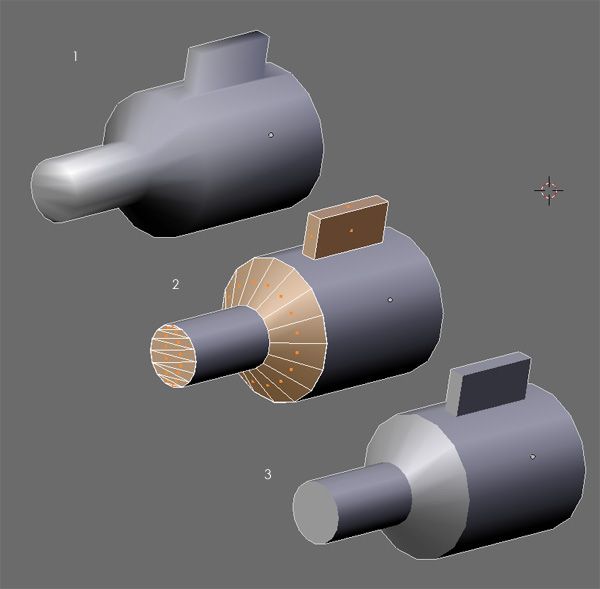
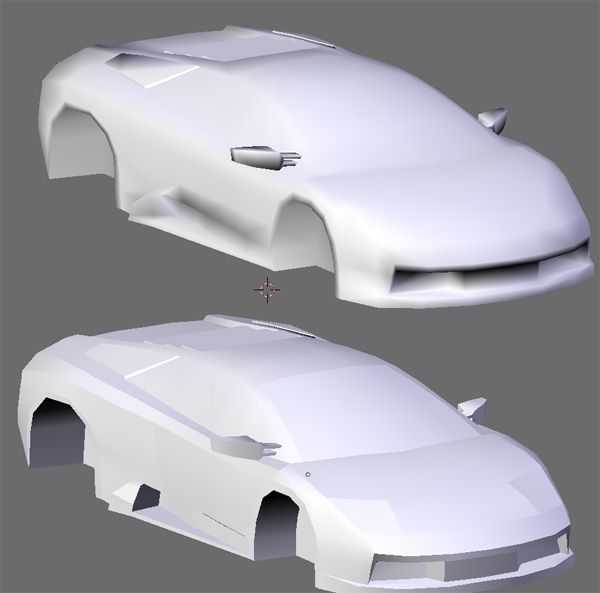
Number 1 shows a model that has smoothing applied, useful, but it leaves those nasty black lines around sharp edges. By selecting the appropriate sections, then pressing P to seperate them, you can get rid of those lines and with the added bonus of an increase in detail due to the better way in which the light falls on it.
Once you’ve got rid of the black lines just rejoin the pieces, at (what i can tell) no loss in game engine performance.
This image shows how you can make a massive difference to your models using this technique. Its not only for cars and tubes either, its a common technique in character modelling. (I’ll post an example once ive finished it).
I hope this was useful, if anyone doesn’t understand anything let me know. Thanks.
Well, I’ve only been awake for an hour and learned something about blender today! Thanks blenderage, very useful.
This could also be useful in rendering couldn’t it?
Looks interesting, I always wondered how to do smoothing groups in Blender, but it never occured to me to separate the meshes. One tip though, using Y is probably easier, since it doesn’t create a second object.
I could add a little insight, why it works. When rendering smooth objects, every vertex needs a normal, which is computed as a normalized sum of normals of all polygons the vertex belongs to. By separating the vertices along sharp edges, no suming of normals happens, hence the sharp edge appears.
This is a decent bandaid until actual smoothing groups are supported! Its not as good as actual smoothing groups, of course, because you can’t do things like a join between two different smoothing groups at a specific polygon but not the surrounding polygons.
Other programs have much more elegant solutions for hard/soft edges (have a look at Maya or Multigen).
If the lovely programmers are going to donate some time to this feature myself and a few other people (see the threads floating around on Elysium and Blender.org) would like a solution that isn’t based on Max’s Smoothing Groups.
I think this is a very clever way of solving it but, whats when you’re using armatures on an object?
I noticed the mesh is deformed. no subsurfing anymore, for example.
Just another small point, if you are going to use this make sure it is the last thing you do. Its not always possible to know when you’ve completely finished a model, but it makes life easier. That way you can unwrap, texture, rig as normal then just use, as ondrew correctly point out, Y to split the polys.
Jacco- this technique is best suited to the game engine, so its not good for subsurfing. Instead use creases or add extra edge loops to get hard edges. Armatures should work fine as long as you rig before you split.
This is a very generic smoothing group technique AFAIK. Smoothing group on a software (namely max) won’t displayed correctly on some other software.
I dug up quake 2 models back then and I’m quite confused why does the models separated in irregular way. Turn out they use this technique. Although it’s much painful todo than max’ it is surely safer.
Not just Quake 2 models. Doom3, and any games using that engine, need the same sort of splitting. I don’t know about other engines, but I’d expect it’s a pretty common thing. With skeletal animation becoming more and more prominent, storing normals for each frame just doesn’t work. It becomes impossible once physics and IK is added to the mix. Splitting the mesh is really the only way to get it to work right, without a lot of extra code. Saving time on the art isn’t worth the extra time per frame.
I’ve been trying to make an interactive model (using the game engine). So far it’s pretty complex and runs slow but after spending 15 minutes doing the seperating and rejoining it’s already loading twice as fast and running a lot smoother!
It’s no smoothing group at all, even if it turns out to have (only visualy!) the same effect. Just to mention those extra vertices created with the split. Hopefully one day Blender will have tools for normal editing others than auto smooth.
What’s the difference with selecting groups of faces in Edit mode, and then Applying Set Smolid area by area? It seems to me a very complex (and not so straightforward) for smoothing only parts of a model???
It’s a commonly used technique: suppose you have a cylinder and that you want it to be smoothed: on the flat ends, the shading will be wrong it you use SetSmooth on the whole mesh. So set smooth the entire cylinder, enter Edit mode, select one end : SetSolid, unselect all, select the other end: SetSolid.
The trick is done!!! (and you can do it since ages…)
I don’t want to bash blenderage’s tip, it’s just that i’m wondering if i misunderstood something about the point of this…
Hey awesome trick!
Blenderage: in a case of a rigged mesh are you really sure that you can aply this method BEFORE rigging without messing the model? Does i need to use the “P” button to make that? And if i have asigned animation cicles will this method also work?
Thankx in advance.
There’s another way to do this that’s probably better than the other techniques mentioned here.
If you add the “Edge Split” mesh modifier to the mesh, you get the same result. You also get the added ability to use it with other modifiers (such as subsurf) and do UV mapping.
Very good trick; it integrates perfectly in the way that the 3D libraries manage vertices.
I prefer this approach to smoothing groups, because the latter is no more than a modifier that tells the modelling program to only average the normals of every group together. Nevertheless, that information is lost when exported to a game engine.
By splitting the mesh into several parts, vertices get duplicated. In OpenGL for example, a vertex can only be considered equal to another not only if their coordinates match, but they also have to have identical normal and texture coordinates. So, even if you used a program with smoothing groups, you would have to split eventually the mesh anyway to send it to the graphics pipeline.
I think this is the main reason for the Blender developers not to implement that feature. It is supplied already with creases in subsurf mode and as seen before, it is not really important or neccesary when lowpoly modelling, because we have the good old Y key.
This is a nice technique, but I think olivS is correct, you can set partes of objects smooth without having to separate the vertices. Also guys, consider that this thread was written nearly a year ago in february of '06, and I haven’t seen Blenderage on here for some time.