Oh that? That was just me having a Bob Ross moment Ignore all that mess.
As for distance, well, if you say so Regarding vectors, I don’t like them, and they don’t like me either. I just went with what I found here. Yeah, I see now above some of those weird symbols Feel free to modify, but yeah, I like that object input, I just never thought about how it could be used.
I did set up an animation to test it, but unfortunately I seem to be experiencing some HD troubles. Managed to back up blender dir and some other important stuff, but working on and saving that file seemed to make the whole directory corrupt.
I feel like we should just rename this thread and start adding various different shaders such a phong, blinn, etc. implemented in Cycles as experiments.
@CarlG, as for using the light by light selection, that could be implemented in order to improve the shaders performance when full realism is unnecessary.
But I think the primary issue is sampling the various different wavelengths of light. It takes really long since the time it takes for the samples to converge to a definite value take at least three times as long (based on an R-G-B splitting of wavelengths). It would be so very useful if there was a way to utilise a single computation for each order of light diffraction and then adjust the angle accordingly for each wavelength, but even that takes too long with the nodes available since the “sampling” mechanism is either using a brick texture with very high scaling, or selecting sufficiently separate finite wavelengths and computing for each one before combining them for the final colour.
The best seems to be scripting the shader in terms of sampling, but due to the implementation of OSL that method is too slow for most usage scenarios since it is CPU limited at the moment.
I’m going to give your selective light idea a go and see where I get with that as I think it is promising.
Just uploaded a testanim where I test out a few ideas, incl using texture coordinate/object and then linking to light source to drive some kind of weird shading effect:
It’s only rendered at 150 samples, so please do excuse the noise
CarlG: this is quite interesting!! I think moony would love to play around with your node setup . Too bad that doesn’t really fit into the PBR schema, but it’s a helper for a big variety of effects.
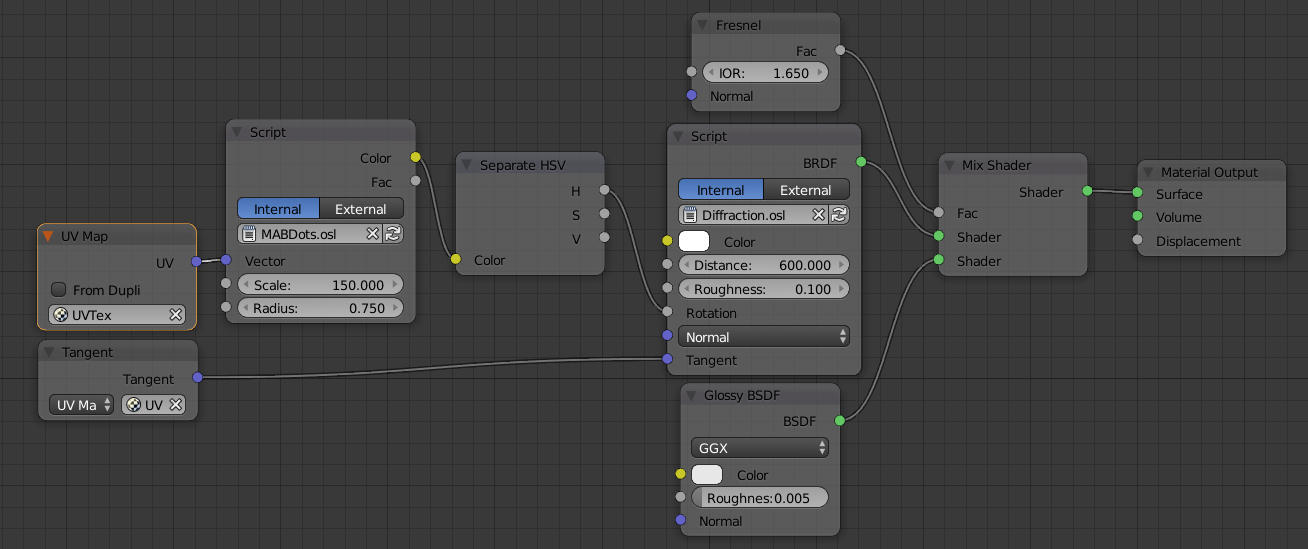
Don’t have the file anymore, but it was just a glossy, the diffraction node, and an osl script for the flakes (a variation of the voronoi function)
It possible to have a similar effect with the voronoi texture… using the intensity you can mask the circles (with a ‘is less than’ math node), and for the rotation value you can use the cell from another voronoi with the same scale and coordinates.
Then you can multiply that pair a few times to add more circles, give them different coordinates so that the textures don’t overlap, and mix all together.
Right now I’m working in an implementation of the Diffraction BRDF into cycles code, thought I’m still dealing with some problems in respect to the summation of multiple wavelengths and the consequent conversion to RGB. Thought this is not so problematic for small slit distances (up to ~1500 nm), bigger distances produce too many orders in the same direction, and a novel approach must be created to compensate the total energy reflected. :spin:
ATM, the shader is working, but it’s limited to a pure anisotropic surface (most typically used in measurement systems). I’d like to add the possibility to deal with roughness/multi-direction, so that it may be possible to mimic other diffraction effects normally found in nature.
Also, inspired a bit by Lukas Stockner’s work with the multi-scattering, I’m planning to work out a refractive version of the code.
Maybe in one month or something I’ll have something to share.
Don’t you think we should first start with basic spectral effects like dispersion (not only as a matter of it being apparent in more cases, but also to provide a proof of concept and an architecture for such effects in Cycles)?
I would think diffraction and iridescence would become easier to implement then as part of it would simply expand on the basic functions.
The main problem with dispersion is that the surface reacts differently to different incoming wavelengths… this means changing the way rays are transmitted from point to point, and deep changes in the engine. Diffraction, on the other hand just works the same for any incoming wavelength, and we can still use the current ray-tracing algorithm.
A good illustration of this problem is the known ‘diamond dispersion’: the light comes in but for each frequency the path is changed (with IOR changes), and things are a bit more difficult when we’re dealing with light coming from the inside (hitting the backface) where we don’t know in which wavelength the ray was modulated on the entry point and therefore a bit difficult to predict which out direction we should use.
Also, I’m still learning how Cycles work, and I’m not very comfortable to make such deep changes, specially when those, albeit opening the possibilities to a bunch of other effects, could drastically reduce the speed of rendering (even for scenes where none of these effects are needed)…
I have read through this thread a few times now and still can not replicate what you are explaining. I am in love with the shader that sm48 quoted (post #89), but for the life of me can’t get anywhere close to it, even with your nodes and explanation.
A more detailed explanation would be greatly appreciated, however I understand if this is not possible as you have already given us enough!
Thank you so much Secrop! I finally understand it. I have never used OSL scripts before so it took a bit of figuring out, but now I am able to produce an image similar to yours. I am very excited to use your Diffraction node even further, thank you for the knowledge!
So I know this thread is very much completed but I am very much confused on how to get a bubble looking shader. Someone has said my thread that my node setup has perfect reflections and that bubbles aren’t like that but I am super confused on how to play with the reflection.
Or alternatively how would you make this look more like a bubble
It is a really awesome shader however I feel as though light in a bubble such as the one I am aiming for is more red green blue and not cmyk. I really do like it but I can’t get it to work properly. This is what I had before your shader and after it was more CMYK colour space. Someone has also pointed out that my reflections are too clear but I have no idea how to fix that. Any help would be awesome.
 Ignore all that mess.
 Feel free to modify, but yeah, I like that object input, I just never thought about how it could be used.