changed the lineup of the objects…added in another moon, although i’m not too sure i’m happy with it’s position currently.

i like it much. the noise on the ice looks great ( can use color-modification) as ice/snow reflect or flare in real, very cool. the ring around the planet could have some larger rocks or more dirt maybe.
i agree you don’t need cycles if BI does the job good. you can work around renderlayers with cycles by rendering the layer as you wish in cycles. save the image as EXR and use the image as layer-input in the compositor
Looking good  The only thing I would chage is the aspect ratio of the image. I feel it crops too close to the star in the top right.
It might be nice to move the moon further in the distance, maybe just passing the other side of the planet, but im not even sure the image needs it.
I’m liking it so far, I think the latest one seems slightly too bright for my tastes, but it’s your work. My question is I understand that it’s ice, ice is generally smooth, curvy, reflective, and shimmers in the light, but if there are craters in such a place, would there also not be any jagged edges, sharp points? Something similar to cracked or shattered glass, sharp edges possibly in the distance giving it more life or energy. Just an idea.
@ Blutarsky - hey, thanks! i’ve added a bit of color to the noise now. it’s very subtle because it’s a bit distracting when the color is intense…but it’s there! great suggestion. the ring particles are basically a noise texture on a two dimensional plane, so it’s hard to add rocks to it, but i could work on breaking up the texture some with maybe a cloud texture. yeah, i’ve come to realize Cycles isn’t really cut out for this kind of scene yet. i wish Cycles could handle render layers. the ability to see what i’m doing in Cycles without having to hit Render and wait an hour makes getting things done soooo much easier!
@ DustyKhan - i’ve changed the aspect ratio, moved the moon father away, and even added a couple o’ additional moons. thanks for the crit!
@ endlesslygrimm - i’ve toned down the light coming from the star, which was up too high. thanks! i may actually turn it down even more in the next few renders. anyway, about the ice…ice that’s formed from frozen liquid water might look smooth, curvy, and have jagged edges should it be transformed into craters. i’m not sure icy moons made of rock-ice would look like that though…anyone else have an opinion on this or know the science?
where i’m stuck at now is that i want to add Mist to the landscape to give it the sense of distance. does anyone have any clue how to do this in the Compositor? i only want mist on the terrain and nothing else. i’m able to create a mist using a Map Value node connected to the terrain layer’s Z-buffer…but that gives me a white sky which totally ruins everything else when I composite it in. does anyone know a good way to add Mist to a single layer and have the empty part of that layer be an alpha value so when you composite it will fit in?

its a very nice piece or artwork and getting much better. i like it much (and dark scenes in particular). I could put it on my wall.
relocating the moon is a nice good progress you made there. it can be a little bigger tho.
What i meant with the rocks etc is for more detail to your scene by adding a particle system with not rendering the emitter (purple).
technically the image is too dark. a couple of pure black areas (green). nothing is black (on earth, in space idk). maybe you can try this : add a plane-emitter to the scene (top or little from the front). this simulate light coming from other surrounding stars (esp.back). soft light and very distorted. add the spectrum texture to the plane. if it is too much colorful mix it with a color-mix node. (purple)
e.


@ Blutarsky - hey, thanks for the crits, they’re very useful.  i’ve moved the moons around a bit, and made one of them bigger. i wasn’t getting good results using an emitter plane with the color wheel as a texture. however, i was able to use a spotlight with a colored cloud texture to get a good result. i haven’t added a particle system to the ring yet, but that’s coming up next. thanks again!
i also finally figured out how to composite in some mist, and i didn’t even use a mist pass at all. wahoo! it looks a lot better with the mist.
still need to add some rocks to the terrain, and maybe work up an animation.
if anyone else has some critiques, please let me know.

Lots of evolution going on with this image. The main critique I have is that the moon now looks too dark in the shadow regions. I know that without atmospheric scattering they’d be pretty deep, but there’s also reflected light to consider, plus as an artist you can take some liberties to insure that there is shadow detail, especially when the shadows cover such a large area of the image.
Secondly, the nebula is much, much too bright if you’re intending to portray this as a visible-light image as seen by human eyes. The deep-space photos from Hubble and other 'scopes are very long-exposure shots that are often false-colored or filtered for visual effect. Looking through a 'scope at Orion, for example, only a pale greenish-blue hue is seen, because that’s the peak of the emission spectrum for visible light that our eyes can easily register at the very low levels the nebula emits. Reflection nebulae can be different and sometimes a bit brighter but yours looks like a classic H+ region, an emission nebula like that in Orion. It’s brightness contrasts starkly with the moon’s shadows, making them appear even darker.
@ chipmasque - thanks for the crits as always! ok so basically, lighten up the shadows on the terrain, and tone down the nebula light. got it! working on it now. do keep in mind that the large moon in the sky is in front of the star, thus you’re seeing the night side from this view.
wow very nice progress you made there again. I agree with chip the small yellow moon is somewhat opache. you will solve that with. i disagree with putting rocks on the surface. a good rule in graphics “Less is more”. It’s a abandoned cold icy place, no needs to be cosy up more :). The less there will be on the surface the further away this moon exist in my imagination. (or drop a mars candy wrap in some corner LOL).
good work.
here’s another update. toned down the nebula some, added some camera lens defects. i think it’s safe to say this isn’t really “A Vew From an Icy Moon” now but rather just “A View from an Alien Moon.”
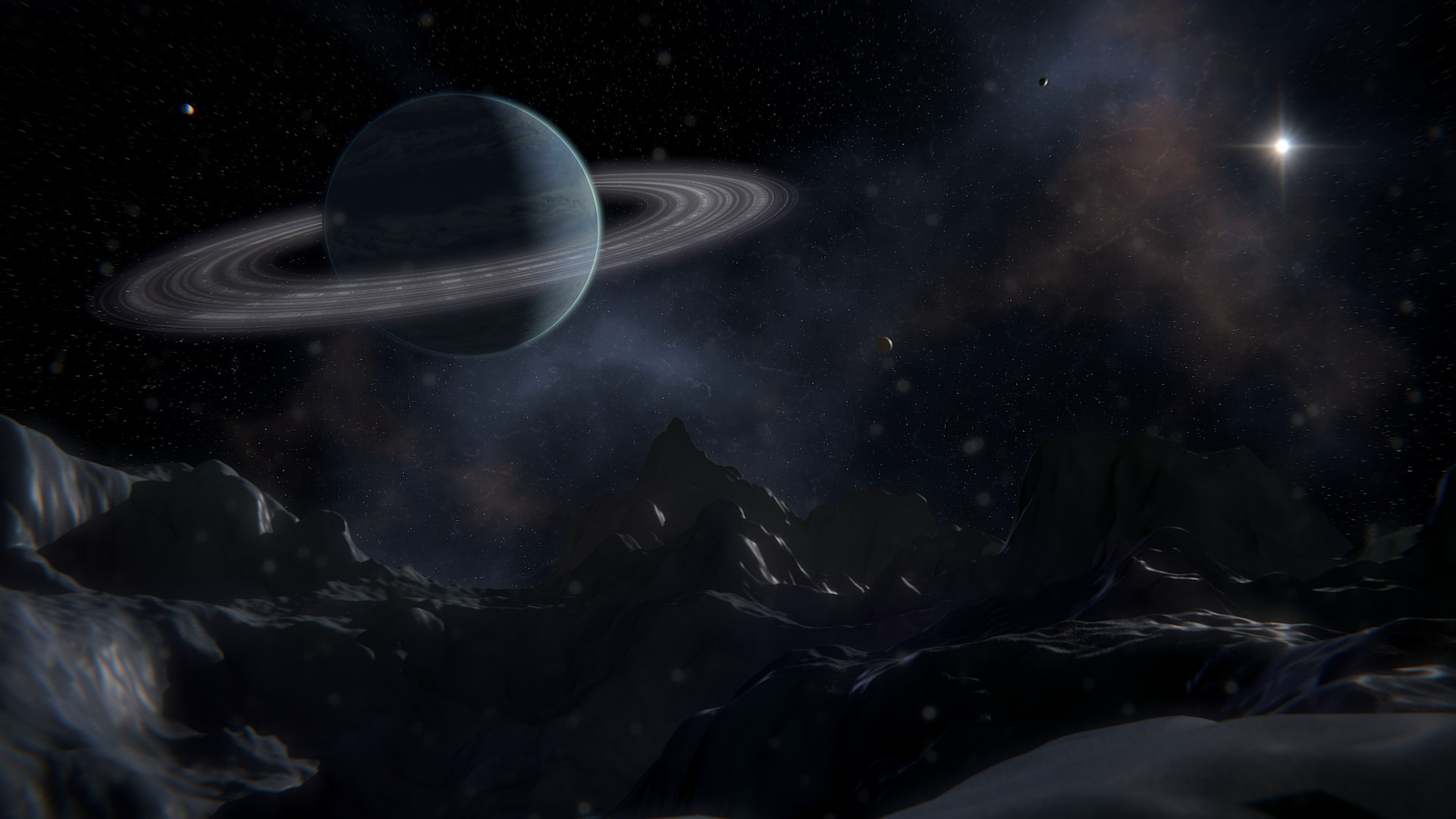
The ice looks too plastic. Try sharpening up the specularity, adding in a noise bumpmap.
@ OL77 - will do. the bump on the ice is already there but i may have it turned down too much now. i’ll fix that and the spec right now. thanks!
Nice image.
But the planet looks a bit close and the rock face on the left isn’t as sharp as those on the right
@ Wentzel - Thanks for the crit! i’ll also move the planet back a bit. i think the rock face on the left is blurry because i have the lens distortion up too high. i’ll tone that down as well.