I am new to Blender. I am Maya user. In maya we have option to bring asset from other file which is not editable but it can be moved animated and placed anywhere. This imported asset file which can be non-rigged asset or rigged asset for animation. If original source file modified then these reference asset also get change automatically. How such kind of referencing is work in Blender. I have seen Append and Linked but both are not same like referencing in maya, correct ??
Thanks… It got it now. Still I have following queries.
* To animate a rig character we right click on collection > Library Override > Make > Selected & Content. What if I have to lock that same character again once animation is done (like original link situation) so nobody can do mess with it? I have tried with same right click collection > Library Override > Reset > Selected & Content But nothing changes, why ??
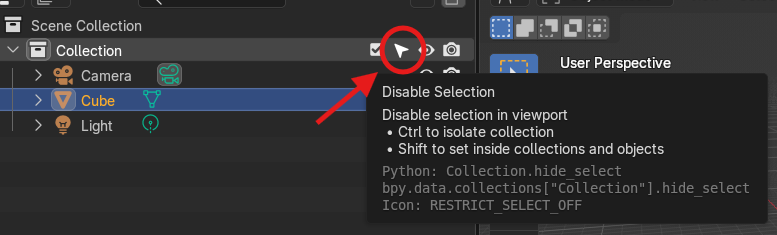
The reset operator doesn’t lock the character, it just reverts any changes you did to the library override. If you have a linked character that’s animated and want to prevent someone else from modifying it or change the animation you can just disable the selection of the collection that contains the rig and the geometry.
I’m not sure there are dedicated ways to “lock” a character, maybe by toggling the armature selectability? make the file itself read-only?
It sounds like this problem is best solved on the human level. Who do you think might “mess” with the file? someone who’s untrained yet handling production files? what’s the context?