Had this exact same issue with Blender 4.5.9 using Ryzen 9 5950x & RTX3090.
Thanks for the fix!
Had some issues with auto smooth when generating cages. But managed to patch those too.
Is the 1.90 version still going to get updates? The docs seem to be a bit dated and it’s unclear what the main differences between v1 & v2 are? Why is it not better stated?
Would like to see just a little bit more information about what’s supported etc. on the store pages and docs.
Cheers.
v1 does not receive updates and the last supported blender version for it is 4.4.
v2 is for blender 5 on.
There are a bunch of changes in v2 with the settings nodes, settings presets and overrides. Plus a system for merging + displacing meshes with an update to auto naming and splitting of objects.
v1 shouldn’t actually be a purchase option any more. I need to look into how I can do that… Okay fixed the gumroad version to no longer show it.
Thanks for the clarification! Having that info somewhere in the docs and FAQ would definitely be helpful.
I find it a bit odd that you’ve left the current LTS 4.5 unsupported? I’d imagine quite a few people only fully switch on LTS releases. Or is that just a limitation for v1?
Managed to patch it myself with some LLM help tho, so not that urgent for me.
That was a feature I was thinking about but never fully implemented. You must have an old version because I moved that file out of the build at some point, I’m sure..
Also I wrote a prototype for a new margining process a few weeks ago and totally forgot about it…
I think this should probably replace the existing systems. Essentially it will use my existing accurate but computationally expensive process to find the base margin of 8-16 px (even though I highly optimized the process, it’s simply too slow when run in python to fill a 4k image). Then the remaining voids will be filled by the much faster but less accurate push-pull method (basically simulates mip mapping to pull the color).
The only issue is that I have to get a mask of the islands, which is an extra render pass. Though it’s very quick.
But the standard default in basically every baking tool is to generate fully filled textures. While in reality that doesn’t really matter so long as the texture never gets sampled on or past the edge of the margin. The extra second per texture to do a full fill is considered worth it as a safe guard. There are also potentially some small gains in file size and color accuracy, but that’s all highly dependant on the image format and probably not worth worrying about.
First of all, thank you so much for creating Bake Wrangler! It’s an incredible addon that has been a core part of my baking workflow for a long time. I really appreciate your work on this tool.
I wanted to report an issue I encountered while baking in Blender 5.2.2 LTS. Whenever I try to use the Auto Cage feature or click the Generate Cages button, the process immediately fails with an error. Baking with a manual Ray Distance or passing a custom cage via the Objects node works perfectly without any problems, so the issue seems isolated to the Auto Cage generation logic.
Environment:
Blender version: 5.2.2 LTS
Bake Wrangler version: 2.0.4
OS: Linux (openSUSE Tumbleweed)
Steps to Reproduce:
Set up a standard High Poly to Low Poly bake scene
Enable Auto Cage in the Recipe Settings node
Click Bake
Console Traceback:
\[Output Image Path.001 (Image)\]: === Bake starts ===
\[Output Image Path.001 (Image)\]: Creating temporary files in /tmp/blender_Hy40S9/
Info: Saved copy as "BW_Untitled.blend"
\[Output Image Path.001 (Image)\]:  - BW_Untitled.blend
\[Output Image Path.001 (Image)\]:  - BW_Untitled.blend.log
\[Output Image Path.001 (Image)\]: Blender: 5.2.2 LTS Addon: 2.0.4
\[Output Image Path.001 (Image)\]: Launching background process:

> Processing \[Output Image Path.001 (Image)\]: Creating 1 images
>
> Pass: \[Bake Pass.001 (OBJNORM)\]  \[Mesh Nodes (1)\]
> Mesh: \[Input Mesh.001\] \[Targets (1)\]
> ================================================================================
> \[Output Image Path.001 (Image)\]: Background process ended
> \[Output Image Path.001 (Image)\]: Process did not complete and no progress made on retry
> \[Output Image Path.001 (Image)\]: Bake failed after 0:00:01.599849
> \[Output Image Path.001 (Image)\]: Failed

Failed to open dir (No such file or directory):
00:37.792  operator         | ERROR Bake Failed
If I click Generate Cages on side panel at Bake Recipe:
Failed to open dir (No such file or directory):
00:37.792  operator         | ERROR Bake Failed
Traceback (most recent call last):
File "/home/user/.config/blender/5.2/extensions/user_default/BakeWrangler/nodes/node_panel.py", line 136, in invoke
generate_auto_cage(obj\[0\], obj\[1\], obj\[2\], context)
\~\~\~\~\~\~\~\~\~\~\~\~\~\~\~\~\~\~^^^^^^^^^^^^^^^^^^^^^^^^^^^^^^^^^
File "/home/user/.config/blender/5.2/extensions/user_default/BakeWrangler/nodes/node_panel.py", line 263, in generate_auto_cage
cage.data.use_auto_smooth = True
^^^^^^^^^^^^^^^^^^^^^^^^^
AttributeError: 'Mesh' object has no attribute 'use_auto_smooth'
01:42.634  bpy.rna          | ERROR Python script error in BAKE_WRANGLER_OT_auto_cage_create.invoke
01:42.634  operator         | ERROR Python: Traceback (most recent call last):
|   File "/home/user/.config/blender/5.2/extensions/user_default/BakeWrangler/nodes/node_panel.py", line 136, in invoke
|     generate_auto_cage(obj\[0\], obj\[1\], obj\[2\], context)
|     \~\~\~\~\~\~\~\~\~\~\~\~\~\~\~\~\~\~^^^^^^^^^^^^^^^^^^^^^^^^^^^^^^^^^
|   File "/home/user/.config/blender/5.2/extensions/user_default/BakeWrangler/nodes/node_panel.py", line 263, in generate_auto_cage
|     cage.data.use_auto_smooth = True
|     ^^^^^^^^^^^^^^^^^^^^^^^^^
| AttributeError: 'Mesh' object has no attribute 'use_auto_smooth'
Thanks for the report. It looks like it’s to do with the normal smoothing being moved to the modifier stack rather than being a mesh property. I should really have updated that, but I forgot I even use the normal smoothing property
Hello guys, I’m trying to bake the shadows pass but I must doing something wrong. I have the combine pass working as expected WITH the shadow but I can’t find a way to bake only the shadow pass. It’s just fully white… any idea?
It’s a little confusing, but the shadow pass only picks up shadows cast by OTHER objects in the scene. The mesh does not cast shadows on itself. You’re already on the right track with the combined pass. You could take the value output of a combined pass, or use the diffuse/glossy passes with color disabled and combine the value output of them (you only need the glossy pass if you actually use metallic/glossy materials).
ok got it. So I wasn’t doing something wrong then :). that’s a weird way of dealing with the shadow pass. I’ll make a simple white material to bake a combine pass and with some gamma tweak on it I’ll get what I need. Thanks again for this amazing add on.
Is there a way to import a texture already baked so I could split it and combine it with a new baked infos? for instance if I have a normal map already baked from outside the addon and I’d like to bake an AO or curvature pass into the alpha of this normal map?
It’s just a quirk of the rendering system, the dark parts of the mesh aren’t actually in shadow, light rays from them just never reached a viewer. A shadow is when light rays from the mesh would reach something, but then another object should occlude them. It the whole: You can’t see your shadow when the lights off thing
Technically you could bring in an outside generated image, but it’s not something I designed a node for. You would likely be better off just using GiMP or Krita or whatever to combine them..
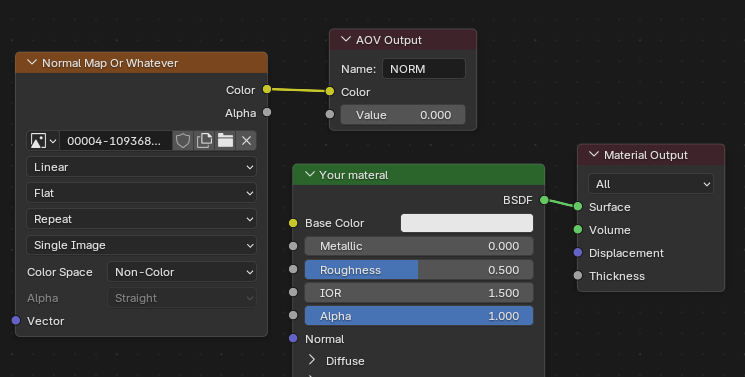
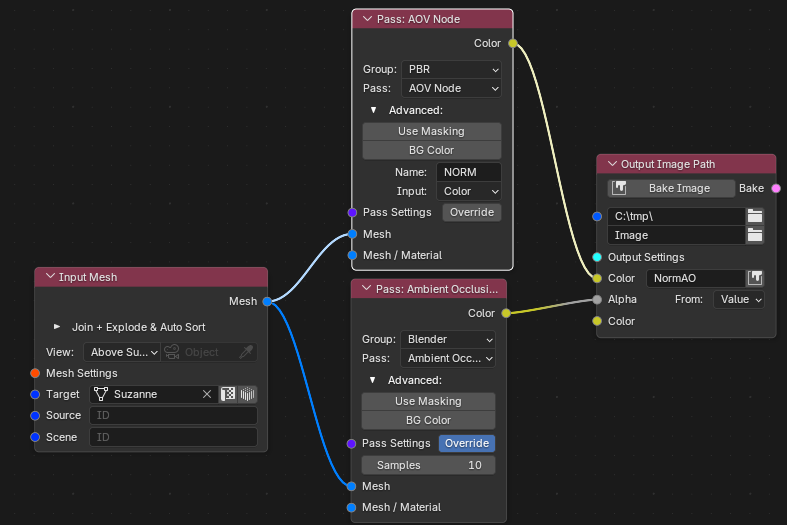
But you can add in anything you want via the AOV node and pass. You just need to include the already created image in your models materials connected to an AOV output, eg:
I’ve connected the color output from AOV to the color of the image and then put the AO into the alpha. Just make sure that the texture node in your material is set to non-color for a normal map and also makre sure you set the output color space of the bake to non-color, since it wont know it’s a normal map (normal maps generally get automatically output as non-color without you having to set anything, but it wont do that in this case).
Thanks, that workaround is good enough (a dedicated import texture would be better ). Yes I could merged the maps elsewhere (Substance designer would be my choice since it’s easy to setup nodes for that) but since I might have to do it quite a lot, it’s better if it’s done inside blender and this addon. I’m trying to reduce the need to switch software as much as possible.
ThX
The main reason for not adding a plain image node is that having an image that’s not associated with a mesh generally doesn’t make sense in a baking workflow. But it could make sense as a post processing node. There are a probably a bunch of post process nodes I could add, but I don’t really know if people even use the current ones
At least, I’m already using the gamma and split and join often. people probably aren’t aware of the possibilities it offer specially if you want to send the files in UE
Well if you find something is missing feeling free to post the idea.
I’ve been mostly working on other projects since the 2.0 version but there are a few things I want to add. The main baking function has gotten out of hand and needs refactoring into smaller chunks and hasn’t been on my ‘really want to do this’ list I did start on it by changing the settings into data classes instead of dicts of keys I’ve mostly forgotten the meaning of. I probably should have had an llm do it…
I wanted to completely remove the dependence on blender for image manipulation and file saving since 1) python libraries for these tasks are now included in blenders builds & 2) they broke how the image output worked with color spaces and when I reported the bug was told it’s working as intended (even though how it works now is completely different to how it has worked for 5+ years and there is no way to achieve the previous behavior now).
I did replace image output, since I had to. But still relying on blender image manipulation. I can also replace blenders margin drawing with a hybrid of my existing (but slow) margin function and a fast less accurate library function for the fill.
Other than that, an external compiled baking system would be the next step. It wouldn’t be too difficult to do for pure data passes (normals, ao, etc), but it’s a fairly significant project to make it work with blender material system. Of course LLM might be good enough to actually make it possible for a one person team to do (I tried it a year or so ago and it wasn’t up to the task).
Also I’m not really being paid anything. I wonder if I should just make the add-on free for the next release and rely on patreon and community support to keep it going…
I understand your feeling . be sure to know that I really love this addon and use it often. I’m not usre people realize how powerfull it is specially if you use it with some geometry node to select the lR and HR mesh in specifics collections. It’s very easy to load the mesh you want, apply some transform if needed to avoid overlapping. bake specifics materials made just for that. and be able to output anywhere you want with whatever naming you need. being about to merge the metalness, roughness Ao etc before exporting …
For simple stylise game or just for quick lookdev into UE it’s really time saving as it remove the need to use another software (marmoset or painter for instance :)).


 ). Yes I could merged the maps elsewhere (Substance designer would be my choice since it’s easy to setup nodes for that) but since I might have to do it quite a lot, it’s better if it’s done inside blender and this addon. I’m trying to reduce the need to switch software as much as possible.

 it offer specially if you want to send the files in UE
 I did start on it by changing the settings into data classes instead of dicts of keys I’ve mostly forgotten the meaning of. I probably should have had an llm do it…