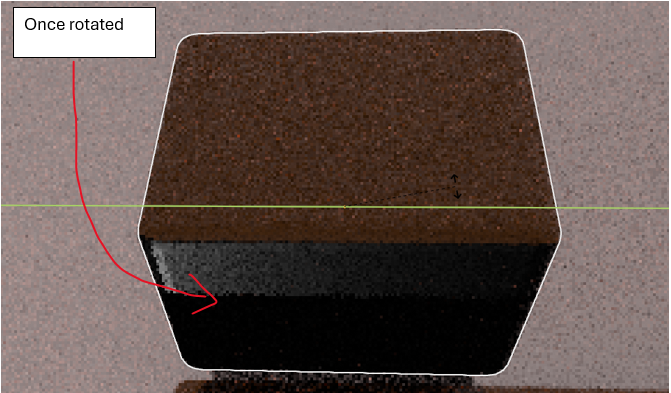
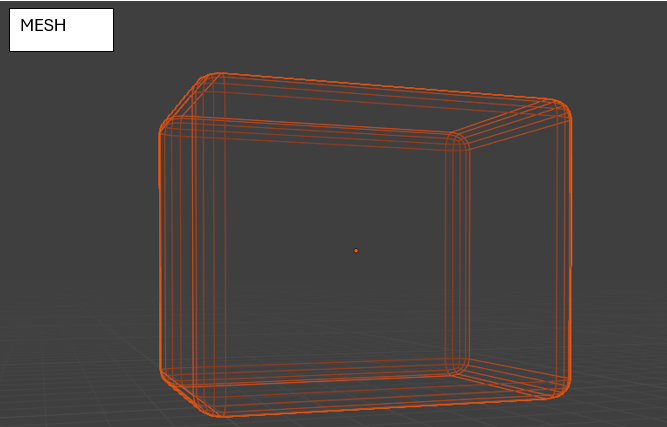
Hi, I created these cubes with rounded edges by (edit mode > CTRL + B) applied the texture and for some reason there are these black lines on the bottom of cubes (if I rotata it in axe y then the whole wall from that side gets black, I thought its some kind of issue of unwrap/ texture on the edge mesh but since its becoming black also on the wall once rotated, I have no idea what causes this issue. Any ideas? Issue is only visible once engine is cycles, for the evee it looks correct… Is it something related to render settings for the lightening? Thanks!
Is there a duplicate mesh occupying the same space? Select a polygon and press CTRL+L to select all linked faces, then delete or hide it. Is anything left?
You mean the grey areas ? Because the black ones seems to be shadow ??
Also:
Any guesswork would be reduced very much if you can provide a blend file… it seems the material behaves differently so i guess there is something not going well in cycles.
So guessing because of the different sized bevels on the outer corners… have you applied scale ?