No, it does not. Because you can’t select an object that is in a hidden collection anyhow.
As josephhansen already mentioned, yes; you can. This is common with collection instancing (this was called group instancing in pre-2.8 versions). To my knowledge however, each object must have a unique name though. I could be mistaken.
Any object in a collection is automatically ready to be used as a collection instance.
is there some video to show how to work with these
object instance in collections
i still have some difficulties to understand how to and when to use this!
now for the hidden list
i search the web for codes snippet in bl 3.2
and i found one
i needed to modify it to find all the unselectable ob
and i modified it to show names and locations
i use same command then earlier script
for i in bpy.context.scene.objects:
if i.hide_select==True :
    print ('obj name  = ' , i.name,'    is not selectable    = ', i.hide_select , ' coll = ' , ob.users_collection , ' LOc = ' , i.location )
not certain why this did not work in the other script
cause i use same command to show hidden ob !
location is needed to determine which hidden ob you want to find
in viewport
i think there should be like an over ride command to be able to select hidden ob in viewport !
would make life easier
I’m not aware of any tutorials… but you can always search YouTube. In my opinion, to understand collection instances, just think of a magic box that magically contains any object that is assigned to a collection. The magic box also also allows you to choose that are contained within it in unlimited quantity - these examples is basically what collection instances are.
That’s not not the correct location. Place it under: for a1 in d1:.
import bpy

SELECTABLE_OBJECTS = []
ALL_OBJECTS = []
SELECTED_OBJECTS = []

def find_if_selectable():

    # Get all unselected objects
    for c1 in bpy.data.collections:
        for o1 in c1.all_objects:
            if o1.hide_select:
                SELECTABLE_OBJECTS.append(o1)

    # Remove duplicate strings, then output final list names
    d1 = [*set(SELECTABLE_OBJECTS)]
    for a1 in d1:
        print("obj name  = " , a1.name,"    is not selectable    = ", a1.hide_select , " coll = " , a1.users_collection , " LOc = " , a1.location )

def find_all_selectable():

    # Get all scene objects + selected objects in Outliner
    for w in bpy.context.window_manager.windows:
        for a in w.screen.areas:
            if a.type == "OUTLINER":
                with bpy.context.temp_override(window=w, area=a):
                    for c2 in bpy.data.collections:
                        for o2 in c2.all_objects:
                            ALL_OBJECTS.append(o2)
                    for item in bpy.context.selected_ids:
                        if item.bl_rna.identifier == "Object":
                            SELECTED_OBJECTS.append(bpy.data.objects[str(item.name)])

    # Remove duplicate strings, then output final list names
    d2 = [*set(ALL_OBJECTS)]
    for a2 in d2:
        if a2 not in SELECTED_OBJECTS:
            print("Unselected object: " + a2.name)

find_if_selectable()
find_all_selectable()
so if you have a few 100’s of objects with several unselectable ob
then you got a problem
there should be some builtin tool in BL to deal with this situation
otherwise you end up loosing time
2 ) collection instances
there has to be some video or tut on how to work and when to use instances !
will try to search web again and hope to find some good intro
Came across this post while searching for solutions for this problem too. I didn’t use the script (not sure how to use it), but I came up with another solution.
A (select all objects) - H (hide)
Go to outliner - filter - objects - visible objects
Now only the unselectable objects are visible.
And then just make the unselectable objects selectable again! Hope this helps <3
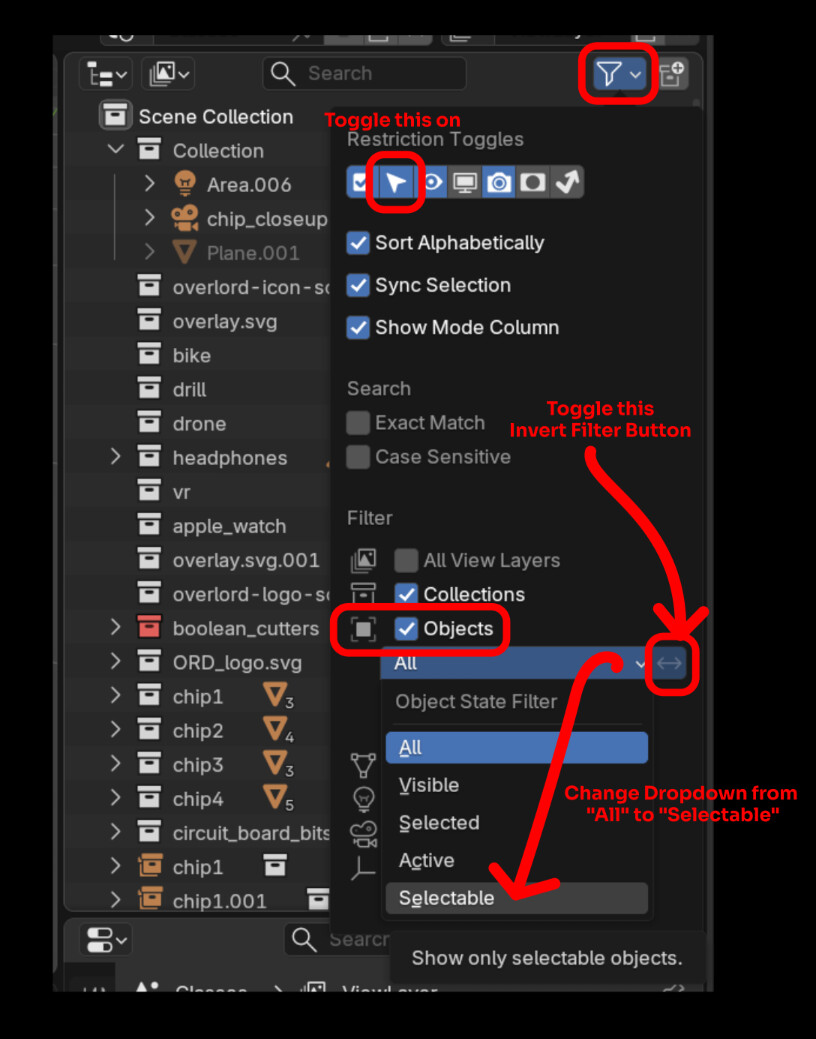
To see only your unselectable objects in the outliner:
In the Outliner, click on the Filters menu
Toggle on the Selctable restriction Indicator, if it isn’t already
toggled on.
Go down to the Filters section, and under Objects, change the dropdown Menu selection from “All” to “Selectable”.
4.Then invert that by clicking the invert filter toggle beside the dropdown.