Here you go. If you watch it on YouTube directly, you can hit up a link that provides the .apk file.

Here you go. If you watch it on YouTube directly, you can hit up a link that provides the .apk file.
thats an old version + why go thru the trouble of linking to some random youtuber when a direct link to the github repo could be given instead?
Edit okay it might be helpful to watch the video for an overview but otherwise a link to the github with ability to peek into the source is preferred.
Cuz I just watched that video, and didn’t know about the github repo. 
I haven’t read through all of this as I’m not interested in tablets, but I wonder has there been any talk of the touchscreen navigation controls making its way back to the desktop version so the viewport could be navigated on a touchscreen drawing tablet like a Cintiq?
Yes, the plan is to improve Blender usability without mouse or keyboard in a general sense. So for all kinds of touch devices. It’s not about the iPad (that’s just the device that these changes might get tested on first for now).
Wouldn’t it be quicker, easier and make more sense to test for a graphics tablet first, given that many of us likely already have and use one for 2D/3D work and there would be no need to actually build/compile and deploy an iOS version.
Since it could just all be done with a ‘normal’ Windows/MacOS/Linux build we all currently use.
Yes, I second what @thetony20 wrote. Would be great. I’m using a Wacom Intuos Pro Medium tablet all the time for everything, no more mouse.
I think the idea is to kill a bunch of birds with the same stone :
They already have a prototype , they think it could be interesting to see if that bring interest in the community, what will append if this version is released to the world ?
Then the improvements will also benefit graphic tablet as well and probably regular users will benefit some of these improvements too…
I think the idea is to release an ipad verson, therefore some UI stuff needs to be done rather than UI stuff needs to be done therefore lets work on an ipad version
Yeah, but then you have to manage and work on all those ‘birds’ at the same time. It’s not just the UI/workflow, it’s the whole iPad ecosystem/code as well.
By focusing on just the UI/workflow with a graphics tablet and hence a normal build/install of Blender (Windows, Linux or MacOS), it would be way faster and easier to see, test and get a lot more feedback on what works and doesn’t work.
Then port it all to iPad. Because if the UI, etc doesn’t work on a graphics tablet, I have serious doubts that it would then magically be awesome on an iPad.
The development of these UI changes happens in main and can easily be tested on regular builds. Take https://projects.blender.org/blender/blender/pulls/144591 as a random example. Or https://projects.blender.org/blender/blender/pulls/142681. They are completely separate from the ios branch (which mostly includes changes that are just there to make it run and compile on that platform).
Well, that’s all good then, means all can see and test the changes without having to worry about an iPad.
Some things might be more difficult to test like touch gesture inputs (I think on iPad you can 2 or 3 finger tap to undo/redo for example). So that will depend on what your tablet supports and if Blender recognizes it. But UI changes especially should be easy to test.
My decade old Wacom Intuos tablet supports up to 4 finger touch gestures, along with the stylus of course, so I’d expect most modern graphics tablets and those with a screen to be much the same.
To be fair, I do disable the touch input anyway, I’ve got 8 buttons down the side of the tablet, so with those and the stylus I find it all much easier with a little custom key assignment compared to using touch.
Awesome news! Three extra developers is pretty huge. Blender for tablets is already paying off
This should satisfy those who were concerned about the project taking resources from other areas like Cycles, Hair, and Sculpt/Paint.
Wacom is expensive, but you get quality for that, good for them in helping the BF get Blender onto tablets, it probably helps that Blender has been attracting many of the kind of people who can afford their hardware.
I imagine this would go directly towards hiring devs to work on sculpt and paint? It would make the most sense if sculpt and paint is the initial priority for tablet.
Okay, now this Blender and Tablets seems to be not waste of resources, because someone actually invested it in, will gonna be paying one.
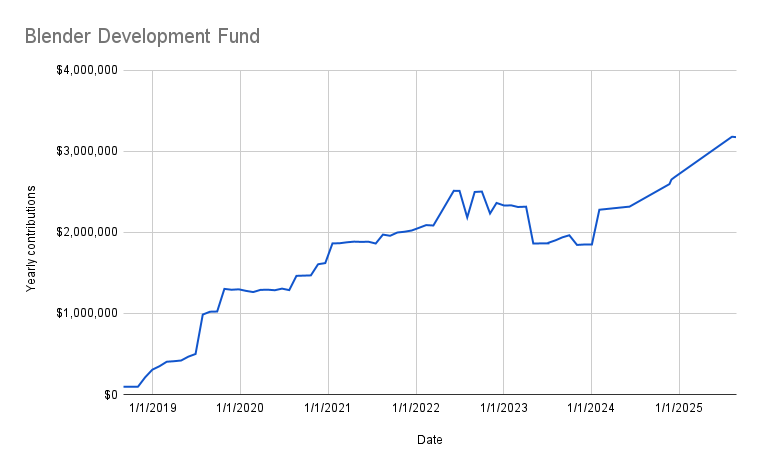
With those new sponsors coming in, the Development Fund is at over $3M per year