Are the objects located in very high coordinates ? This happens with georeferenced files because of floating point precision limits. You’ll need to define a local origin in order to display your mesh closer to the center of the world (0, 0, 0)
1 Like
not necessarily very high, but yes very far away. thats roughly their offset from the world origin. when opening directly as ifc they do sit nicely those 400m directly over the origin
So would i need to adjust that at the falso origin value while linkking??
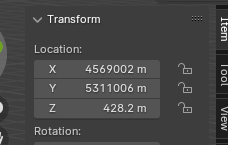
ah yes this much to be exact. But if i understand correctly this means this isnt georeferenced. makes sense for 2x3 files
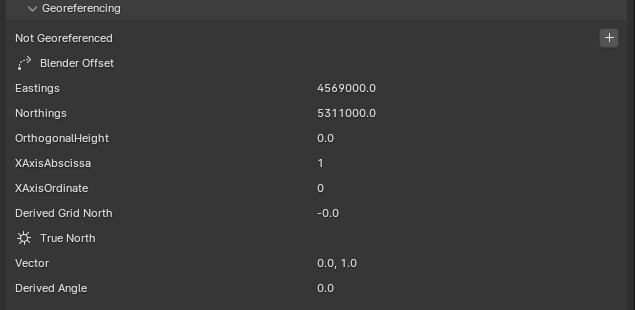
Yes, so when linking the IFC in the file browse dialog you can see a setting on the top right to type in a false origin xyz coordinate. Use your eastings and northings as the origin and you should be good.
We’ll be making it automatic for the next eeelwad
Dion Moult
1 Like
Nice! yeah that solves the quality issues, thank you!
since this is just a text file maybe i can try to find that offset info beforehand and use that value for the links automatically. Or do you might have another idea since the endgoal would be to have it somewhat automated. but this is already way better thanks again 

Edit: ah for the first few the offset seems to be all the same so this is already perfect, if it doesnt change at least ^^
In the next version, we will autodetect an origin if no origin is specified. You can always override this false origin if you desire. This is similar to how we already autodetect when loading models (as opposed to linking).
4 Likes
Bonsai v0.8.0 has been released with 1,357 (!!!) new features and fixes. It’s our built environment, help support Bonsai: 100% free and open source software that lets you author and document BIM data fully to ISO standards. It’s built by the AEC community, for the AEC community. Get it today: https://bonsaibim.org/
This release simultaneously contains a ridiculous amount of sweeping under-the-hood changes as well as UX work.
Due to the sheer volume of new stuff and changes, please treat this release as more experimental than usual  Help in testing and reporting bugs will be really appreciated!
OK. Deep breath. Get ready. Go!

Hello Bonsai - rebrand from the BlenderBIM Add-on
Same software, same community, new name! The BlenderBIM Add-on is now known as Bonsai!
What initially started as a discussion with the Blender foundation about their updated branding guidelines has resulted in a completely new, distinct brand. Bonsai is a comprehensive interface to the IfcOpenShell suite, our name reflects the precision, detail, craft, cultivation, and community behind our shared vision. The name was decided by the community in 8 pages of forum discussion. Also rabbits next to little trees are so cute
Support for IFC4X3 geometry
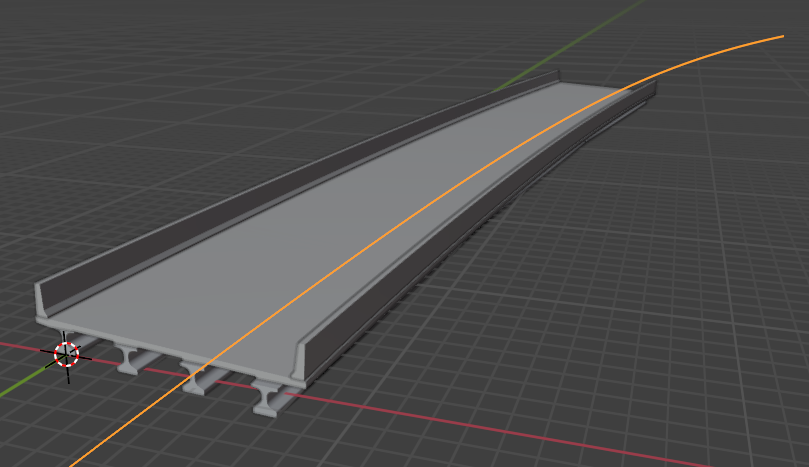
Alignments (linear elements, linear positioning elements, and referents) are now supported! As IFC4X3 is now an official ISO standard, many users in the infrastructure space are asking “What can view my infrastructure geometry?” - some viewers won’t show 2D or 3D curves, let alone infrastructure curves. This also includes more complex 3D forms like sectioned horizontal solids. There was a huge amount of work to achieve this over many months, and the best thing is that it’s invisible to users - just load your models!
Upgrade to IfcOpenShell v0.8.0
IfcOpenShell has had an incredibly huge refactor in the meantime. This significant change means that API signatures have changed. Users will immediately notice that Bonsai, and the rest of the IfcOpenShell ecosystem, now share a release cycle and version scheme. That’s right! We’re now version 0.8.0!
Previously, Bonsai had its own version number based on the date. Stable and unstable releases were not distinguished. IfcOpenShell had its own version number too, but used a commit hash to distinguish builds - version comparisons couldn’t be made, and it was unclear if the API was compatible or not, even within the IfcOpenShell ecosystem. The rest of the ecosystem (IfcClash, IfcCSV, etc) had no versions at all. Documentation was unversioned and published sporadically. These were all released at different cycles on different channels. What a mess!
Now, everything has exactly the same version number (now 0.8.0) and has the same release cycle (every ~2 months) and is distributed at the same time across all channels. All in-between versions (unstable alpha builds) are now distinguished using semver compatible versions. Channels are now also consolidated, with everything on PyPI (added IfcDiff, Ifc4D, Ifc5D, IfcCityJSON, IfcFM), and the infamous IfcOpenBot build now redistributed in the main Github releases channel. All libraries expose a VERSION variable you can use to compare.
The biggest user impact in IfcOpenShell is that it now supports multiple geometry kernels. Historically, only OpenCASCADE was supported. Now, you can also use CGAL, or a hybrid of both (some shapes with CGAL and some shapes with OpenCASCADE). This also means in the future that more kernels, smaller kernels, or tailored kernels can be used. This addresses a huge shortcoming in OpenCASCADE where dealing with mesh-like geometry was slow. This means that in the future, loading models can be easily twice as fast. However right now work is still being done on stability and feature parity, so unfortunately this release comes with a speed slowdown regression. If loading huge models quickly is important, you may wish to use an older release until this is addressed. Users can test an experimental CGAL or hybrid kernel in the advanced mode to see what the current state is (expect some stability issues).
This also means that in the future, it’s a step towards being able to bundle smaller versions of IfcOpenShell-WASM for the web.
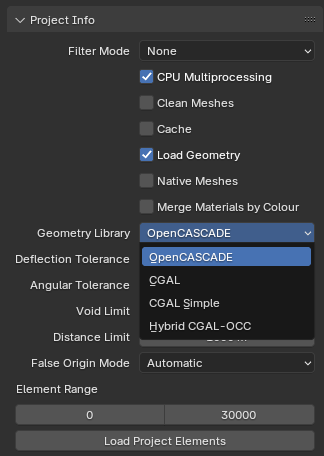
In the IfcOpenShell-Python API, it’s been completely refactored to use the new static functions from the previous release. This means a general incremental speedup across everywhere, and a few minor bugs fixed along the process. Documentation now also only uses the static functions. UI tests also are now easier and more fun to write, and can test what the user sees and clicks - great stuff for preventing regressions in the future.
New wall polyline tool and measure tool!
To draw a wall, first enable snapping, Shift-RMB to set the 3D cursor, then Shift-A to add a new wall, then R to rotate, then Shift-RMB to the distance of the end point of the wall, then Shift-E to extend the wall to that distance.
How about this? To draw a wall, Shift-A to add a wall, click the first point, click the second point, then Enter or RMB to finish. Nice!
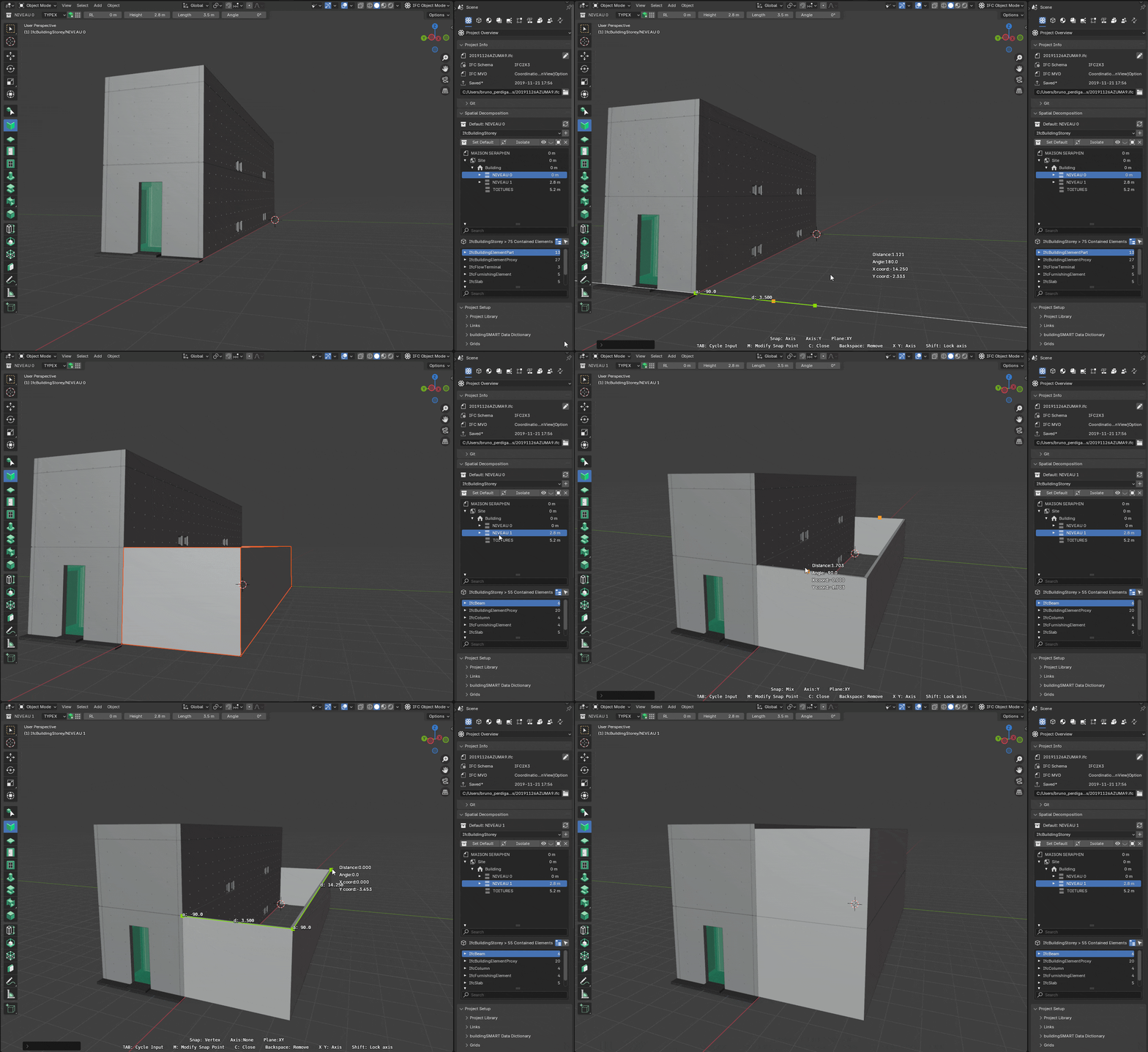
Drawing walls should feel intuitive. This new approach by Bruno Perdigao is exactly what users expect when drawing walls, with built in snap, clever ways of projecting or aligning wall start and end points, quickly typing in the length of the wall as you draw it, knowing at what height your wall is going to appear at as you draw it, undoing (backspace) segments in the wall tool as you draw it, auto closing loops (press C), and drawing multiple wall segments at once which are auto joined together.
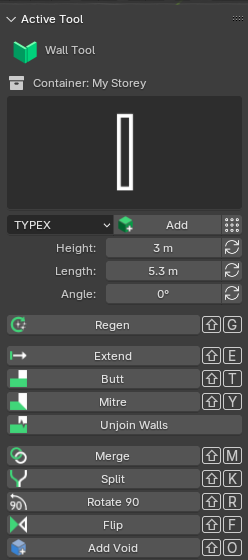
Work has also started in icons and a more usable horizontal toolbar.

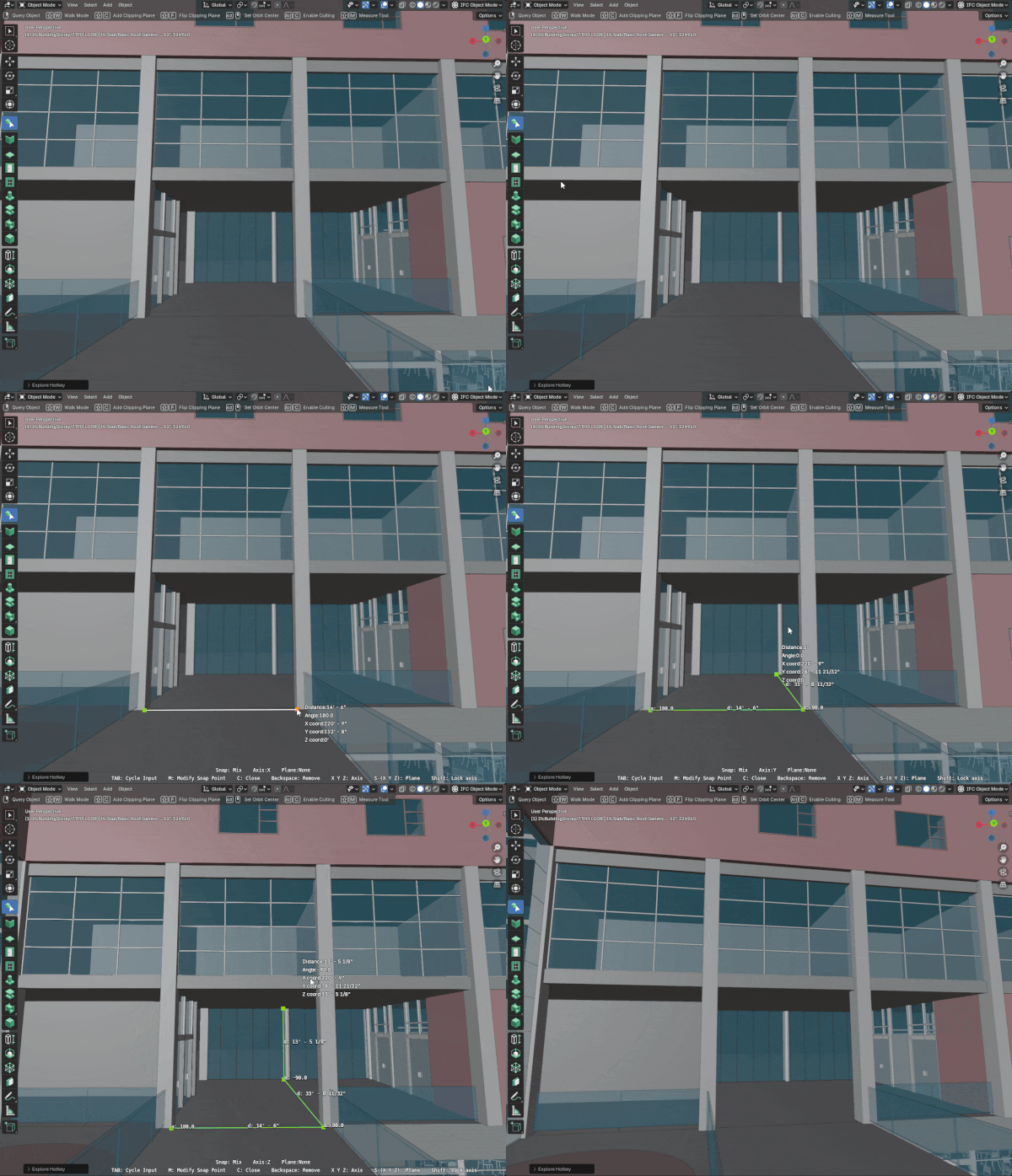
There is also a new measurement tool. You’ll notice this follows a similar approach to the new wall tool.
Georeferencing: better false origin handling and coordinate operation support
Handling coordinate systems and large coordinates has seen a complete overhaul. IFC defines all geometry in terms of a local engineering coordinate system, and additionally may define a coordinate system, with an optional transformation to convert between local and map coordinates. Previously, all models were loaded such that the Blender origin coincided with the IFC local engineering origin. If you had two models that were geolocated in different parts of the world (or different parts of the same site), Bonsai would still load their local origins on top of one another. In general, all IFC viewers have this (incorrect) behaviour except for specialist software dedicated to showing this properly like IfcGref or ArcGIS.
Bonsai now supports federating models together true to their map coordinates, not just local coordinates. You can take many models across a city or site with different origins, project norths, or even project and map units, and they’ll all come in correctly (for both opening, linking, and (yes!) merging). Even obscure combinations of both map conversions and rotated custom world coordinate systems are handled. To my knowledge this is the most advanced and correct implementation out there. The only thing not yet supported is reprojection across different coordinate systems.
In addition, where coordinates are very large, or where there are conflicting, irreconcilable coordinate ranges within the same model, Bonsai’s ability to pick a meaningful, session-specific false origin is now faster, more accurate, more customisable (including a new disabled mode), and handles really strange coordinate combinations which we see out there in the wild. Users can also interrogate elements with problematic coordinates and fix them, or set a temporary, session-specific project north. There is a new, simple to use, SetFalseOrigin patch recipe that lets you pick a point and set the map coordinates at that point with that point being a new local origin. In the past, editing these “incorrectly georeferenced” models would be hit-and-miss. Now, it’s actually possible to do regular geometric editing in this situation.
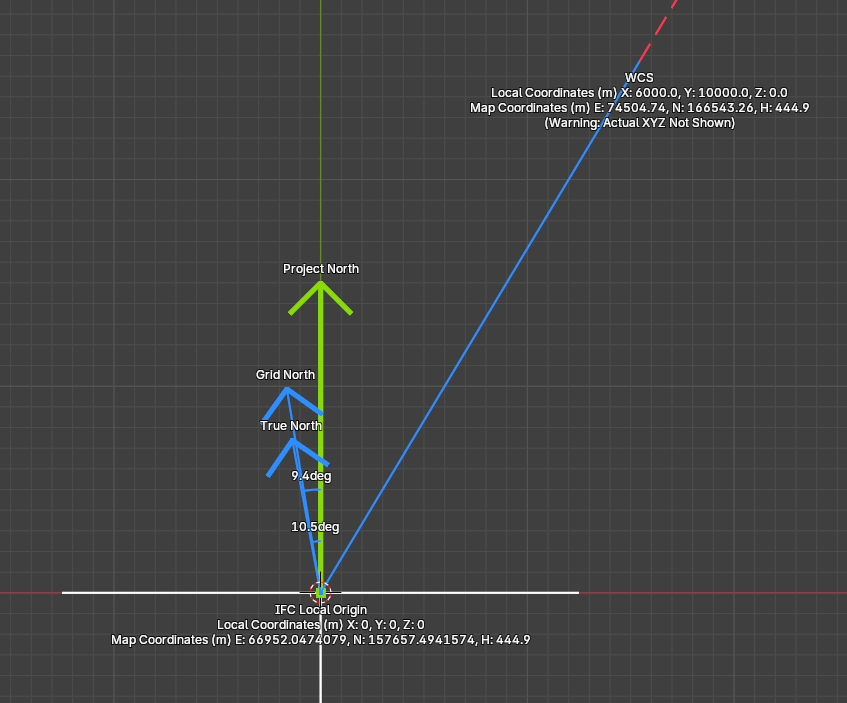
What makes this extra special is that this also works in IFC2X3 using the fallback georeferencing property sets! We also support all the new coordinate operations in IFC4X3. Editing a WCS is now possible in the Blender interface. Editing angles for true north and grid north now auto calculates abscissas, ordinates, (or vice versa) for ease of use.
Understanding exactly how georeferencing works in general, let alone how it is expressed in IFC is not an easy task. You can now turn on a visualisation which shows clearly where is the project north, where is the map north, where is true north, if you have any session-specific overrides, what is defined locally and what is defined as a transformation, etc. There is also a simpler coordinate conversion calculator, and all coordinates always show with units to prevent ambiguity. We hope for this to be a reference implementation for the industry.
BCF version 3 support
In addition to a ton of BCF bugs being fixed by bernd, thanks to Andrej730 the Bonsai interface now has support for loading and creating BCF XML version 3 files (previously, only BCF v2.1). Hooray!
New web interface for scheduling, gantt charts, and more
Despite Blender’s phenomenal extensibility, there are some areas where Blender’s interface falls short. It’s great at 3D, but not so great at spreadsheets, page layouting, gantt charts, long-form textareas, and highly customised interface widgets. In contrast, the web is really good at this type of flexible interface, and vice versa, doesn’t do so well at graphics. What if we could have the best of both worlds?
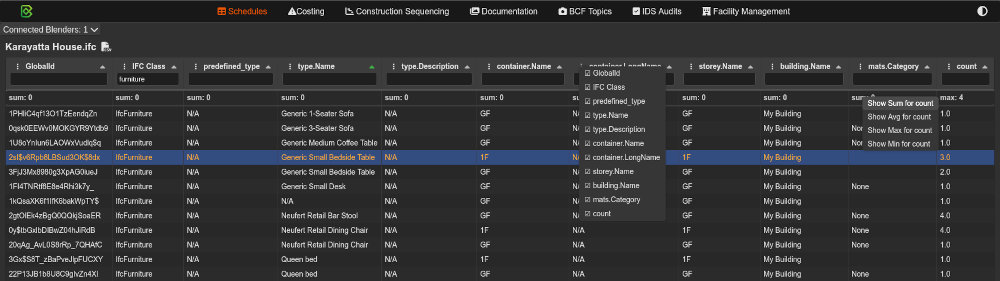
Ziad set out to do exactly that. Bonsai’s code is largely decoupled from Blender. This means we can reuse the exact same code across any interface or app (like FreeCAD!). Ziad has now built a new websocket based web interface that you can launch alongside your Blender session. For this first release, you’ll notice that spreadsheet and scheduling now defaults to displaying tabular data directly on the web instead of having to save to a file and reopen it in another spreadsheet software. This is a live connection, so you can click rows in the spreadsheet and auto zoom to the object in 3D in Blender.
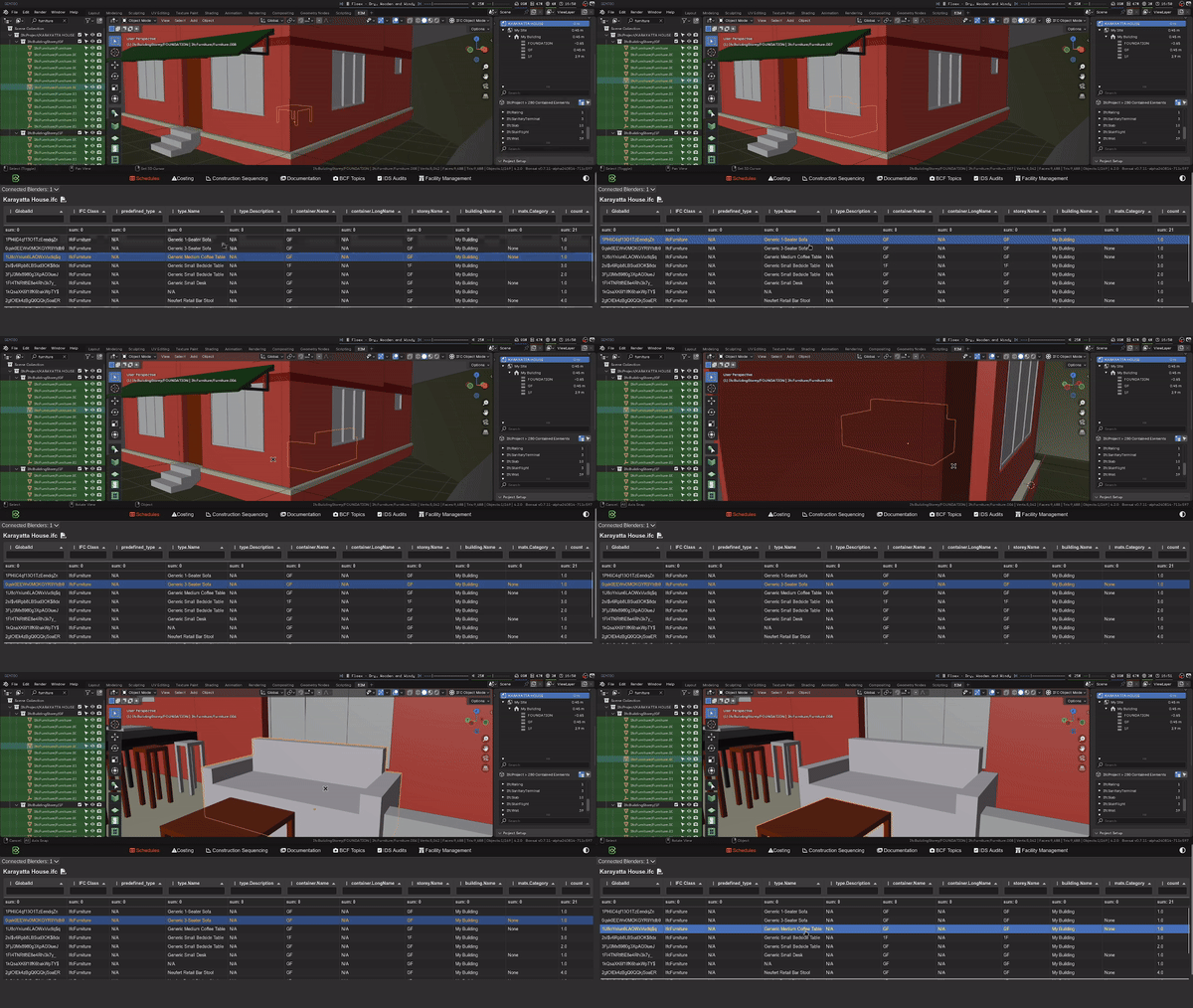
Another module with support is the gantt chart module. Previously, gantt charts were statically exported. Now, you can have a live gantt chart showing your construction schedules, and edit your dates from the web interface and see the gantt chart update live!
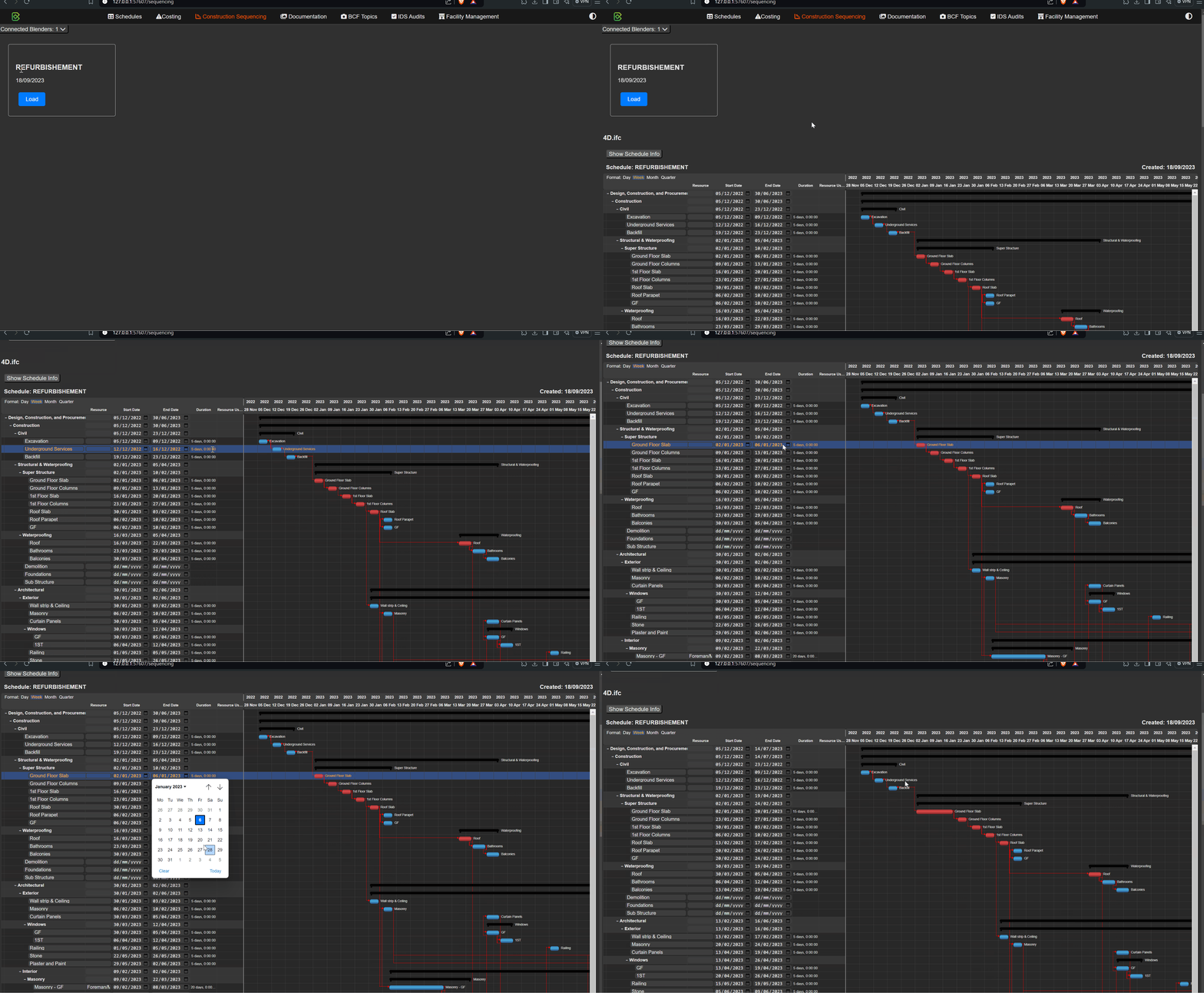
Yass managed to sneak in an implementation of a costing module too!
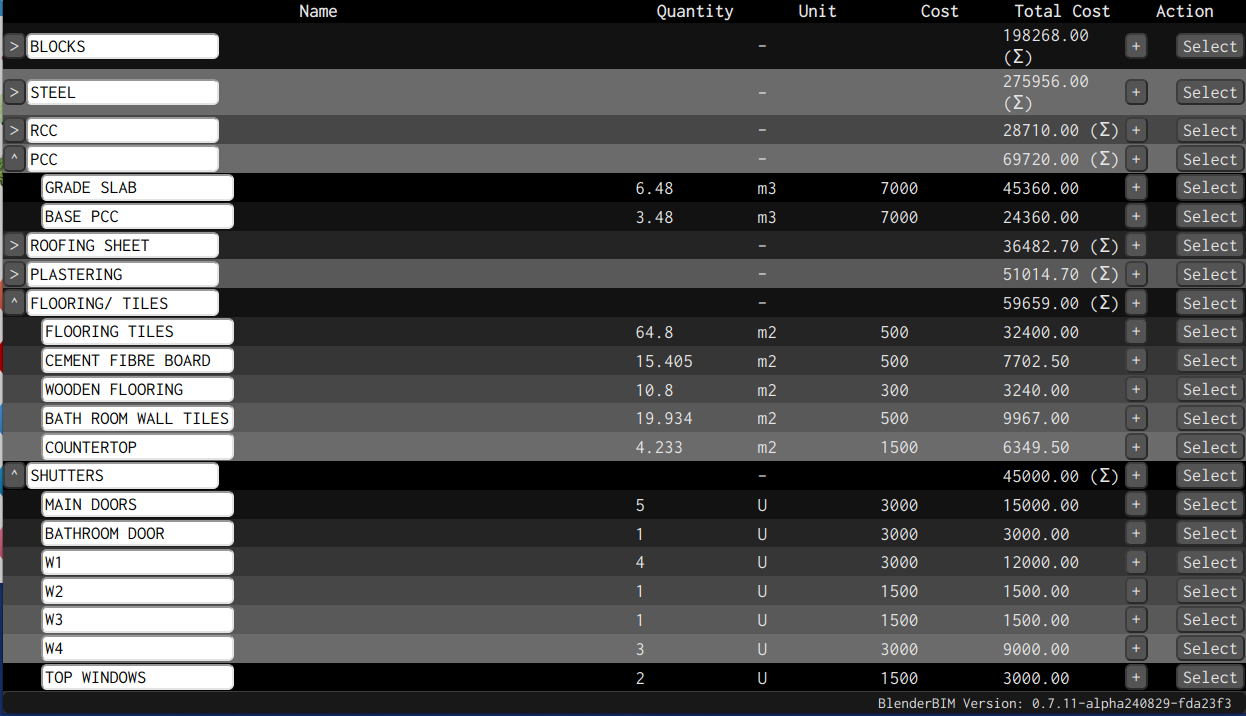
You can also now browse drawings from the web. Quickly and visually switch between drawings and sheets on the web and see previews of them instead of having to launch them separately.

You can also connect multiple Blender sessions together and see their data together in a shared web interface.
This is just the beginning! For those who want to learn how to build your own web interface, the tutorial demo module has been extended.
Experimental light simulation integration with Radiance
Although Blender offers very powerful artistic rendering capabilities out of the box, lesser known is how to perform light simulation in Blender itself. There are already add-ons for this (such as Vi-suite) which can do such things, but these lack a close integration with IFC. IFC can store lighting styles and light distribution data for light sources, and reference external style definitions. It would be great to combine the best of the scientific and artistic worlds and perform photometrically accurate luminance renderings (within a tolerance certainty) that are also beautiful, textured, and evocative.
Chirag has made an excellent start to this - we now ship with PyRadiance and can produce renders directly from the IFC with Radiance. Users can pick simple physical material definitions from SpectralDB and define a camera and sun location (based off IFC true north and georeferencing data). The module handles the conversion from IFC to OBJ to RTM formats under the hood, and users can configure basic rendering settings and material mappings.
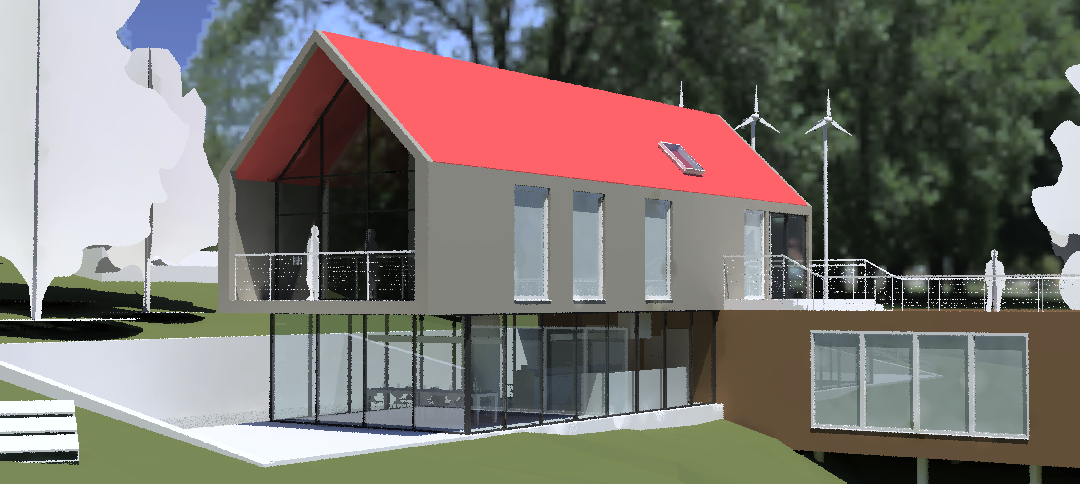
New solar analysis tool
Blender has an excellent Sun Position add-on which is able to calculate azimuths, altitudes, solar positions, and analemmas. However effectively using this add-on for architectural, solar, and shadow study usecases required a bit of Blender knowledge. There is now a completely new Solar Analysis panel which extends the Sun Position add-on with better visualisation of the sun position, easier setting lat/longs (reads from IfcSite), easier setting of UTC offset (auto-calculates timezone), and auto sets true north (from IFC true north).
It also supports a one-click view setup for creating shadow renders, with configurable shadow intensity, which are often a requirement for architectural submissions.
There is also a “View From Sun” mode, which places a camera from the sun’s position, allowing you to quickly scroll through key dates to check minimum solar access requirements across larger projects such as multiple apartment towers.
Blender 4.2 extension support
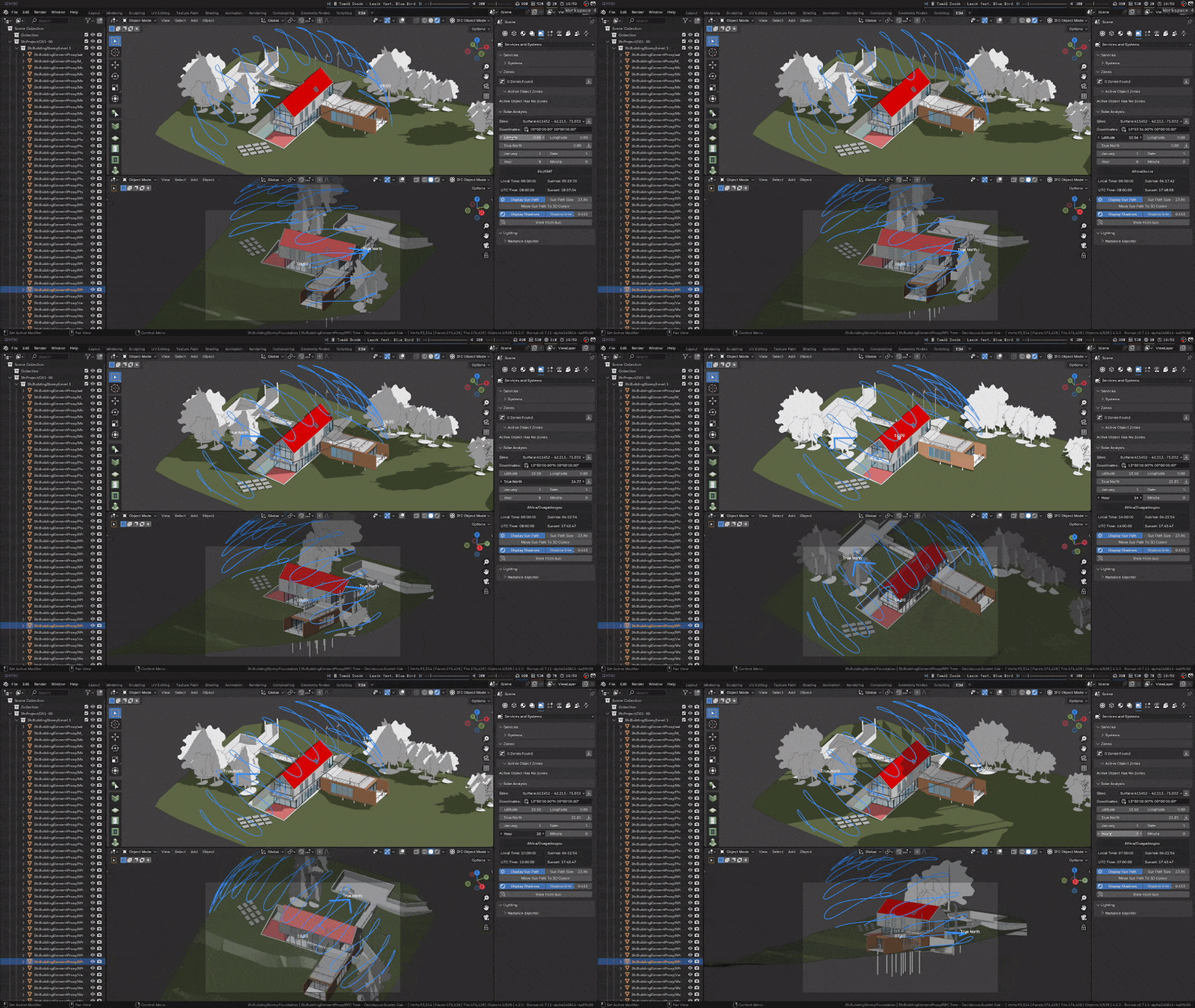
This release marks our debut on Blender’s new Extensions Website. Blender has standardised how to distribute extensions (add-ons and themes) on the web, where they can be searched, installed, and updated directly from Blender itself. We’re super proud to be listed on the main Blender extensions website. This means users can install us easily, and in a single click inside Blender, update to the latest version. Yes! This also means those using latest unstable releases can update every single day with a single click!
This also means that the workarounds previously required for updating or uninstalling are now fixed!
Unfortunately, this does mean that we are dropping support for Blender versions 4.1 and older, as well as Python 3.10 and older, due to a lack of resources.
Consolidated material and style handling
There’s been ongoing work to restructure the way materials and styles are handled. This work continues in this release, with more stability and more obscure cases handled. The biggest change was that in the past, a Blender material could either represent an IFC material, an IFC style, or (!!!) both at the same time. This unnecessary complexity led to no shortage of bugs and limitations. Now, Blender materials accurately only refer to IFC styles. Physical materials are managed separately. This is mostly code simplification, bug fixing, and a minor speedup during loading and saving, but means that in the next release we can do more cool things.
Also pretty neat, you can now press a button to assign a style to the selected objects.
Flexible collections and new spatial manager
In previous versions, the way of managing the spatial tree was done in the outliner. This had a number of limitations. For larger projects, you’d end up with very, very long lists of objects and it wasn’t possible to get an understanding of what objects you actually had, or even how many storeys or spaces you had. Instead you had to collapse and expand collections and manually filter and count to get an understanding of larger spatial trees. Another problem is that it took away the flexibility of Blender’s collection system: you couldn’t have objects assigned to multiple collections, and you couldn’t ad-hoc create or reoganise custom collections for temporary grouping and visibility like regular Blender. This led to lots of bugs unless you knew the exact rules of what could be nested in what. It also blurred the lines between spaces / objects groups, versus aggregate / subelement groups. In IFC4X3, other relationships like covers or nesting is increasingly common, which would lead to very deep, nested spatial trees. This deep nesting and collection-based way of managing the tree also meant load, save, and drawing generation times were unnecessarily long, and had a risk of creating “sync” bugs.
A huge change has been made to how the spatial tree is managed to address all of this. There is a new spatial decomposition panel with friendly icons, showing only the spatial structure. A split panel below shows elements contained within the active space, grouped into types with counts per class and type. At a glance, you can now see more meaningful results like “I have X storeys”, and “X walls on level 2”. There are also dedicated buttons for isolating spaces and toggling visibility, and quickly selecting elements within a space (recursively and non-recursively). Previously, you’d have to scroll constantly, and use up to 3 possible visiblity controls to achieve the same thing.
You can now also create new spaces from the spatial panel. These also filter only to valid subspaces. For example, it doesn’t allow you to create a bridge inside a room, but it does allow you to place a road on a site. It also has separate dedicated search filters for spaces and elements. These search filters search not only for names, but also long names. Previously, especially for rooms which only have room numbers or buildings with short codes, it was difficult to quickly search for room names or building descriptions, but now you can do it.
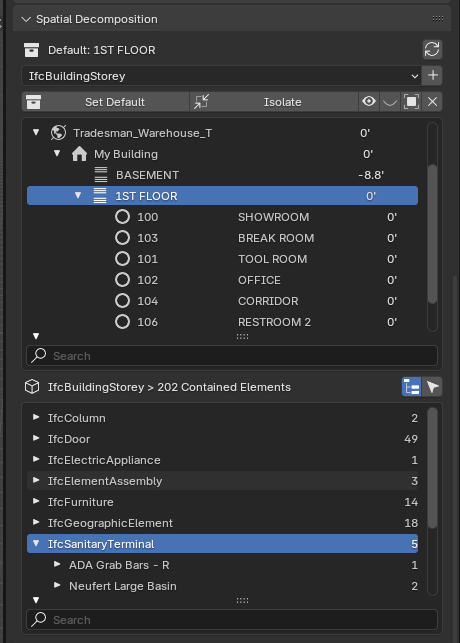
This also leads to faster drawings, load, save, and less bugs.
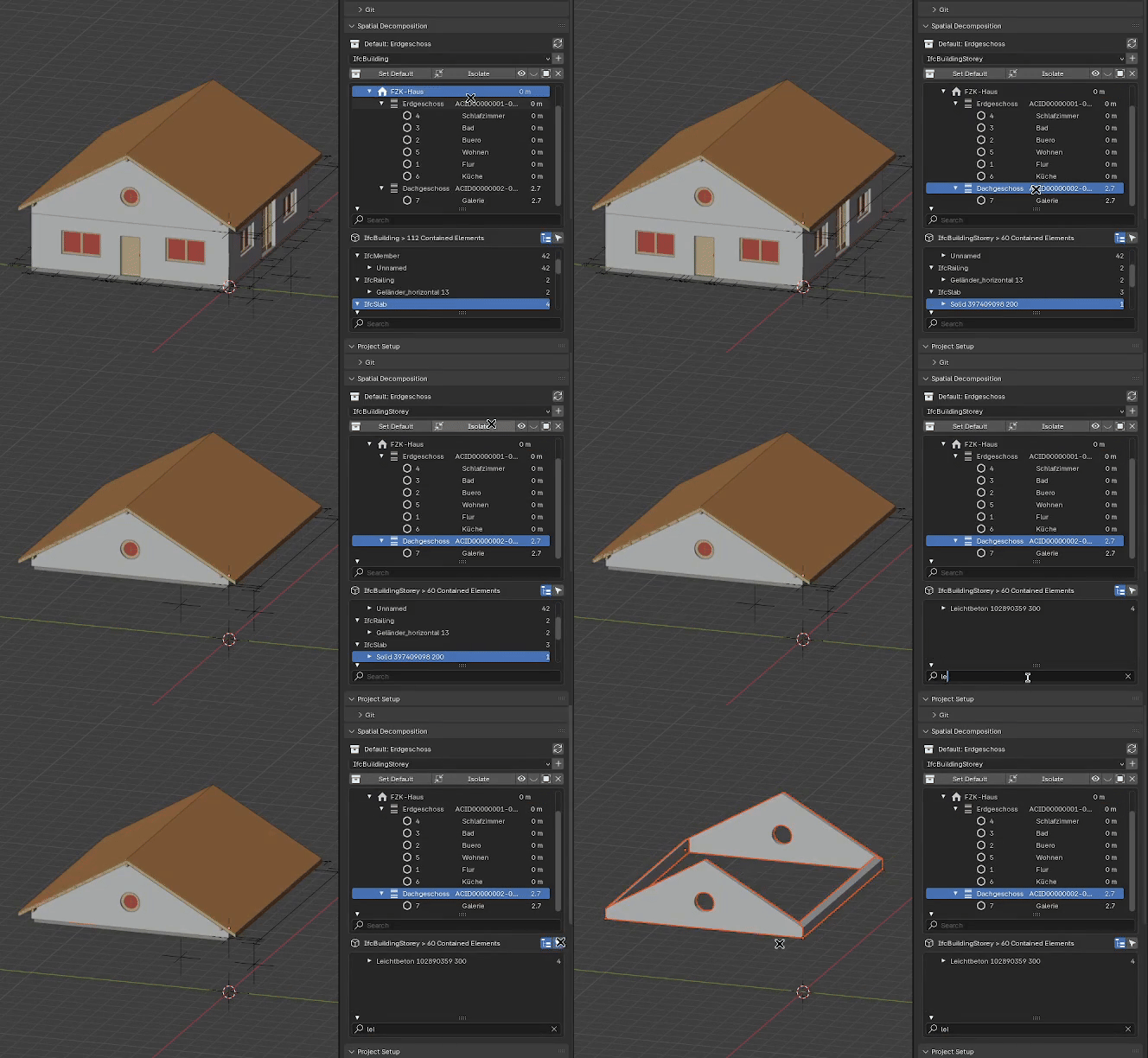
Users can now also set a “Default Container”. Previously, new objects were created in whatever collection was active in Blender and contained in whatever IFC element that correlated to. Unless you are a Blender whiz, it isn’t clear where your objects are being added to, or if it’s valid or not. Now, your nominated “Default Container” is where all new objects end up in, and impacts things like where new walls are drawn to.
This big change means that managing spaces must now be done in this new panel. Reorganising and using multiple non-IFC collections in the outliner is now completely decoupled and freeform for your own organisation and won’t change (or break) your IFC structure. For those who wish to create their own session-specific workflows, this is a big win.
IfcTester supports v1.0! IfcPatch is now friendlier and batch process models
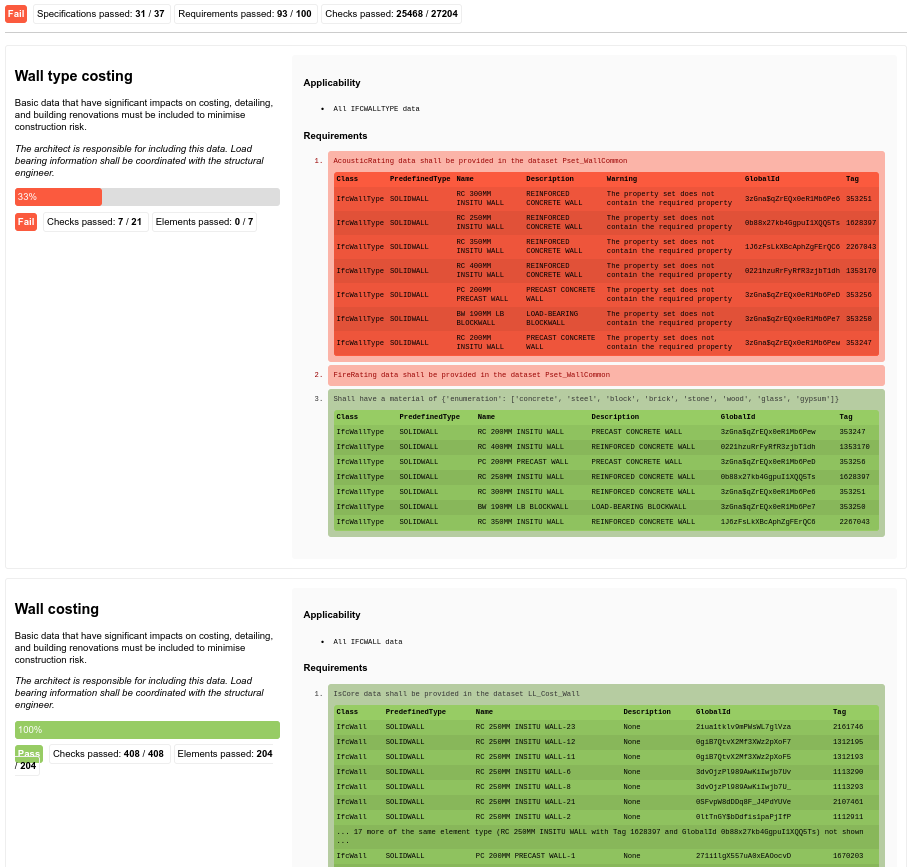
IfcTester now supports IDS v1.0! IfcTester now supports the new requirement in IDS for lowercase booleans or 0/1, has more detailed failure messages for predefined types, and handles restrictions on data types. JSON reports are also more comprehensive for those integrating into their own systems. Auditing nested relationships in IFC2X3 is also now supported.
IfcTester can also select multiple IFCs and multiple IDSes and run them all in one go - a game changer for large projects thanks to Beedy! Reporting is now redesigned, and shows more information like whether the IFC schema version is accepted in the IDS, as well as passing elements, not just failures. When an IDS specification applies to an occurrence, the results automatically groups occurrences by type (if they exist) and clusters occurrences so that you can get a feel of common problems by type rather than a huge list of occurrences.
IfcPatch recipes are now easier to use. There are new dropdown menus to select configuration options, file browsing to open up files, and sensitive coordinates preserves precision. You can now merge projects in bulk rather than one by one.
Improved colour legends
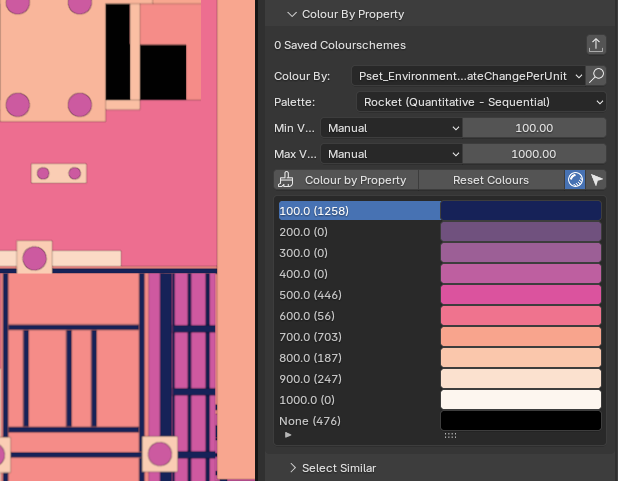
When auditing models, we often want to visually check whether properties are correct. The Colour By Property panel now lets you quickly pick a property from the active object and apply a colour legend to it. Two new colourschemes are now available for categorial / qualitative data analysis, and a new view preset to quickly toggle flat colouring to make colours pop and easy to spot. Nice!
For quantitative analysis, there are now 4 new colour legends (2 for min to max ranges, and 2 diverging palettes highlighting the average), with an automatic (or custom) min and max. Ever wanted to quickly colour code your model to show carbon intensities for different materials? You can now do so! Or quickly spot anomalous volumes or lengths during quantity take-off by setting maximum or minimum thresholds.
New Bisect mode and Freestyle mode for drawings
A drawing is composed of a possible raster render as a background, followed by projection / background linework, the linework is then potentially filled or coloured in, then there is the actual cut objects, and finally the annotations.
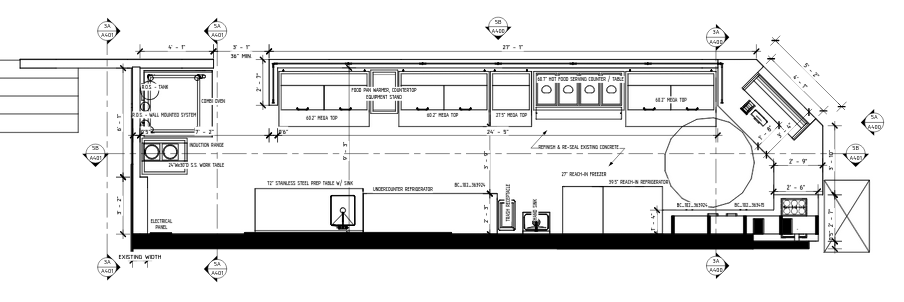
Previously, the hidden line rendering for background / projection linework as well as the cut linework was calculated by OpenCASCADE. OpenCASCADE is quite slow to perform this, and doesn’t work very well on organic forms (for heritage or landscape architecture). The new, default, Bisect cut mode uses Blender’s built-in Bisect tool to perform the cut - and is generally faster and more robust against strange and non-manifold geometry.
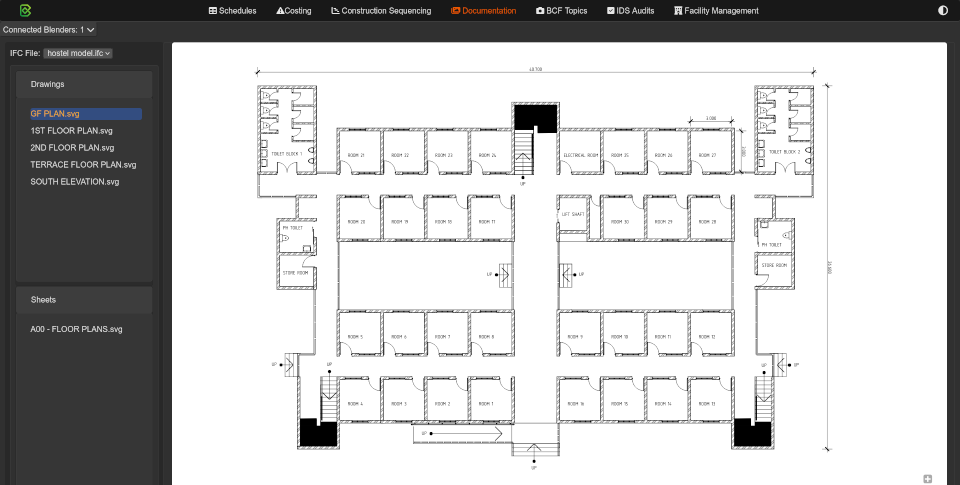
There is also an option to use Blender’s Freestyle renderer to perform the background / projection linework. This is significantly faster on complex scenes, being easily twice as fast to 10x faster. As a trade-off, it is also less accurate, but it may be sufficient for your situation.
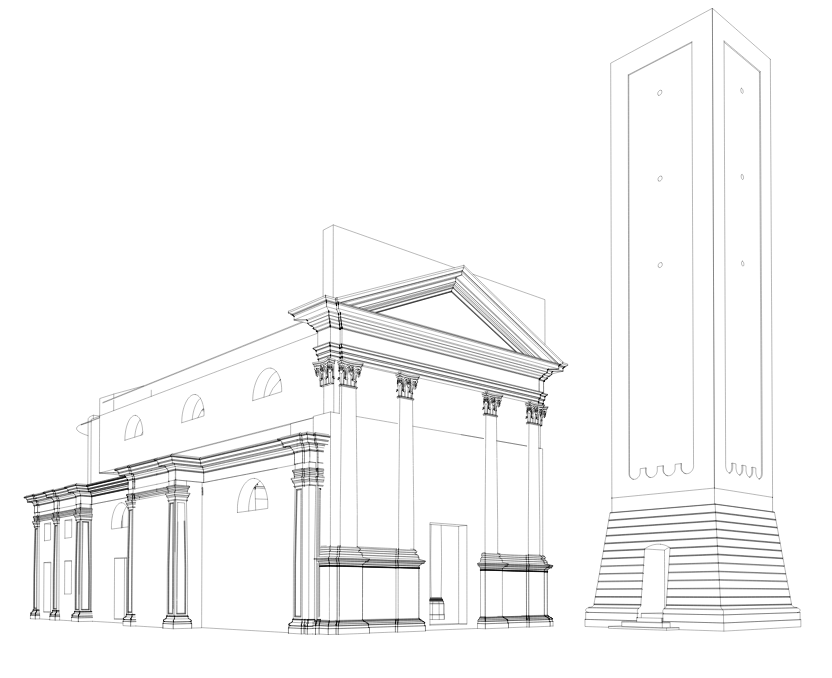
It also doesn’t allow for vector background fills yet. On the flip side, it does mean we now support producing vector linework for perspective renders.
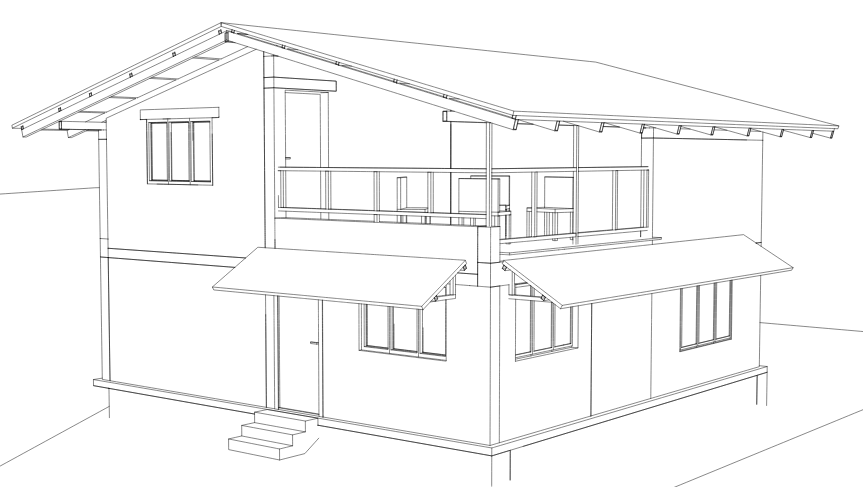
Thanks to Manu Varkey, theoryshaw, and Carlopav for test models shown above!
Sponsored development by Beedy and Bruno!
Thanks to all our financial donors we’ve been able to sponsor work by Beedy and Bruno Perdigao! It’s incredible how many people chipping in from $5 a month can allow us to accelerate development.
We have about $2300 per month in funding. Will you help us reach $2500? Check out https://opencollective.com/opensourcebim if you haven’t already
So much more
It’s hard to capture absolutely everything which has changed, but here are a few more stragglers.
- The spatial containment panel won’t show for spatial containers
- Only allow aggregates to elements which don’t have geometry
- Improve type hinting generally everywhere, and better autocompletion in API methods
- Ensure you can only add certain quantities for different resources
- Fix bug removing resources in IFC2X3
- Fix bug where cubic meter quantities had the wrong unit
- Fix bug where orphaned aggregates were never shown when loading a model
- New get_contained utility function
- Blender panels now only exists in the dropdown switch, and other Blender tabs hidden by default to prevent confusion and lost users
- Centered tab bar
- You can now search / filter styles when selecting
- Old complex selector syntax deprecated, and drawing styles now use the new selector syntax
- General cleanup to prevent orphaned elements when removing scheduling related entities
- Coordination mode / merge advanced modes deprecated in favour of new link IFC feature
- Support invalid spatial trees from 12D
- IFC object / edit modes, IFC meshes, are now hidden if there is no IFC model
- Linking IFCs now also includes spatial elements
- JSON schema definitions purged. We now only use dynamic schema data from IfcOpenShell.
- Generally better error reporting and handling across many invalid interactions, especially for using Blend files, or discarding errors
- The codebase uses schema identifiers, so schema geeks can technically test minor IFC version variations
- Fix critical bug where Qtos always used IFC4 Qtos. Remember: IFC2X3 does not have standard Qtos!
- You can reuse a cache or force a new load when (re)linking in IFCs
- Fix bug where 2D angles weren’t correctly parsed in OffsetObjectPlacements recipe
- Fix bug where merge duplicate types would trigger listeners in an active Blender session
- TesselateElement ifcpatch recipe now supports product types
- Minor fix in IfcFM to derive occurrences from types (and make it easier to override)
- Various bugs fixed in IfcOpenShell Qto calculation engine in Ifc5D.
- Various bugs fixed in upgrading models to IFC4X3
- Multiliteral text annotations can now be reordered
- More accurate quantity take off for beams and flow segments (pipes, ducts, cable trays) in Ifc5D
- Migrating calendar dates from IFC2X3 to IFC4 is now supported
- Remove unload project button - superseded by Convert To Blender File operator
- Move new project wizard into its own panel and actually title it “New Project Wizard” for clarity. Improve UX around opening, creating, and saving.
- You can now open recently opened IFC models. The tooltip shows the IFC version. Yay!
- Fix bug where MergeProject didn’t clean up duplicate CRS and coordinate operations
- Fix bug where migrating length units didn’t change properties (critical for IFC2X3 georeferencing).
- Fix missing door flip button
- UI asterisk indicates if the placement is not yet synced
- When removing the active representation, it now switches to another available representation
- Be able to search (select objects in scene) from the Spreadsheet Import/Export UI, as well.
- Support renaming materials, styles, and profiles by double clicking them
- Materials UI now indicates active class
- Significantly faster quantity take-off due to optimised shape utilities
- Add to debug UI an operator to toggle detailed ifcopenshell logs
- Unit panel now shows length, area, and volume unit for convenience
- Allow warning and background decorator colours to be configurable
- BIMTester interface deprecated and removed
- New operator to restart Blender quickly
- Support assigning bSDD classifications in IFC4X3 too, various bugfixes in bSDD and UI improvements
- For those who don’t care about native IFC and just want a simple geometry importer, a File > Import > IFC (Geometry Only) has been added. A small thing, but a huge QoL improvement for those looking for it!
- Members (e.g. stringers) can now have a stair modifier applied as they may be used to support stairs
- Deprecate old dumb stair tool and pie menu
All changes
All changes can view the directly via the Git logs here:
Credits for this release (in order of commits via git shortlog -sn --since "2024-06-02"):
   493  Andrej730
   358  Dion Moult
   157  Ziad-I
   115  Thomas Krijnen
   104  Bruno Perdigão
    23  Blender Defender
    21  Ryan Schultz
    16  Chirag Singh
    14  ay-ex
     8  tim
     6  John Yani
     6  Kristoffer Andersen
     6  Richard Brice
     4  Bernd Hahnebach
     3  Bruno Postle
     3  Vanuan
     3  Yassine Oualid
     2  VDobranov
     1  ArturTomczak
     1  Augustin Trancart
     1  D4ve-R
     1  DimitriosThe
     1  Gorgious56
     1  Jean-Marc Couffin
     1  Johannes Schorr
     1  Jonathan Gan
     1  Junzhe Ren
     1  Kurt Battisti
     1  Manu Varkey
     1  Tim
     1  mat
     1  petrisch
     1  shungeer
Donors since the last release:
BIMvoice
Incognito
Lawrence Giroux
PlaniBIM SA
Randolph
Sailor
Tomasz
Aether Engineering s.a.s. (Aether Engineering)
Cyril Waechter BIM Insight
E4tech Software SA
carlopav
Matthew Fuller
OpeningDesign
Alex
Dion Moult
Yoann OBRY
Guest
StefStap
Sven Amiet
Haritonov Alexander
Losepacific
Isaac Rowe
Arjan
Dumitru Minciu
Hannes
Marcos
Rodas
tlang
cvillagrasa
Jonny Knopp
Abdelmalek HARRAG
Arun
Bedrossian Ádám
bimage
bitenergie
Dmitriy Koptev
Duarte Farrajota Ramos
Frode Lund Tharaldsen
Henning Munzel
Leon ten Brinke
Louis Trümpler
Mattijs
N1k0
Omar Zerhouni
ppaawweeuu
Udo
Hjalti
Alexander
Jeremy
Agents of Architecture
Ari Pikkarainen
bclmnt
Benny
Bruno Perdigão
casiovadal
Choong1219
Christoph Mellüh
Cordero Architecture
Dawid Fedko
Dirk Olbrich
Fabian Emanuel Kitzberger
Gaurav Rampal
Krande
Madars Siksna
Marcin Boguslawski
Miguel
Rafel Bayarre
Royner
Tim McGinley
Vinícius De Souza Lima
Alexander Kleemann
Aslejo
Benjamin Smith
Dayo Ayadi
k zhong
Stephen Cremin
WILTON
Marco Andrade
Christian
Denis Pommier
GPM UNIVERSAL MX
Jan Mayer
Valter Robson
Kevin Lee
11 Likes
WTH …
OMG.
I’m speechless again.
So many useful and important updates in a single 2 month release cycle.
Would be happy if my commercial Apps would have half of that after
3 years releases.
I hope I can keep up with these updates …
4 Likes
Bonsai v0.8.1 has been released with 1,902 (!!!) new features and fixes. It’s our built environment, help support Bonsai: 100% free and open source software that lets you author and document BIM data fully to ISO standards. It’s built by the AEC community, for the AEC community. Get it today: https://bonsaibim.org/

It has been 6 months since the last release, so fasten your seatbelts for another 3,000 word essay. This release focuses on fundamental authoring capabilities and stability.
CGAL hybrid is now the default
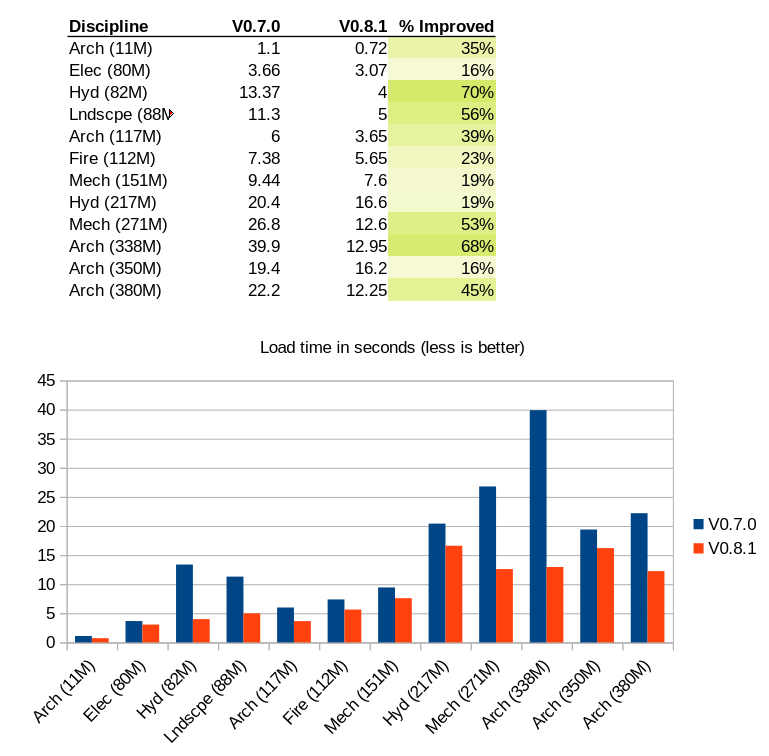
The previous release brought support to choose between multiple geometry kernels. For a long time, IfcOpenShell used OpenCASCADE, but now, it can mix and match between CGAL and OpenCASCADE. Because CGAL support was new, it was highly unstable. It’s now stable enough for a hybrid CGAL-OCC engine to become the default. The biggest thing this means for users is that things are much faster and regressions where objects don’t load properly have been resolved. Depending on the model, load times can be easily twice as fast or better (especially if you’re running a script outside Blender).
Improved polyline drawing tool and general authoring
The polyline drawing tool (e.g. for drawing walls) has improved the input experience to be more intuitive and stable. There are also now wall and slab previews, consistent visual style, input formulas and metric/imperial-parsing input, and works on all LAYER2 elements, not just walls. As it matures it’s now the default tool (as opposed to Shift-P). Snapping has been improved, with custom snap axis angle, lock angle, new increment “nice-number” snapping, custom snap symbols, snap to empties and curves, and toggle snap target.
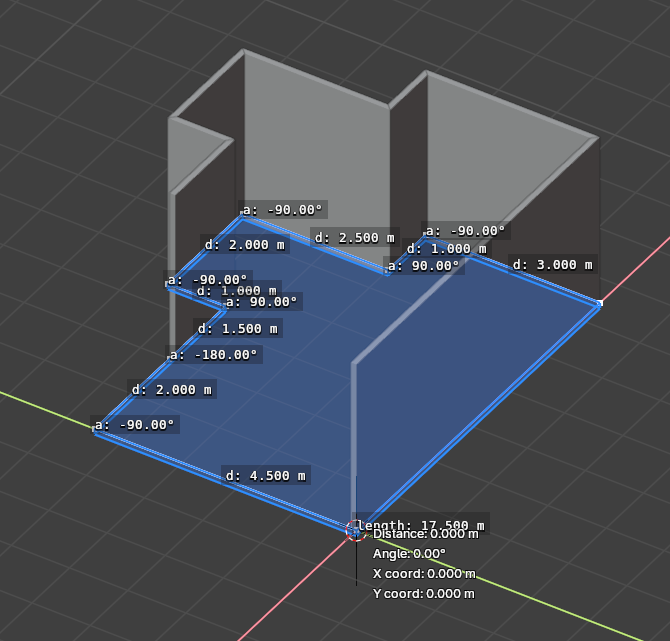
When drawing walls, you can also flip walls and slabs and change the axis offset (i.e. whether you draw from centerline, interior, exterior, etc, or if a slab goes up or down). You can also one-click generate walls around the perimeter of a slab, or vice versa, generate a slab from a perimeter of walls.
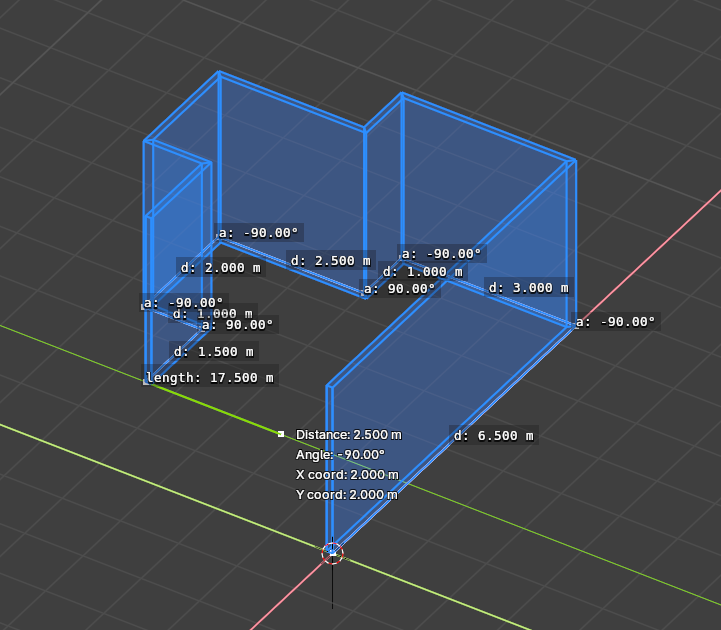
The polyline tool as been extended to now work for drawing slabs and profiled elements (beams, coverings, etc).
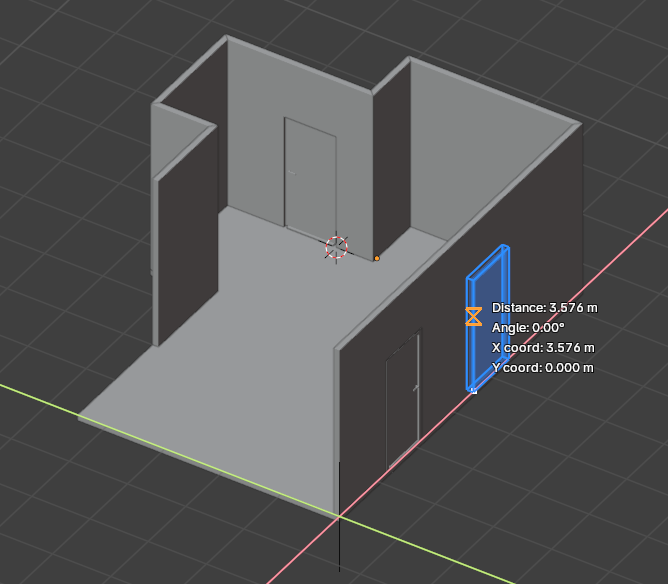
The type manager has been consolidated and upgraded, including a new way to filter by name and better UX to see which types are active. When adding a type, a preview is now shown to show what you’re inserting and where it’s going to appear, including auto snapping doors and windows to walls. In general, using the 3D cursor, which is really unintuitive to non-Blender veterans, is slowly going away.
Elements that are aggregated together will now move together as a group, and you can Tab into it to isolate and edit individual subelements. This also now works for nested elements.
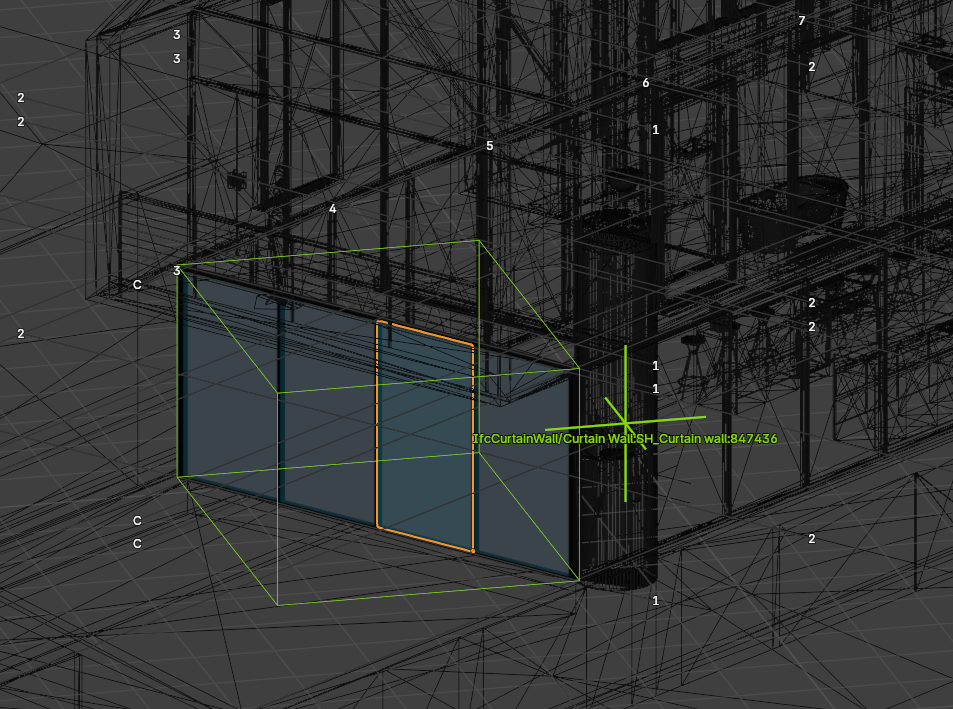
A new lock mode means you can globally lock and unlock, or hide and show rarely changed elements such as grids and spatial elements. Grids are now highlighted globally and render their axis tag. Locked elements cannot be moved, duplicated, or deleted. Object scales are also globally locked, to prevent users from being confused about whether scaling works in IFC.
Parametric object upgrades
Parametric roofs got an upgrade. The roof profile now always represents the top of eave. This better represents how things are built rather than the bottom of eave previously. The roof therefore always grows down from the profile. The rafter edge angle can only be acute. This means that the roof will never grow larger than the footprint profile that you’ve drawn. (before, the footprint was not guaranteed to match). The roof thickness is now the actual thickness of the roof, not the “vertical dimension” of the roof. This means that the roof thickness can now match intended layer thicknesses instead of you needing to do math to work it out.
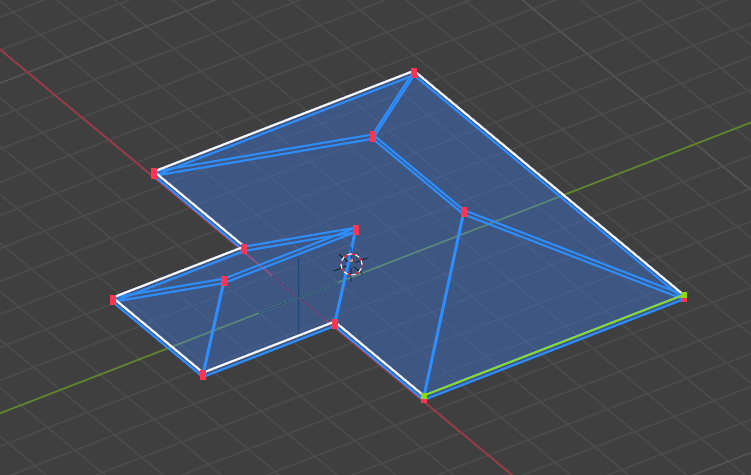
Parametric geometry (e.g. stairs, roof) can now be added to non-geometric objects. Parametric stairs can now have the length dimension constrained, so you can change other parameters without affecting the length.
Parametric doors now have rudimentary support for constituent materials! This means that you can have different materials (and shape aspects, more on that later!) for framing and lining. As this matures this’ll roll out to all tools.
Improved measure tool
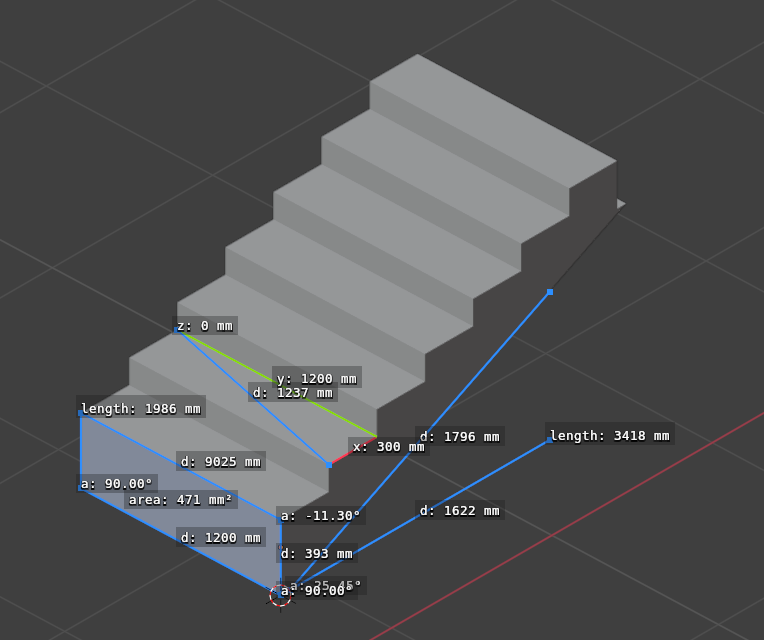
Measurements now persist, snaps with multi-snap target support, has modes (single / polyline / area), and allow orbiting while tool is active.
Direct IFC element adding
This sounds as though it should’ve happened a long time ago, but here it is. Previously, the only way to create a IFC element was to first create a Blender object, then “convert” it into an IFC element. So if you wanted to add a simple solid extrusion (not a mesh), you’d first model a mesh, convert it, then re-convert that mesh into a solid through automated topological analysis. Yikes! If you wanted to add a parametric wall or profiled beam, you’d have to either follow the preset wizards, or know the exact rules in how IFC uses non-geometric types and material sets to generate layered elements. Also yikes!
It’s now possible to straight up directly create an IFC element. This new Add > IFC Element is now a standardised way to add any new element.
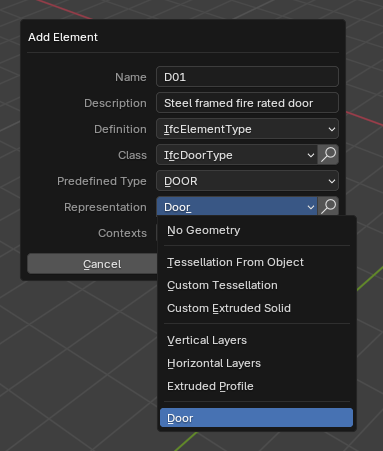
Because IFC elements are a bit more than just geometry, you’re given the choice to name and describe it whilst you’re creating it. You’re also asked to make the choice on the type of geometry (or no geometry at all!). Right now, there are three main types of geometry: mesh-like, solid-like, and parametric. Solid geometry will allow you to immediately model geometry using extrusions, not meshes (similar to most existing BIM software). Parametric ones give you access to things like standard cases doors, windows, stairs, and so on.
Similarly, adding an occurrence of a non-geometric type also now lets you pick what type of geometry to add.
A special scenario is for feature elements. You might know them by the most popular type of feature: an opening in a wall. Feature elements aren’t just openings, they can also be additive (i.e. protrusions) or surface features (i.e. paint layers). These are “dependent” elements, which rely on a parent object to exist and “add or subtract upon”. Basic work is done to consolidate openings into a more holistic feature elements workflow that is consistent with how you add all objects.
New item editing mode
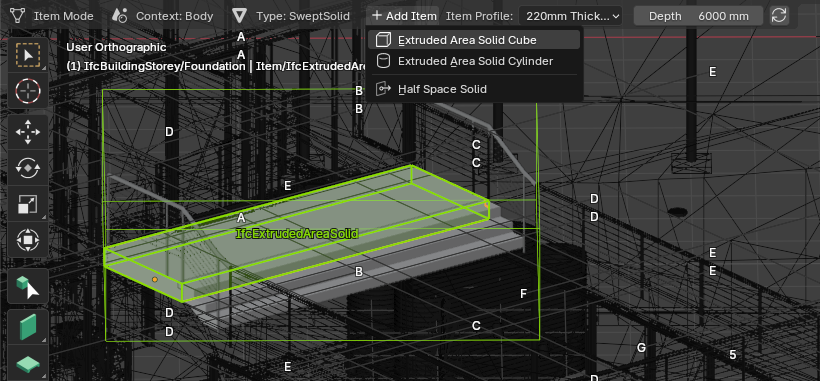
In IFC, an object’s geometry is made out of “items”. A single item represents an isolated mesh, extrusion, boolean operation, or similar. Viewing, adding, and editing individual items of geometry is now possible!
This means that you can add new, distinct mesh “islands” or extrusions, each with their own extrusion depth and direction. This completely transforms Blender from a pure-mesh-only editing tool with only rudimentary non-mesh modeling, into a fledgling truly native solid modeler similar to the modeling paradigm in software like FreeCAD (and Revit, ArchiCAD, Tekla, etc). It’s now more significant than ever to choose an appropriate modeling paradigm per object. It’s also incredibly educational and revealing when you receive a model with completely inappropriate geometry choices.
This also means that you can distinctively view and create boolean operands, and see how they interact with individual items to combine or cut away portions of your object’s geometry. Yes - boolean unions and intersection are also now supported, and you can see the full hierarchy of boolean operations. The old approach of creating “potential” booleans is gone.
This also means you can individually name and style geometric items. A new feature known as Shape Aspects is how you can give individual items of geometry a name. For example, if an extrusion represents a window frame, you can name it “Framing”. This can correlate to material constituents, so if names match, the material and the geometry are correlated. If the material has a style colour attached, then the geometry also inherits that colour.
If you use presentation layers (a.k.a CAD layers), you can also assign them individual to items now. Management (add, edit, remove) of layers is now possible.
This also allows you to change style colours of individual items (previously only possible in a limited fashion only for meshes). For Blender veterans, imagine “Material Slots”, “Boolean Modifier Stacks”, and “Vertex Groups” that now works for non-mesh or composite geometry natively in IFC. Neat!
Along with the new item editing mode comes improved profile editing support. Consecutive arcs are now supported in polylines, and composite profiles are now supported. This is a necessary step on the roadmap for advanced axis editing for curved walls and beams. You can also use an object as a template to create a new profile, or swap out one profile with another when editing a profiled element (e.g. beam, skirting).
Structural analysis visualisation
There is now basic visualisation for structural loads and reactions.

Costing and resourcing improvements
The web cost UI has been significantly upgraded, with an ability to add cost schedules, add / delete / duplicate cost items, add / edit / delete quantities, delete individual cost values, or update cost values on the fly. There is a new ribbon toolbar and improved spreadsheet layout. There are now quick actions upon hover, and can click on quantity and cost cells to change values. It’s now also possible to show a schedule of rates. You can configure column visibility with a new form to manage cost classifications. You can also assign parametric quantities from queries, or link cost rates to cost items.
WASM and ARM64 support
IfcOpenShell is now continuously built for WASM / Pyodide and ARM64. It’s still highly experimental, but it loads significantly faster now and is starting to become a practical choice. Check out the new IfcOpenShell builds server for developers!

Bugfixes
The number of bugfixes have become too large to list individually, so these release notes no longer mention any fixes, no matter how big or small. This is especially true since the last release represented a significant change in the core IfcOpenShell code. IfcOpenShell itself has become significantly more stable since the last upgrade.
This release cycle saw 673 new issues logged and 596 issued resolved.
So much more
- Support positionining CSG pyramids
- Warnings are now shown if manual editing or scaling is performed that isn’t synced to IFC.
- You can now make the selected element in the decomposition panel active.
- The spatial decomposition panel can now switch between different modes of model breakdowns, such as aggregation or classification. It is also sorted by elevation and name.
- Adding and retrieving IFC2X3 material / profile psets are now supported in the API.
- You can now reassign an occurrence to become a type and vice versa.
- You can now detect and unshare psets individually or in bulk, with new API features to assign and unassign psets.
- New icons everywhere with automatic dark and light mode detection.
- Font scaling now takes into account system DPI and Blender interface scale.
- Block deletion of mandatory elements (e.g. project)
- Styles assigned to individual IfcFaces are now supported in the iterator, and support loading per-face colours as colour attributes
- Added API support for editing physical complex quantities.
- Schedules have a CSS class to aid in custom styling
- You can now purge unused styles and materials
- Active bSDD is preserved across sessions
- bSDD now supports pagination and is updated to the latest API
- PowerProject2Ifc conversion now supports more languages and preserves IDs
- Only relevant parametric templates are shown when creating new elements
- Oh so many interface tweaks, improved error reporting or warnings, new descriptions and tooltips, and documentation updates
- Linked models can now be transformed
- Models can be serialsed to TTL WKT
- Model precision is now editable
- Easier selection of clipping planes
- BIM tool now switches between add and edit modes depending on selection
- IfcFillAreaStyleTiles and hatching is now supported in the style manager, which now shows all style types (not just surface), and it reports per-style-type stats
- Appending assets can now disable reusing named assets
- Conversion using IfcConvert can now choose between surface colours and diffuse colours explicitly
- You can now merge identical styles and materials together
- Advanced mode is now auto enabled on large projects with unlimited loading enabled (with a warning)
- New unify shapes option in IfcConvert
- IfcSpace is now treated as special and stored in their own collection. Elements are moved into the parent collection.
- Adjusted documents UI to prevent invalid IFC editing
- Can search through external styles
- New filter for profiles used in materials
- Pset template editing interface generally improved to prevent invalid states and generate unique pset names
- New feature to save a pset into a template
- Try to still allowing undo in case an error occured so you can try to save your work
- New quick way to jump to and from materials / styles / profiles when managing / assigning them.
- All IFC lengths are now shown as lengths with units and allow math or unit mixing
- Support for authoring IfcEllipse
- So many new developer util and API functions, and mathutils is no longer a dependency!
- Converting properties to quantities now has IFC4X3 support
- Quantity sets with no templates will now guess an appropriate measure type based on keywords
- Wrap text annotations after number of characters is now possible so you don’t need to manually add linebreaks
- The render engine can now be saved for styled drawings
- New date picker interface when choosing IfcDate / IfcDateTime values
- Resources can now import / export schedule usage
- Georeferencing decoration can now be resized
- IfcCSV now supports importing enum values
- You can now extract elements from your current selection into a new model
- Voids are now shown as wireframe
- Colours and inner radius for Blender-native swept disks are now supported, and can be reloaded
- Linked models can now be saved as document references natively in IFC, so you can have IFC federation models
- External styles can be set using the Blender asset browser for materials
- IfcPatch is now easier for devs as it no longer needs the src argument
- IfcTester’s behaviour on optional facets has changed to the latest specification: null values pass, with a new colour indicating optional / skipped specifications in reports
- COBie 2.4 now supports the coordinate tab with colour-coded tabs
- IfcTester can now read from XML strings
- Git and IfcMerge can now be installed for IfcGit support
- Unstable docs are now published and you can switch version of docs
- Group manager completely revised and now supports bulk operations for assign / unassign
- You can now select elements that use a profile
- SetFalseOrigin now can handle non-georeferenced model offsets
- New recipe to assign constituent fractions for IFC4 reference view MVDs for layered elements
- Cant geometry is implemented.
- IfcOpenShell’s validation capabilities have been upgraded and can now catch header issues.
- Spatial manager now has improved visibility controls
Funding target reached!
We’ve reached our funding target of 2,500USD per month! This additional funding has sponsored many of the new features you see in this release, such as the improved wall, slab, beam, modeling tools, measurement tools, and aggregate management. We’re currently spending more than we earn each month, eating into our savings. Any donation you can help make will go a long way! See https://opencollective.com/opensourcebim for more details.
All changes
All changes can view the directly via the Git logs. A huge thanks to the growing volume of new contributors who are joining the team and changing the industry. You can too!
Credits for this release (in order of commits via git shortlog -sn --since "2024-09-01"):
   925  Andrej730
   303  Dion Moult
   242  Bruno Perdigão
   187  Thomas Krijnen
    56  Gorgious56
    38  Ryan Schultz
    22  myoualid
    21  tim
    13  Bruno Postle
    12  Lucas Nascimento
    12  Richard Brice
     9  Manu Varkey
     4  John Yani
     4  raj-open
     3  Daniel Bo Olesen
     3  Kristoffer Andersen
     3  `myoualid`
     3  civilx64
     3  mrfcoelho
     3  sboddy
     2  Chris Mayo
     2  Kipre
     2  Louis Trümpler
     2  Raj
     2  Stephen Boddy
     2  Taku Makoni
     2  krande
     2  ti
     1  ArturTomczak
     1  Blender Defender
     1  Cristian Ritter
     1  Dawid Huczyński
     1  Herlianto
     1  Jason Hilton
     1  Jesse Roodhorst
     1  LM-Nascimento
     1  Moritz Amberger
     1  Radek Hlaváček
     1  Scott Lecher
     1  Takayuki Kato
     1  Tyler Kvochick
     1  c4rlosdias
     1  csritter
     1  dependabot[bot]
     1  dylcos
     1  htlcnn
     1  smr02
     1  sukanka
Donors since the last release:
Cyril Waechter BIM Insight
Gortemaker Algra Feenstra
Incognito
BIMvoice
PlaniBIM SA
Randolph
Sailor
Lawrence Giroux
Scott Lecher
Tomasz
Full infra (ifc4.3) geometry implementation
Oke
CORE Digital Engineering
Andyro
Heinrich
Matthew Fuller
OpeningDesign
carlopav
emiliano
Hannes Wörn
Jocelin Birling
E4tech Software SA
Ivo Leeman
Mats Norén
Guest
Dion Moult
Lukas Alberts
Brendon Reid
Víctor Bertran
Jonny Knopp
cvillagrasa
StefStap
Sven Amiet
Ari Pikkarainen
BimETS
David Felix
Flurin Müller
Haritonov Alexander
Keith
Losepacific
Dumitru Minciu
Frode Lund Tharaldsen
Hannes
Louis Trümpler
Rodas
tlang
Albert Ray Ratcliffe
ppaawweeuu
Arjan
Smiljan Tukic
Apple M1 build server
Bedrossian Ádám
Henning M.
KennethR
Marcos
N1k0
Udo
bimage
vdl
Abdelmalek HARRAG
Arun
Denis Pommier
Dmitriy Koptev
Duarte Farrajota Ramos
Leon ten Brinke
Mattijs
bitenergie
Hjalti
Omar Zerhouni
Abdelhamid BELMAARIS
Alexander Kleemann
Aslejo
Benjamin Smith
Benny
Bruno Perdigão
Carlos
Dawid Fedko
Fabian Emanuel Kitzberger
Krande
Madars Siksna
Manu Varkey
Marcin Boguslawski
Mitch
Rafel Bayarre
Tim McGinley
Choong1219
Christian
Christoph Mellüh
Miguel
Royner
Valter
bclmnt
casiovadal
Lars
Christopher
Cintia
Dirk Olbrich
Francesc
GPM UNIVERSAL MX
Jean-Pascal
Louis
Mayday
Owura_qu
Pedro Franco
Stephen Cremin
Gaurav Rampal
Marco Andrade
Open Source Collective
Cordero Architecture
Emilio Tasso
Joern Rettweiler
Sam Morley
Cristina
Enrico
van duong
Dale
8 Likes
I am excited and impressed even more again.
But it does not really help the users to follow the development if you release updates only every 6 months - but pack in 3 times new features instead 
My favorite is the continuous Wall drawing and Walls from Slab or Slab from Walls.
Meanwhile I use the daily build in any of my Blender installations and do recognize and get used to some of the new features one by one over time. But it is still nearly impossible to follow Bonsai’s pace.
What a great Blender Extension, or better vertical App …
1 Like
Yeah, the intention was to release every 2 months, but the first cycle was missed after some really incomplete work (changing geometry editing to item based was a huge change), and I was completely AFK for the second cycle, so here we are. I’ll try to do better
4 Likes