@moony,have you tryed autotile size addon,it is inculded in the Blender addon section,just active it.
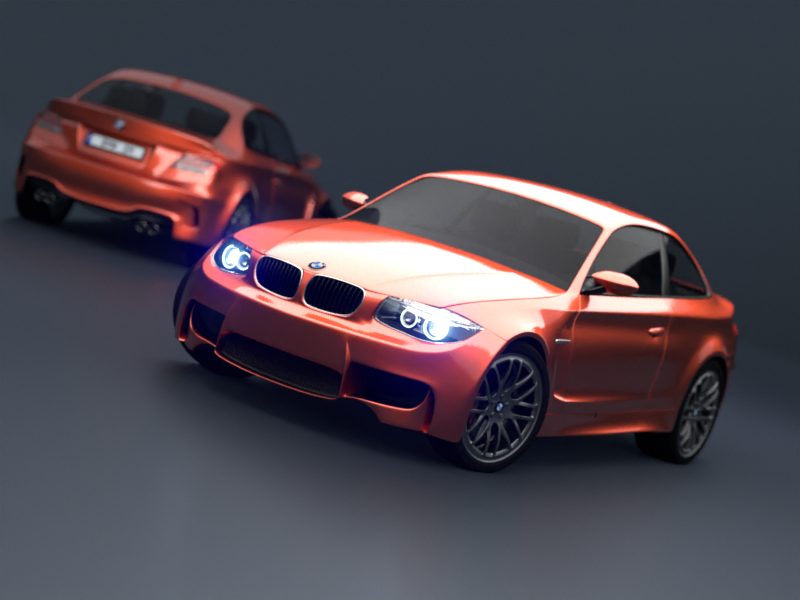
Have rendered with your settings.800x600 adaptive 0.01 and autotile size on,and Optix with GPU. My GTX970 needs 25,53 sec.
@moony,have you tryed autotile size addon,it is inculded in the Blender addon section,just active it.
Have rendered with your settings.800x600 adaptive 0.01 and autotile size on,and Optix with GPU. My GTX970 needs 25,53 sec.
Using auto tile size - it sets the number of tiles to 12. Using the same render settings as you I get:
Optix = 14.45 seconds.
CUDA = 26.63 seconds.
This is exactly where I would have expected these to fall based on the first graph above.
edit: Using a combination of adaptive sampling (0.01) ,simplify (AO bounces = 1) Optix rendering and the compositor denoise node - I can get the following clean render on the BMW scene in a little over 10 seconds on my 980Ti. Shows just how far Cycles has come.
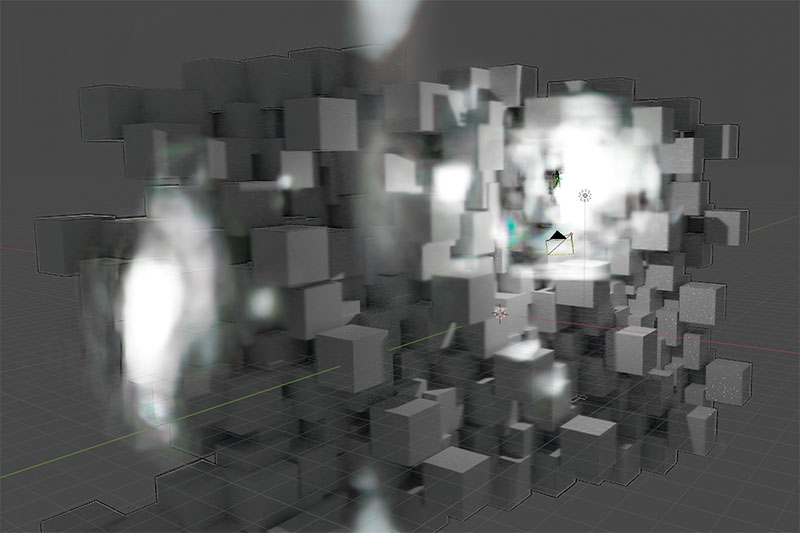
i tried viewport denoising with my geforce 1060 (i tried with cuda and optix) and i get very weird results:
in motion this looks kind of cool.  the splotches get bigger and bigger until the screen is fully white. kind of like when film gets burned when it gets stuck in the projector.
anyone else with that problem? i already had denoising working in one of the bone studio builds a few weeks ago.
Now we need to know, how the RTX tensor cores resulting in your graph.
I cant wait for the next generation of RTX cards for upgrade.
Has the code of that addon been updated? (I’m not just talking about it being ported to 2.8). In old times even before Blender 2.8 the utility of this addon was discussed, because for example optimal tile sizes depended on the nvidia family of cards, even the card model in the same family, and this was not taken into account by the addon. It mainly selected optimal sizes for the time the addon was created (400 or 500 GTX family)
sry, I dont know
You can simply deactivate it by clicking on it,if the results are slower as expected.
It can happen because by default values are 64x64. In 2.8 there have been some changes so that CUDA render is not as bad with small tiles as it was in 2.7x, this made possible among other things the possibility of using CPU+GPU rendering (CPU works much better with small tiles). But still, large tile sizes are still optimal for GPU only (CUDA) in most scenes.
The addon has set the tile size to 200x200 in this BMW 800x600 render.
I rendered again same settings,except with 64x64 tile size.result 39.84 sec.much slower vs 25,5sec
(Optix)
Rendered again with Cuda,64x64 result 22,57sec
Cuda with 200x200 result 36,9sec
32x32 result 20,04sec
48x48=18,76
I rendered the BMW scene in it’s default “benchmark state” (i.e. just loaded the file and hit F12) with autotilesize active (12 tiles).
CUDA = 49.91 seconds.
Optix = 41.75 seconds.
I’m therefore seeing around 16% speed boost using Optix.
I guess the code hasn’t been modified, because that used to be the optimal size for 400 to 700 series:
https://gregzaal.github.io/auto-tile-size/
From 900 series the optimal size used to be larger tiles.
All this before optimizations to improve performance with small tiles are introduced:
https://developer.blender.org/D2856
However this has always been controversial, Brecht even said that there is no single optimal tile size because it may also depend on the scene. The goal of devs is that performance does not depend on tile sizes at all, including removing tile size options from render properties.
Based on my experiment above - Optix does get them closer to that goal.
The tile size dependency with Optix appears to be much less drastic than for CUDA and is also pretty much linear for both adaptive and non adaptive sampling making it more predictable as well.
Another experiment on a different scene, this time incorporating a lot of refraction/glossy and volumetric shader action.
When I tried to render the scene as a single tile, the Optix render crashed out with a memory error. I could only successfully render the scene with at least 4 tiles using Optix, whereas CUDA rendered fine with just one tile. Optix was also slower than CUDA in both cases until I reached around 12 tiles at which point the render times crossed over.
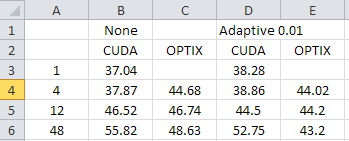
The general rule that Optix handles smaller tiles better than CUDA seems to hold. Again as the tile size is decreased (total number of tiles goes up), CUDA performance suffers far more, whereas Optix, despite getting slower, does so in a much more gradual way (and in fact on this particular scene, when combined with adaptive sampling, the render time for smaller tiles actually improved slightly when using Optix).
Hi kekapo,
I had the same problem, upgrading the nvidia drivers to the latest Studio version solved it!
thanks! wow, that’s incredibly awesome even on a 1060. 
I am having the same problem. Any strong highlights turn into these blobs.
you have to install the newest nvidia studio driver then it should work.
Do studio drivers have any negative effects on games?
probably it doesn’t contain the driver optimizations for certain games but otherwise they should work fine.
It doesn’t work for me, my driver is already the newest version, and I asked one of my friends to check, and he told me he had the same problem. I also reported the problem to the developers forum, it still “Needs Triage” though
https://developer.blender.org/T77552
Just in case.
People here reported that the latest “Studio” drivers are the ones that have worked. Not sure about “Game” drivers.
Do not use the drivers provided by Windows. Download drivers from nvidia site and in the installer select the option to perform a clean installation. Preferably install only the nvidia driver, not install the other components if you are not going to use them.