THAT IS HILARIOUS!  lol
lol
Correction: Bryce (first release 1994, 20 years ago) has them.
Anyway, you are all following the wrong route.
When you want to persuade your boss to do something, the LAST thing you have to do is to bring on the table logical reasons why YOU are right. This action is immediately interpreted not as a helpful suggestion but as an encroachment into your boss fiefdom and shot down accordingly (with the added bonus of being added to your boss hit list).
What you have to do is to find a way of making the thing look like as the accomplishment of some past orders or wish of your boss or, alternatively, manuever your boss into ordering you what you want to be ordered. Stop thinking like a nerd/programmer/artists and start thinking like a Richelieu (be careful not to twirl your moustaches in front of your boss).
In this build, where can we change the wireframe color ?
Like I see it.
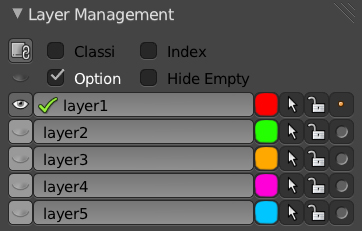
Thank you very much.
I think it’s a good start. Personally I don’t like that unselected objects have dotted wireframes and that the background turns black instead of the default color.
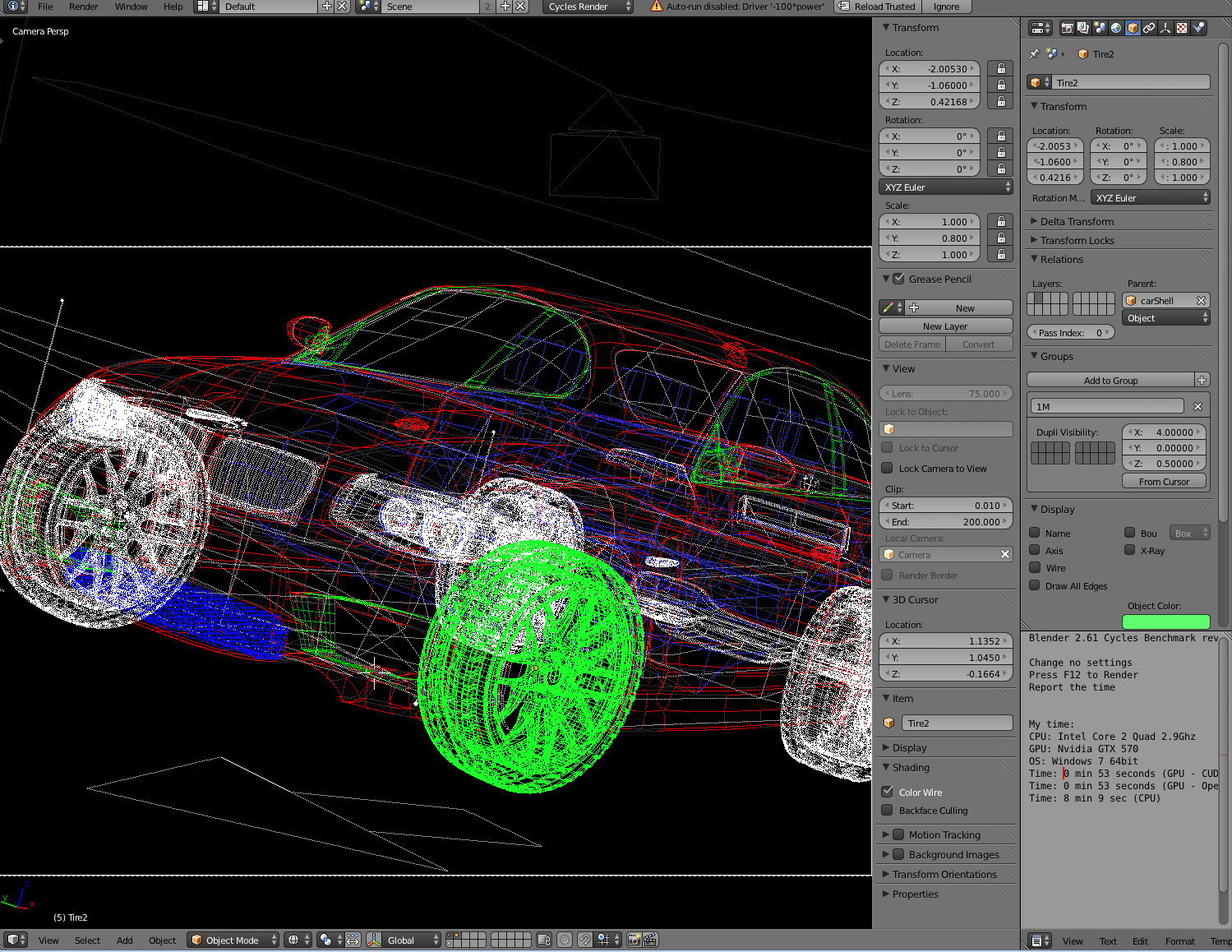
yeah that dot style stuff kinda sux… and would be nice if object in front would be drawed in front and not by selection… that would be make perfect! so here is my 2 cents…
CLINK ON IMAGE FOR FULL RESOLUTION

Thanks tungerz, that’ll be a great plus to test it for real.
I don’t dislike it so far, but the fact that you have to set you wire colour in the object panel of the properties kinda doubles up with the ability to set a viewport colour for a material and can be a bit confusing. Of course I know it is a very incomplete implementation. I will work with it in the next few days and gather experience.
@ideasman42: thanks for your explanations: i didn’t know it was possible to set the colour of the edited wire in the themes: that’s great. I am surprised that the default colour is black for both the edited mesh and the other objects. I’ve set mine to a dark olive green and it’s much much clearer ! So that’s half of my concerns solved.
•About Editmode/ Objectmode: OK, I see. Basically your implementation is active on editmode as well for all the objects bar the one that’s being edited. I hadn’t thought of that. I thought you would not allow it AT ALL in edit mode. It’s OK this way i guess, but i think it doesn’t bring much, only distraction. But that’s my personnal taste.
•I like the fact that is optionnal, just like matcaps are. That’s a very good point, and coherent.
In Cycles mode, perhaps it would be nice to use or quicly assign the viewport color of the material and the diffuse color when in Blender Internal Mode ?
I think that allowing user to set Saturation/Value, whilst theme/object-state controls the HUE is fair.
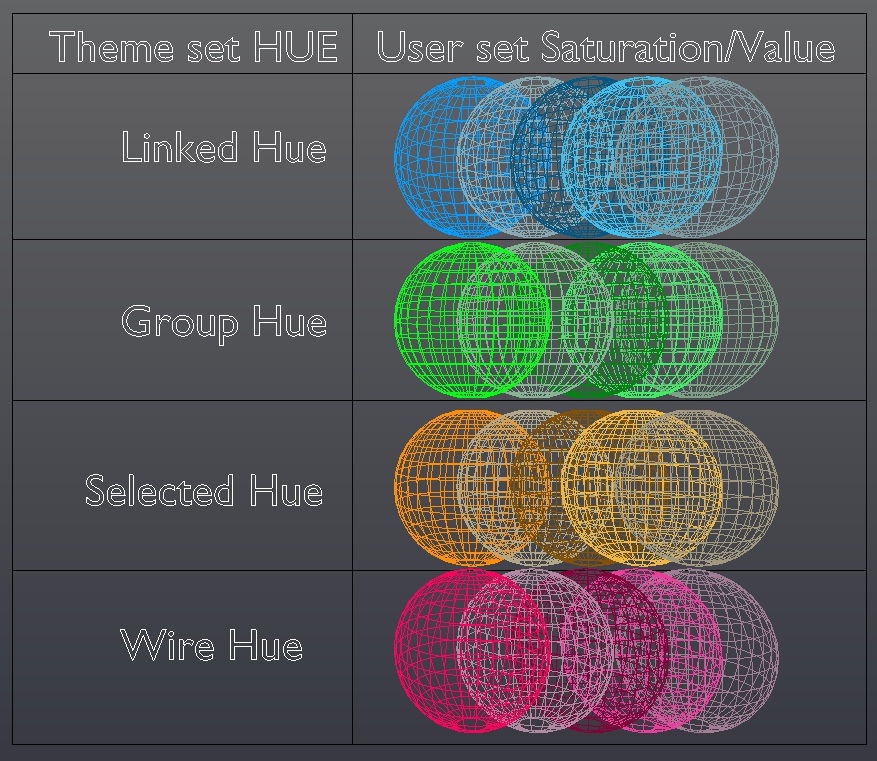
Vs

Vs

Thank you Tungerz.
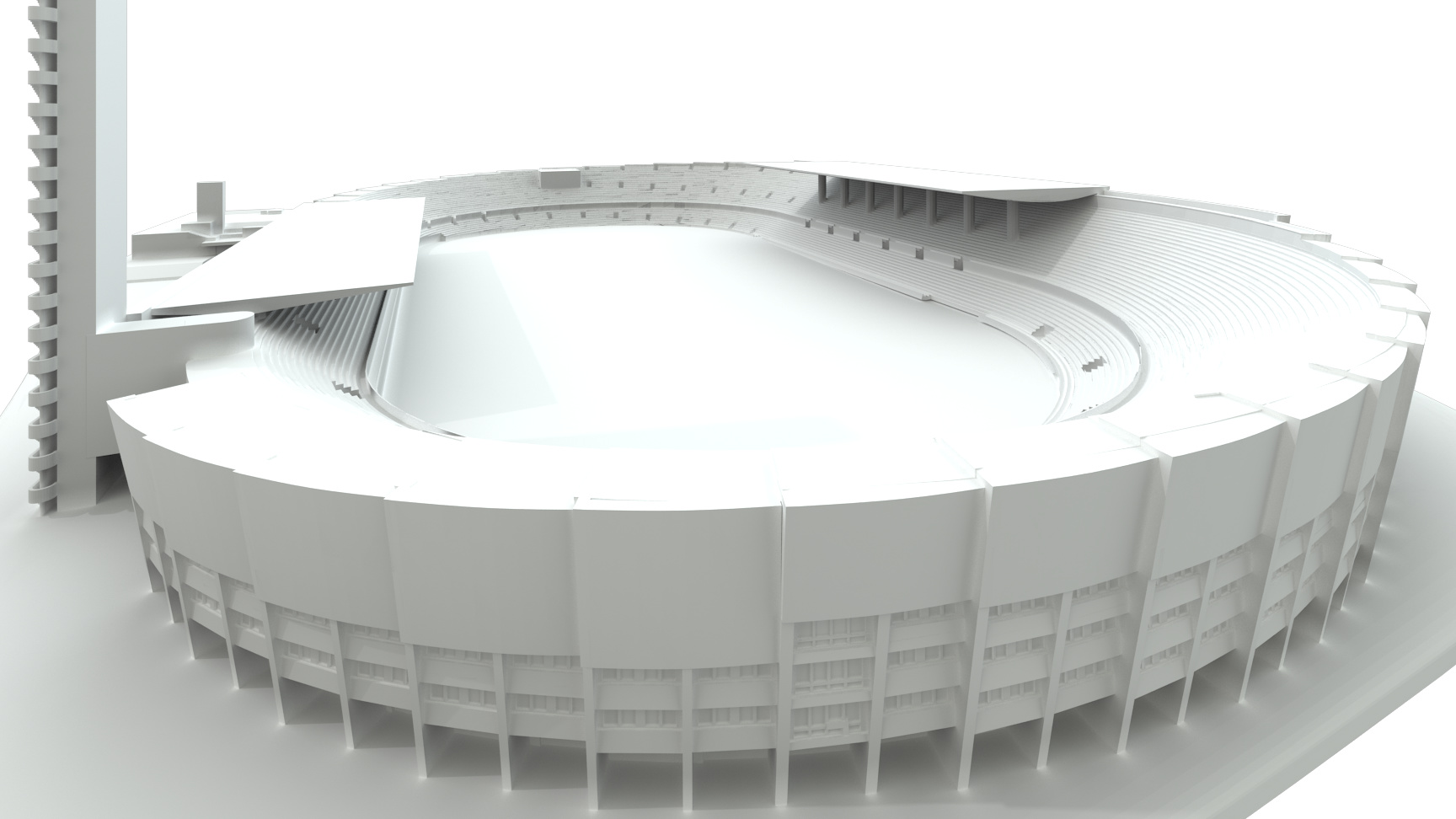
When I had Helsinki Olympic stadium project, wireframe patch would have been great help.
Facades light blue, floor plans green, cross sections red, booleans blue, different wall types brown etc.
It would be good if colors are like materials, there is a list to where you can add colors and set them to selected objects. And when you change that color, all objects with that color will change also.
I liked dotted lines more than solid lines.
Attachments
Thanks for the build. After playing around with it not even for 5 minutes I can tell that it is already a huge improvement even in this state.
I agree that the dotted lines aren’t really that great though. You loose a lot of depth perception with it and you don’t know what your active selection is using only dotted lines. My suggestion would be to use fully drawn lines and use the hue/sat to determine your selection and active selection using a special color for selected objects.
Will test it much more though.
Nice to see a test build. Not liking dotted lines at all. Stick to solid lines. The viewport background should be left alone but I could see having an optional background override setting not just for wire but other modes as well (maybe put it near the matcap toggle). It might be undesirable to use “object color” for the wire color if it gets used by a material. What I would do is add a “wire color” entry to the object display panel. Use this setup as the basis for all other options. With a start like this everyone gets what they want, which is custom wire colors, even if they have to set the colors manually.
Next I would add a default wire color in the user preferences with a “randomize new object” option. If random color is enabled the user can specify a min/max range for Hue, Saturation, and Value.
After that worry about selection/active options and organizational color overrides: colors per object type, group colors that override object colors, selected and unselected color multipliers, etc.
Allright, i tested it.
It’s kind of an OK implementation, I guess, but it’s quite weird.
Questions that I get from using it:
Why use dashed lines?
Why make the background change?
Why isn’t a random colour to an object assigned whenever the object is created?
Why should the user manually pick the colour every time?
I am pretty sure, this could be implemented in a better way, and I think I know how:
Advantages:
 My proposed way would be more automatic. That is, no need for manual colour selection, unless the user wants to.
No conflict with group/linked colours. The user would have a choice on what he wants to be colour coded.
No background changes or dashed lines.
STEP ONE: RANDOM COLOUR GENERATION
Option one:
In the display panel, object tab, there could be three colours for the object, not one. These are:
Object unselected, object selected, object active.
These three colours should get generated randomly whenever an object is created.
The three colours should get generated in one gradient: Dim (unselected), Bright (Selected), Brightest or White (Active).
Each object should have similar brightness on their colours, when generated.
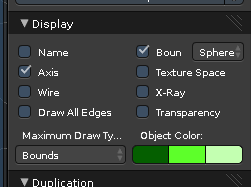
Option two:
Only one object colour, the other two are dependant. Brighter and brightest.
Option three:
One colour. But the other two would differ in transparency. Unselected - 50% alpha, selected - 75% alpha, active - 100% alpha. (Or something like that)
Choose one of the tree options, can be discussed which is the best idea. Definitely not dashed lines, though.
The random colour generator should have these rules:
- Avoid a colour that is similar to the background. This will avoid the need to change the background colour.
- Make sure it’s always Dim, Bright, Brightest. The first colour shouldn’t be bright, so the other two could have space to brighten up.
- Best if it generated real colours, not shades of grey or close to grey colours.
Even if the colours randomly generated, the user should be free to change them to his liking.
This kind of colour coding would need no dashed lines. All objects, by default, would be quite dim, therefore it would be easy to recognise which objects are selected by the fact that they brighten up.
Random colours are A MUST.
Random colour generation would benefit the user, so that he wouldn’t have to spend a lot of time manually colour coding all of his objects when he starts to see that he has so many objects that he actually needs colour coding. The user shouldn’t be bothered by that.
STEP TWO: CUSTOM COLOURS FOR GROUPS
Off Topic question: Why aren’t groups in list boxes, like vertex groups or Shape keys, etc? This is obviously needlessly inconsistent and should be addressed.
Groups should also have their own colours. Randomly generated on creation too.
Same rules would apply as in Step one. And the same option from step one should be used.
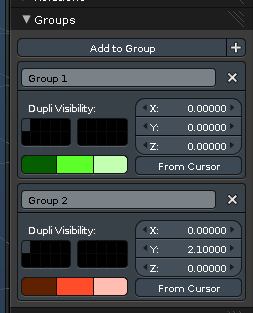
The advantage of having different colours would be that currently, the green outline only shows that the object is in a group, but doesn’t say which group it is in. If all objects are in groups, the green outline is pointless and conveys nothing.
STEP THREE: CUSTOM COLOURS FOR LAYERS.
In case we ever get a proper layer manager (Something similar to autocad), it should too have random colours generated, that can be manually changed (Like step one and step two).
STEP FOUR: MAIN STEP. GIVING THE USER AN OPTION ON WHAT TO COLOUR CODE.
The issue with coloured wireframes is, that varied colours would conflict with colours of groups, linked objects, and… That’s it. Isn’t it?
Even if there is more, the problem can be easily avoided by letting the user decide what he wants colour coded by adding this extra drop down menu in the “Shading” panel in the 3D view:
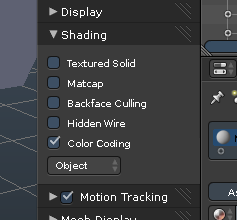
If the Colour coding checkbox is off, blender wireframes are black, the outlines of selected objects are default orange. Groups or linked objects would not have special colours, etc.
Turning the checkox on, allows the drop down menu. In the drop down menu the user is free to select what colour coding he wants. Such as:
“Object” - Colour each wireframe (bounding box, wireframe) and outline (Solid, Texture, material) by the object colour (Step one),
“Group” - Colour by groups (step two). Default Black/orange if object is not in a group.
“Layer” - Colour by layers (Step three)
“Material” - Colour by material viewport colour.
“Link” - Give a specific colour if object is linked, otherwise use the default black/orange
There could be other options can be added if needed. Maybe even such combinations as “Linked and grouped”, this would result in the current colour coding: Green for groups, Blue for links, Orange for neither.
There could be other addition to this colour coding idea:
Let the colours affect not only the wireframes, but also the colour of solid shading.
Currently, This can be done with materials, but not with object colours or group colours.
So here.
I think this is consistent and comfortable.
If anyone see any loopholes or questions, go ahead. Discuss.
i can sign above this
@@tungerz thanks for the build
@FreeMind Why isn’t a random colour to an object assigned whenever the object is created?
Aha I see your a Max user. IMO this workflow just leads to visual noise.
As a user I want to decide the colours (though I’m guessing this is just a pref in Max?)
Please can have the option not to force colours changes to the rest of the package when I’m using coloured wireframes.
Now can we have coloured wireframe on shaded please? 
fingers crossed this makes it past Ton…
i think u didn’t readed all what he has writen because. U have just simply switch option on/off of the color of the wires so if u don’t want to u just simply click no.
Aha I see your a Max user. IMO this workflow just leads to visual noise.
This was inspired by max, sure, but I am not a max user and I don’t know how this works there.
Random colours would be generated, but you could change them to your liking afterwards in the object display panel. But really, I don’t see why you would bother?
Visual noise? Whatever you wanna call it. I’d call it “Effortless different colours for different objects, so that one could be distinct from another when you are in wireframe shading mode”.
Maybe it’s a good idea to be able to turn off random generation in the preferences if the user wants.
But trust me on this one, you will not want to manually set colours for 257 unique objects once you notice that you can’t see through the wireframe anymore.
Note: The colour coding checkbox. Turn it off and you will see no distinct colours for different objects.
Could be off by default, so no “Visual noise” on get go.
Thanks Tungerz for making this build. And thanks Campbell for making this patch
This is already a really nice implementation. Not this much to moan. And definitely a useful improvement.
My first concern goes about the UI. After a short search i find a colour wire checkbox in the properties under the shading tab. And then i have to guess where i could probably find the place to tweak the colour. One place to set things up would be better. It was pure luck that i changed the object colour then. This one needs a new label i guess.
Second issue goes to the change in the background colour to black when switching to wireframe colour. I am also not really happy with it. I have tweaked my background colour and have changed the colours for my ground grid too. So this turns out to be very dominant now. What about optional here? When in doubt i would leave the background colour as is.
Dotted line is indeed very irritating. What about you set the currently selected object to the non wireframe standard colour? This orange one? I see though that this could conflict with multiselection. So this idea needs further discussion. Hue would be another possible way. But fails with bright colours. Means also this method has its drawbacks.
I still think that we would be better suited to manage the colours by layers. Not by the object. That way we would not need anything in the object tab at all. And a object is quicker put into a layer than set up to have a custom colour. This task can become tedious when you have lots of object to change to a single colour. Drawback is of course that we would be limited to the currently available 20 layers. Makes 20 colours maximum.
I still think that we would be better suited to manage the colours by layers.
Why not both?
Read #172
Why not both?
Uh, yeah, why not both \o/
I got the svn but how do you make it works
where to find the new checkbox for this
thanks
I still think that we would be better suited to manage the colours by layers. Not by the object. That way we would not need anything in the object tab at all. And a object is quicker put into a layer than set up to have a custom colour. This task can become tedious when you have lots of object to change to a single colour. Drawback is of course that we would be limited to the currently available 20 layers. Makes 20 colours maximum.
gotta be kidding i have whole engine on one layer… so… what whole engine red?
Post #172 is the best solution