Nice app Oleg, it downloads versions nicely but I can’t get it to run them from the app…
I discovered a very weird bug - if there is white spaces in path blender will not launch.
So use path without spaces!
I will fix this bug as soon as possible.
Thanx to @krupa for reporting!
1 Like
Latest release v1.3.2:
- Fixed Blender not launching if root folder has white spaces
Also, I created a Gumroad page for the sake of easier update sharing via email, but it forces to set price at least 1$ if file size more than 25 megabites.
You still can get Blender Version Manager for free on GitHub. Gumroad page is a way to support creator and help you stay tuned with updates via email subscription!
4 Likes
Hi Oleg, thanks for this amazing tool ! using it right now 
works perfect on my laptop, only problem i found so far, impossible to toggle the system console from blender when it is launched through version manager panel (which can be a bummer when coding addon), no idea why… have you got a clue ?
Otherwise, this little tool is perfect !
cheers !
Hi!
I know that such issue exists. That’s because program watching for running blender and indicates number of instances. It is a nice feature but also it prevents deleting blender while running.
For now I’m thinking how I can solve this problem in a good way. So stay tuned!
2 Likes
I sure will, thx for quick answer ! cheers !
 Get latest version on GitHub
3 Likes
Thank you for your awesome work. 
2 Likes
You rock man, thx ! your tool is perfect for my use of 2.8 right now !
2 Likes
I have a question, yesterday, they were 3 update in same day, are they always sorted by date (more recent → less recent) ? (cf screenshot)
cheers !

Hi!
Versions sorted by creation time (in seconds).
So, the recent version is always on top and oldest one at the bottom 
2 Likes
perfect ! thx for quick answer !
Super cool, thank you for this programm 
Hey thanks, thats a really handy application.
Do you have plans to add a scroll bar for those of us that test 20 versions of 2.8 ?
Also do you have any plans to add other versions of blender like the 2.79 fracture build or the 2.8 sculpt build?
Hi!
I’m aware of “scroll problem”, so It is more of time question. It is not that easy as it sounds 
Right now I’m doing some code fixing and refactoring when have time. Hope to implement it soon.
About including other builds is a good feature. But it depends on hosting. As far as I know there is only graphicall.org hosting such builds. So can’t promise when I will get a look at it.
1 Like
thank you for 1.4
Thanx a lot !
Folks, that was too early!
I deleted 1.4.0 release since there is some weird permission error after extracting build, need a little bit of time to fix this for final release.
I will publish tested build myself as soon as figure out the problem!
I always write a post in here if everything is ok to download, please, be patient and stay tuned!
3 Likes
Hi folks!
Blender Version Manager 1.4.0 finally here!
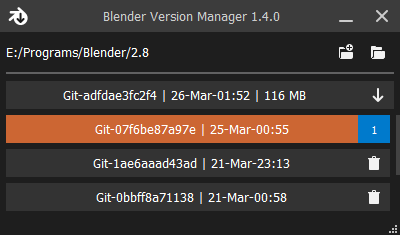
Major:
- Automatic registration of .blend extension (optional in File Menu)
- Display date now matches with blenders splash screen
- Scrolling for long list of versions
- Bug and crash fixes
Minor:
- Better naming of versions in root folder
- Display build time instead of year
- Automatic cache cleaning
- UI polishing
Downloads
Latest build:
Download Blender Version Manager v1.4.0 (Win x64) from GitHub
Source Code:
Blender Version Manager on GitHub
Support:
Blender Version Manager on Gumroad
4 Likes
Hey there. Thanks for making this addon, it’s a life saver. Would it be possible to add an option to keep your activated addons and prefs from the previous version?
Thanks in advance