Thank you for your kind words, I am afraid that this is not true, I am still just learning, answering these questions helps me clarify concepts for myself.
My answers should be taken as “thoughts” and are not necessarily the best way to do things!
I do believe that Geometry Nodes (and “everything” nodes) will be a big part of the future and I have always enjoyed plugging nodes into each other!
I am instancing from a collection, with each object having a different material. For me realizing instances instantly breaks these materials even when setting them. Do you have a fix for this?
I am working with 3.0 and the materials are mainly setups with image textures. The realize instances makes them a flat color.
Hi in 3.4 it seems to work and intances retain their materials after realising them. Here I have a collection of 4 spheres (each with its own material) instancesd on a subdivided cube. I can realise the instances retaining the materials.
This could be something that has changed for the better in newer versions. I would try giving the base object with the GN modifier (in my case the cube) all the materials in it’s material slots, maybe that would fix it.
If not try with 3.4 as GNodes are constantly getting better and it is worth using the newer versions.
Thanks @DNorman
This is indeed good news in 3.4 that simplify this step of retaining of multiple objects each with different materials, used as instances.
Say, would you know if the new version 3.4 take care of allowing a “collection of collections (child)” where the child (collection) can be used as instances in GN too ?
Realize Instances breaks the UVs, that is also the reason you get a flat color instead of images.
To fix this, add an “Attribute” node and type in “UVMap” and connect it.
I am not sure I totaly understand the question, with the collection info node you can choose any collection (it does not matter if it is a child collection.)
If you have a collection of collections and use it as instances with the “pick instance” option each instance will be an instance of one of the child collections (each instance will include all the objects in that child collection).
If you want to use just one of the objects from the child collection as the instance I think you have to acces the child collection directly with the collection instance node.
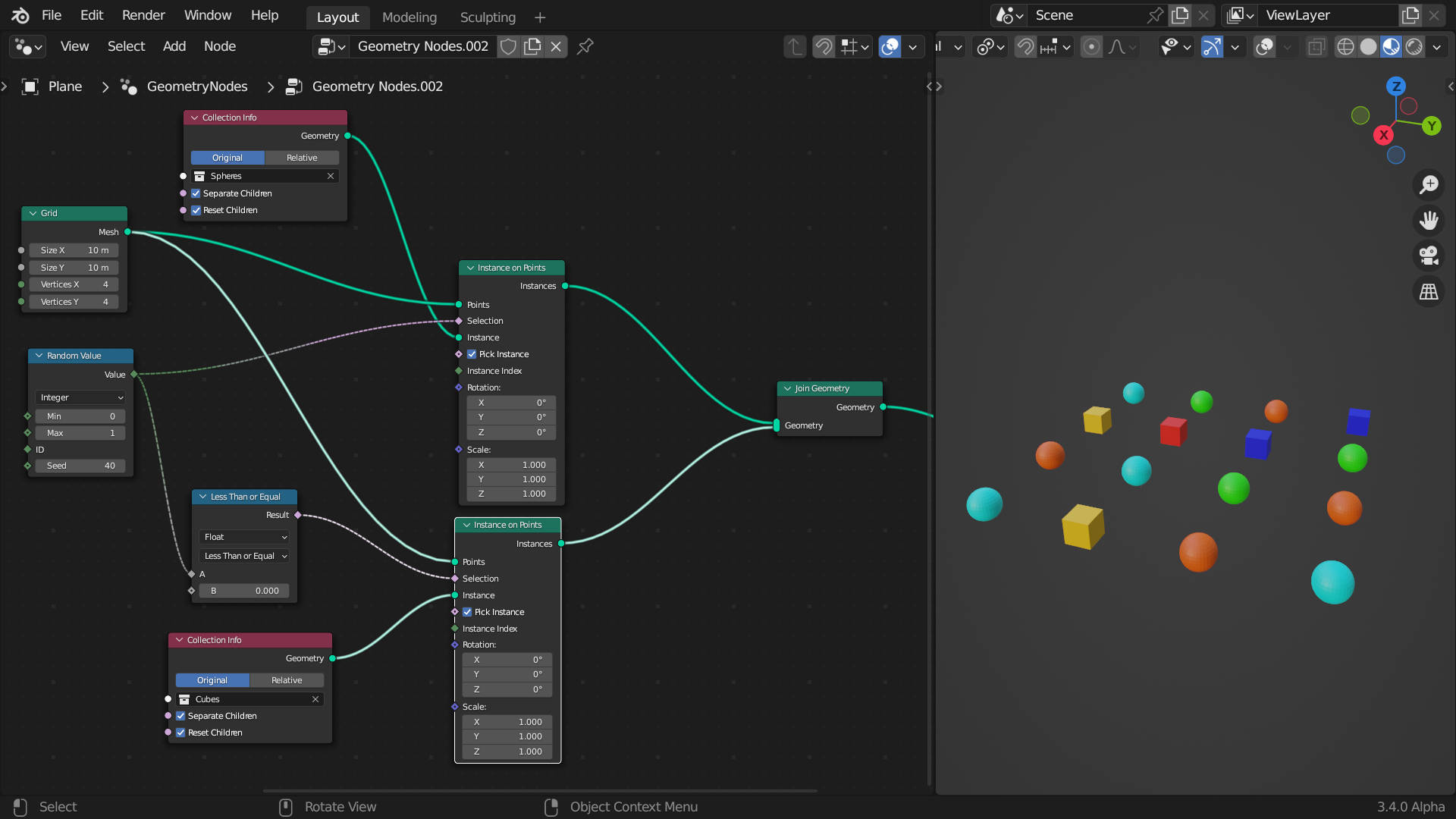
To pick one object as an instacnce from one collection and another from another you need to instance them seperatly. Something like this:
Hi @Dnorman, thanks !! so the trick is to enable “pick instance” which I never really understood this feature and did not try it out. It works now … cheers.
Yes the “pick instance” will pick one of the objects in a collection for each instance.
In you case “collection of collectios” it will pick one of the child collections for each instance.
If you want to randomize which selection is “picked” you can use a random value and plug it into the instance index input.
The range of the random value should be the number of objects you have in the collection (or in your case the numer of child collections you have).
Here I have a collection with 3 cubes so I set the range of the random value to 0-2, I could have set it 1-3 or 5-7 the important part is I needed 3 posible outcomes to be able to pick one of the cubes. If I had set it to 0-1 only 2 of the cubes would have been picked.
Changing the seed will randomly change which collection is instanced on each point.
Hello I have a question for a project I’m currently on related to this topic.
I followed this tutorial to make an object like its made of legos and I was wondering if it is possible to transform it to a mesh with baked texture image. I finally found how to convert it to a mesh with “Realize instances”, the problem is that when applying the geoemtry node modifier the color info is lost; and here is my question, is it possible to bake the color of the lego object to transfer it to the new mesh?
Here is a comment of the tutorial creator explaining the way of doing it but can anyone elaborate please?
Hi @defaultblenderuser
I follow this geometry setup. The 2nd part of assigning material does not work.
See my results … compare to the original material
Hello, I’m too newbie to recall what happens, but could be yes, recently tried zeroskilz procedure, but looks like the texture is unwraping in each lego brick.
Oh, I see… looks like you’re using the UV of the object that you’re instancing onto… In that case, you’ll need to capture the “parent” objects UVs… Since they’re both called “UVMap” I expect the one to overwrite the other.
Before doing the instances, do a Store Named Attribute, piping in the “UVMap” attribute, and call it something like “UVMap2”, then use that attribute in the Shader editor in Geometry mode instead.
Hi @zeroskilz,
Thanks this works as you suggested, but require also to store Named Attribute to another name as u mentioned too in your subsequent notes - UVMap2 instead of UVMap.