In substance painter you have backfacing on/off with angle limit: https://youtu.be/xOB7X5-rXkQ?t=259
I think that would make sense in combination with option 2) . That is my personal opinion though.
Hello howardt.
I think this should behave as it works in Texture paint to maintain some consistency?
I’m not sure if I understood correctly. But “1” would seem to be how it works texture paint in Perspective view, and “2” in Orthographic view?
I’m sorry if I’m misunderstanding all this.
It looks like the fact that “Limit To Visible” option that already exists in 2.78c for weight paint mode was forgotten.
So, non-occluded paint already exists for weight paint mode.
It is a valuable option to have when you are doing vertex selection as a mask.
It looks like when this button is disabled in Weight Paint in the branch.
The display in vertex paint mode is affected although the button is missing.
There is no reason to restrict this option to Weight Paint mode.
Differences are not a question of mode but a question of workflow.
As Hadriscus said, he wants to use vertex paint mode for values as he does in weight paint mode.
And pildanovak is talking to filling area like he does in texture paint mode where no vertex is used or important.
So, you can force Hadriscus to use weight paint mode and provide a conversion tool to change a weight group into a vertex color channel.
Or you can provide all options in vertex group.
In fact, the deactivation of Limit to Visible option is sufficient to provide a “Cone” method (which become a easy to use Cylinder method in ortho view).
Maybe it would be better for consistency to change texture paint mode Occlude option to a Limit to Visible.
And it would be great to also have a “Sphere” option because it corresponds to another need.
Hiding parts of model with a “Cone” method is obviously not the same thing than keeping model visible and using a “Sphere” method.
I tested the branch, today.
It is what I obtained at first try with default brush. (No problem when Occlude option is enabled).
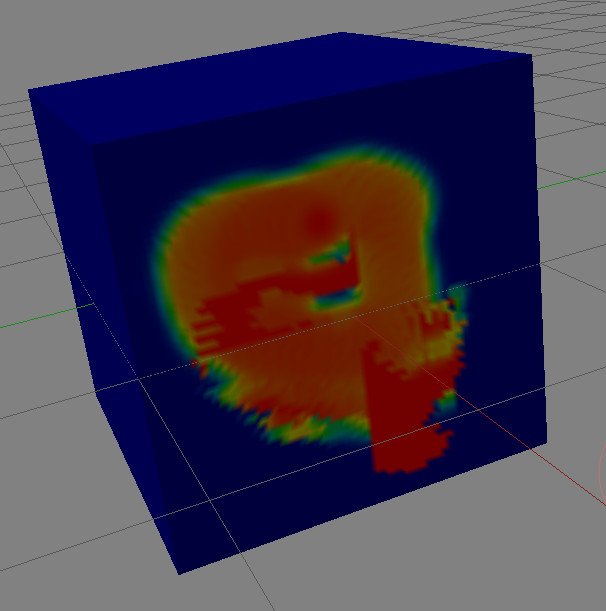
Non occluded mode in vertex paint mode gives similar result on occluded faces.
Pattern drawn on front side that should be drawn as is, is restricted to a quarter of the back side.
In vertex paint mode, it looks like symmetry also have a problem with non-occluded mode.
It would be nice to have in Blender a native weights to vertex paint converter. I usually use this addon/script to do this:
Hi Darshan; Here is an attached image that answers your question of what I meant by random vertex/face/island colors.
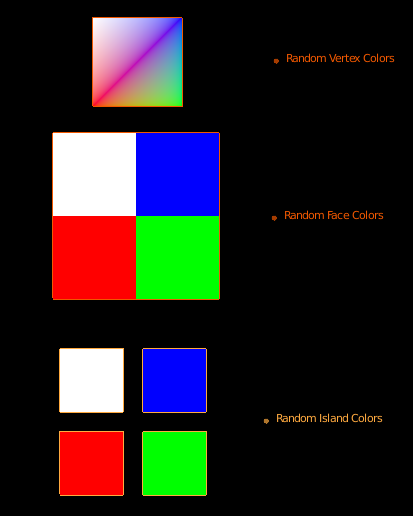
I had to answer the PM in this thread as that system does not have attachment functionality.
What do other artists think about Ace Dragon’s suggestion? Does it look useful?
And for Random Vertex Colors: was the intent that all the face “corners” at that vertex get the same color, or that each get a random color. I am assuming from the name that you meant the former.
could be a useful feature actually.
Random Island colors looks useful.
We are using Object Index and Material Index in shading and compositing.
A color by Island could be used as a workaround to absence of an Island index.
Which can be perceived as a big lack in modeling software where joining meshes into one object is often easier than dealing with multiples objects.
The rest does not make sense for a sculpt made of millions of polys.
But there are people doing architectural or low poly stuff.
A quick way to differentiate faces and discuss the model can be to give a different color to each face.
For motion graphic stuff, it is common to use random colors.
We can use random colors for objects or particles without addons. So why not for faces and vertices ?
Giving an access through nodes to index of each element, part of the model and a random option would be better.
But “everything nodes” will probably take time.
It is probably already possible with animation nodes which is an addon, not yet official.
But using animation nodes just to organize your work in viewport looks like using an atomic bomb to kill a fly.
I have implemented the weight to vertex color converter. red color corresponds to black while blue corresponds to white. I have attached the screenshot. Any suggestions are welcome.
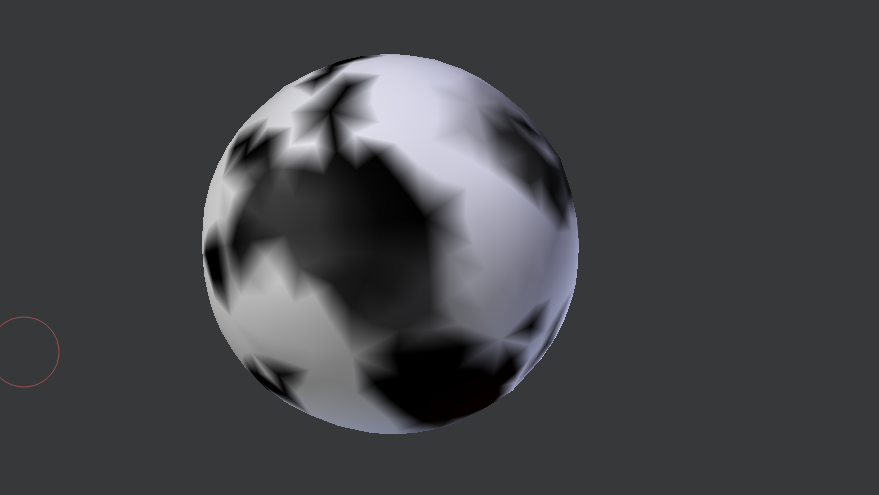

I know this is probably an obvious thing as I assume you are using the weight values and not the actual colours but this will still work as expected if someone uses different weight value colours? Also, are the values clamped?
I’m really not sure why you would want to use the weight color range itself to become vertex colors (unless you were creating some fancily rendered demonstrated of a weight painted object).
The weight color-ramp is a global setting and its main job is visualization (converting the range to greyscale by contrast is far more useful, especially if it means you can use the 3D-print mesh analysis tool results as a mask).
Can we paint multiple layers of vertex color with 1 stroke at high speed?
Can we have a mode, where it converts a model with texture layers, into a high density mesh and interpolate the vertex color layers using the texture
Then we can paint in realtime, and use vertex color for GLSL values in a shader
Then when finished, bake the new colors back to the textures and delete the extra vertex?
Basically, we could paint on a zipper in 1 stroke,
(metalness, normal, diffuse, etc)
This might really push it as far as a GSoC project is concerned (not only that, but the better way to go would be to allow for per-polygon vertex painting on multires meshes, that way you just skip the first conversion altogether and just do the bake to texture part). Even then, the GSoC period only lasts to August so you want to suggest things the student actually has a chance of completing (depending on his skill).
You can perhaps already do something similar with the PBVH painting, a high-res dyntopo mesh, and a retopo’ed version that’s lower resolution).
Thats exactly what I was saying (but wrote badly), I was checking the conversion was weights to grey scale and NOT Blue/Red to Black/White.
As for clamping, the question was based on weights can be greater than 100% is all.
Thanks! Seems to be working well.
Can you tell which convention is to follow here i.e. blue corresponds to white color and red corresponds to black or vice versa.
Yes, the weight values are used, not the visualization colors. But there is a question of how they should be converted to grey scale. The addon he used for reference converted weight 0 -> white, weight 1 -> black, so that’s what Darshan implemented. It feels to me that it should be the other way around: 0 -> black, 1 -> white. Darshan just posted asking what others think about this.
Well 0=black and 1=white is kinda universal so I would go for that. The ideal would be having options as part of the operators, for instance an invert checkbox or even better a color ramp. Maybe individual R G and B channels could even be included/excluded from the conversion as well. But that’s a great start !
I’m really not sure about conventions on this. I thought it was irrelevant since you can invert weights and get the opposite mode when converting. If one is based on default color ramp in Blender, it goes from left to right > Black to White. If one “reads” from left to right one tends to think that it should be Black=0, White=1.
Now that I think, the convention to choose could also be related to Masks and alpha channel. In masks, what generally corresponds to full opacity and what corresponds to transparency?
Actually someone with more knowledge than I have should give their opinion here.
Edit:
Ohps, I was writing and I did not see Hadriscus message before
+1 on this because it is Blender like 
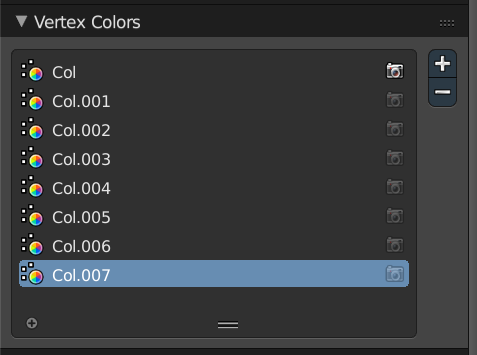
@howardt and @Darshan kadu can we have more vertex color layers? For now it is limited to 8 layers, maybe something like 10-20?