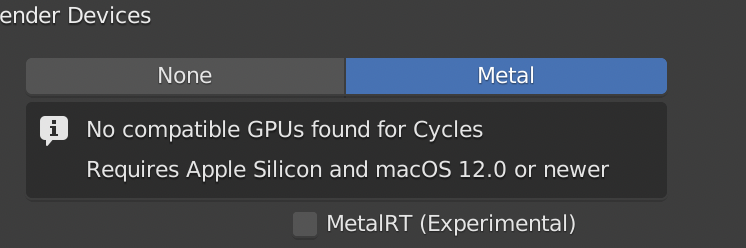
Yes I think so - also for M1 you need the latest macOS !
I am going to update my old macpro 2010 with an amd rx 5600 xt so I can test blender and metal on a better gpu than my Mac mini
Yes I think so - also for M1 you need the latest macOS !
I am going to update my old macpro 2010 with an amd rx 5600 xt so I can test blender and metal on a better gpu than my Mac mini
Came across this and thought it might be interesting here. 
The Apple Silicon Macs can run iOS apps. Does anyone know if Wacom tablet pressure sensitivity works with iOS apps on macOS?
I would love to try Nomad Sculpt, but I’ve got no iPad at the moment, and am planning to buy an iMac this year.
Interesting idea, will see if I can install nomad on the m1.
Not sure if you know there is also a web demo version https://stephaneginier.com/archive/nomad_demo
I do not see nomad sculpt on my M1 in the app store. I only see Voxel Max when I search which I have been thinking about trying.
Procreate does not show either that would have been a fun one to try too, especially now with the 3d painting.
I asked the developer on discord let see what his answer is 
Also the trial version of iMazng does not let me export the ipa to i stall it manually 
Hi Metin,
For what is worth, A while ago I extended my display to the ipad, and then dragged blender to that window. Apple pencil with pressure sensitivity worked quite well this way.
Haven’t had much sculpting to do, but this setup works, it even works wirelessly and pretty well.
Not sure if that fits your usecase but its there.
Thanks for your replies guys, appreciated. I’m fond of my Wacom Intuos Pro Medium tablet connected to my desktop computer, running Blender and 3D Coat. I’ve read a lot of praise about Nomad Sculpt, and hoped that running the iOS app on macOS could work.
I might consider buying an iPad again, although for all other apps my iPhone suffices.
an iOS app has to be made discoverable for the Apple Mac App Store
Some apps makers do not man
yeah, i was shocked to discover that almost none of the apps i use on my iphone/ipad were available for my apple silicon mac. it feels like the only stuff was junky shovelware. definitely a disappointing “feature”
Metin, you know I ranted my frustration at 3D Coat, but, speaking of voxel sculpt, I can confirm Nomad is outstanding, even on a iPad Pro from 2017.
Isecond your interest in making these apps working on mac desktop, even with a trick like the one you describe
In some aspects making an iOS app work on a mac does not make sense because the UI is so different
On windows yiu can run android apps to with the mouse but is that that good either ?
I think Apple has a case to use each device for what it is best
But I agree it is disappointing to see how many app devs did not make them running a Mac
I know some did not to prevent bad experiences and ratings !
It would be an interesting experiment. In my opinion it was a great machine and not only a piece of modern art. Please share your experience with MP 2013 and Cycles X.
I wonder if you accidentally downloaded the Intel version?
same here, but older builds are fine though, so its some bug in the latest build.
Not so exciting.
Spend quite some time trying to install Monterey via remote desktop.
1st 12+ GB download corrupt, next attempt worked but had to wait
for my OK, later another OK for really migrating, Beta activation,
download and installation procedure again, some clean up work
for all the Apps deprecated because of Monterey …
And finally installed newer 301 + 320 Blenders on Trash Can and M1 Mini.
Started with BMW.
I was not able to GPU Render anything with my D700s on the Trash Can
with 320 Alpha. AFAIK it stopped/freeze when calculating/loading Shaders …
Better than Blender 320 and my M1 Mini.
BMW did Shaders fast and rendered about 70-80% until my screen went black
and I had to force quit. Classroom (GPU?) rendered fine.
5:24.86 !?
Also no AMD GPU Intel Mac rendering for Classroom on Trash Can.
Same problem and freezing/aborting with Shaders.
https://developer.blender.org/T92212
Amd and Intel support is not in the build yet.
If you download the diff that was linked earlier and compile it yourself it might work or you wait till it has the check box there.
OK, thank you.
But for me it is currently useless because of 12.3 PB2 in general.
I have the same Black Screens with Twinmotion.
Or maybe likely when GPU cores are seriously used by any task (?)
Mail is so much worse than it was 10 years ago, Safari behaves
strange and different after each PB update again, Sleep does not
work most times and now more freezing or crashing.
And now I see that the same Montery Issues also happen on Intel.
My experience so far,
my early CAD betas or releases, or early macOS PBs worke
pretty ok at the beginning, but the more Service Pack or Release
Numbers being added, the more problems I got.
I think when 12.3 finally arrives I will stop Public Betas.
Thanks Marco! I’ve asked at the Nomad Sculpt forum if a macOS desktop version of Nomad Sculpt will be released anytime soon, but the developer wrote that he will keep his focus on the iOS app for now.
Looking at this Nomad Sculpt review video I guess Nomad Sculpt is not yet a real competitor to ZBrush, so I’m hesitant if buying an iPad just to work with Nomad Sculpt would make sense for me.
I a not a great sculptor but yes it is not a real replacement, Nomad sculpt has improved a lot and is great for tablet use but way more basic than zBrush.
I guess the only real zBrush alternative is 3d Coat but I have not really bothered with that one. Last time I opened it I thought the interface was even worse than zBrush.