truth is we should collab with someone who has Free mocap development and take this forward. like carlos barretto
maybe but that’s not something you can just ask them to do. Maybe working with Freemocap’s tools could be done in a tech demo context but asking them to help us seems unreasonable. You can always make something of your own with their toolset. Thing is, I don’t want to drop $60 on webcams and a chARuco board

More rigging work is done before I hand it over to someone in the Blender Character Project Discord to do some metarig fixes
1 Like
the only thing left is to hook it up with a proper face detection opencv algorithm
You might mention it above but I didn’t notice. Have you attempted to utilize the Blender open source plans https://devtalk.blender.org/t/asset-bundle-base-meshes/21535
Any thoughts?
(That might be what the discord group actually is!)
This is quite nice, but it isn’t necessarily what we’re doing, What Blender is providing are base meshes not fully rigged and textured humanoids, which has benefits for people needing to make certain things from scratch but for most human characters, they don’t need any radical approach to do most things from scratch. You seem to pretty invested in this topic though, you’d be welcome to join the discord. where i’m more available.

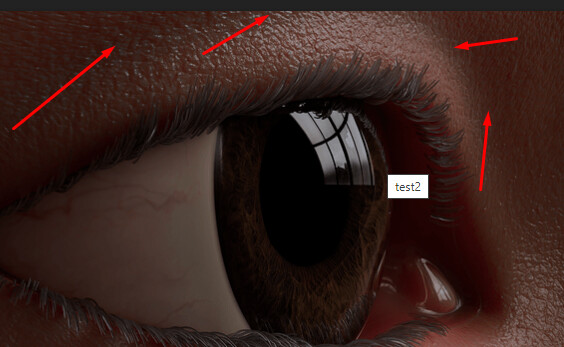
Adding Tearline geometry, I still have issues with the amount of redness it has. could be subsurface settings…

Yep, SSS in Blender is way too red by default, and it’s actually difficult to get the right amount even after changing the settings. The SSS algorithm in Cycles is strongly biased towards red, it’s a fairly common problem. I believe @Musashidan had a decent workaround
So how would i go about using this

I used sirmaxim’s extraction of values from metahuman for subsurface radius then mutliplied it by 0.01 for the scale and then put subsurface on the maximum value which led to the image above


Subsurface color input is the same as the base color
This is with default blender subsurface radius and 0.01 scale

This is with your setup with 0.01 subsurface

Sorry, forget what I said above. It’s wrong. You don’t need that group node. Blender is a bit different than what I usually render skin in(Arnold)
In Blender, the SSS amount controls the scale, so you tweak that down to suit your scene scale.
SSS Radius control the depth/scatter of light from RGB values. It’s best to plug an RGB node in here
and set it to R=1 G=0.33 B=0.2 for human European skin.
The difference is that in other renderers the SSS is set to 1 unless you want to mask the value with diffuse(like if the character is wearing makeup or has dirt or dust on the skin)
But in Blender I’m not sure what happens when SSS amount is below 1. I’m not sure if it blends in diffuse, which isn’t what you would usually want. I don’t use Blender for skin rendering as it’s pretty terrible for realistic skin in comparison to other renderers like Arnold and Vray.
With modern skin shaders you don’t need specular or subdermal maps. The microsurface details break up the spec and roughness.
3 Likes
yeah, i was confused for a bit because it looked like you were setting up a Arnold shader in blender, I basically just use metahuman’s setup for radius and keep it that way. I should experiment more, but I think I also want to wait for Principled v2 in Blender.
Yes, principle V2 should be far better.
Arnold doesn’t use anything like that node group. It has a scale setting built into the material.
I think your skin shader looks pretty good. There’s a little extra redness but it’s not terrible. It’s the eyes that are throwing the portrait more than the skin, particularly the sclera and iris. I’m not sure if the sclera has SSS yet, but most importantly, you need a softer transition between the iris and sclera.
If you get the eyes up to the same level as the skin. I think the effect will make everything look better.
1 Like
I did actually reduce the subsurface on the eye and made an increased limbus but i can adjust it.
Maybe texture are a bigger problem if SSS values are reasonable? Right now there’s a harsh line between the iris and sclera, you want a softer border like this:

2 Likes


This is the subsurface to .01 with default radius. It gets really blue.
Anyways i tried making the transition more subtle this go around.

with SSS 0.1,0.2,0.3
what about indian skin
Is it worth using SSS for the tearlines, given they’re simply water and glucose etc that sit on top of the skin and therefore don’t need any additional colour like red penetrating through them? There are ways to fake refraction such as the method in this post (which is for the cornea but the same principle should apply - and could be used for the corneas). A glossy shader set to near zero roughness added on top would complete the illusion: Tarby's sketchbook - #24 by Tarby
The model in the above link is the standard DAZ Genesis 3 geometry, btw.
1 Like
It might be that your geometry transition here is too harsh? Also, your sclera is taking away from it too. It’s very white where the veins just abruptly end. If you look at refs of eyes you will see that the sclera is not bright white, it is a mix of yellow/cream/grey/off-white, with very subtle variation.
Then there’s the geometry of the eye region itself. It looks really weird, as if there’s not enough skin for the eyelid to close. I don’t think it will ever look realistic, no matter how good the shaders are, until you fix the geometry.
2 Likes
I haven’t actually used subsurface for tearline, it’s just the underlying texture being red.
1 Like