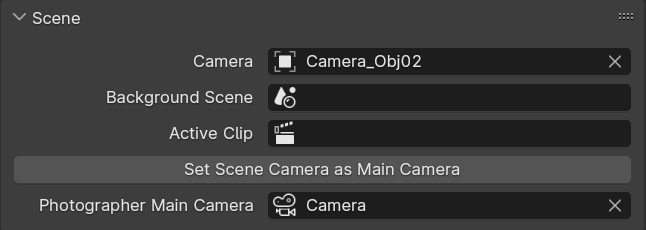
Changed: Main Camera is now linking Camera Data and not Camera Object (will require manual fix of older scenes)
Fixed: Compatibility with Blender 4.0.
Added: Stores addon preferences when updating / reinstalling the addon.
Added: Sunlight modal now works when pointing at the sky.
Added: Help text for simple Light Modal placement.
Changed: Light Mixer to list lights from current View Layer only.
When I released Photographer 3, I actually wrote a presentation to explain Physically based rendering to artists and users of Photographer.
I never got the time to record that video, and I kinda dropped it as there were already many excellent resources on the internet. But I figured it could still be helpful for others if I shared the slides. This is a condensed overview of Physically based shading, lighting and cameras, that might answer your questions about lumens and candelas, dynamic range, tonemapping and other technical buzzwords.
And yes, video tutorials about Photographer 5 are coming soon
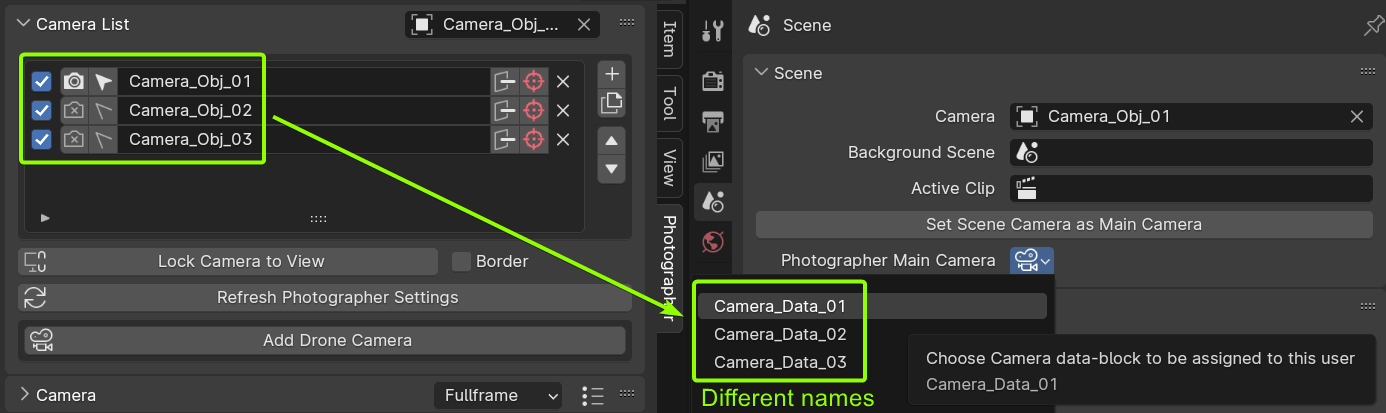
Blender makes the difference between an Object (which contains Transform information) and its Data (the parameters of the type of object: Light, Camera, Mesh…).
What you see in the Camera List are Camera Objects.
When creating a camera, it creates new Camera Data and assigns it to the newly created Camera Object.
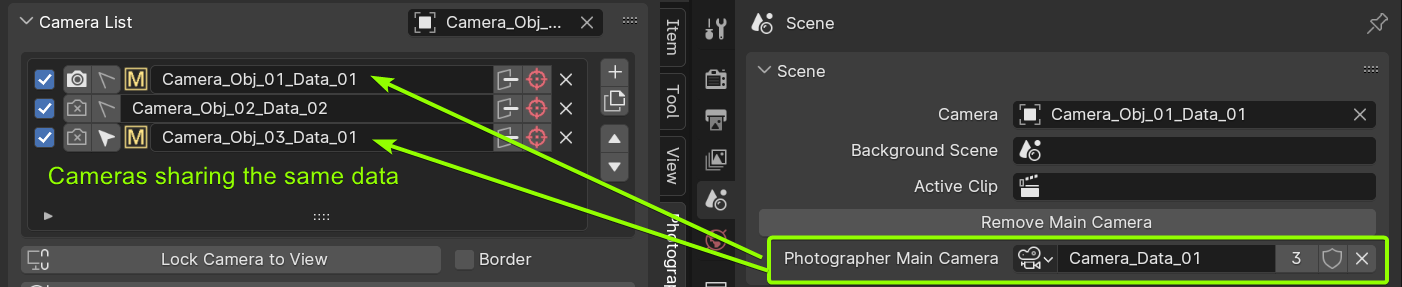
Nothing stops you from reusing the same data across several objects: 2 Cameras Objects can share the same Camera Data.
Before 5.2, the Main Camera was a reference to the Camera Object. Now it is a reference to the Camera Data, which makes more sense because what’s important here for the inheritance, is the Data holding the settings.
For the user, it’s doesn’t change much in term of workflow:
Hold Alt when clicking on the Look Through button in the Camera List to set it as a Main
Or in the Scene properties, set the Photographer Main Camera manually.
What might be counter-intuitive is that renaming a Camera Object does not rename its Camera Data, so the list to pick the Main Camera might not be relevant.
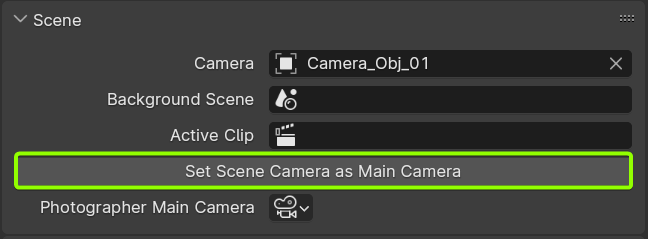
So I added a button right above to set the Current Scene Camera as Main.
Why did I do that change?
For performance reason: to create the previous list of possible Main Camera objects, Blender was constantly going through all objects in the scene. I thought it would do it only when wanting to change the property, but I noticed it was doing it on every UI refresh.
Because 2 Camera objects can share the same Data, you essentially can have 2 Main Cameras, but Photographer’s UI was not reflecting that. This is now clearer.
I wonder if its possible to avoid iterating through data type all together and instead of enum have object picker that can only pick cameras. Like how it works in Lattice or Curve modifiers, when it can only pick one type of object
Hi Chafouin, using blender 4.0 i updated the add-on to the latest 5.2 version, but i’m having an error using the “Add emissive control” and it adds the group but it’s completly empty and unconnected.
Don’t know if i did something wrong as my shader only have one blackbody and emissive node. The Shader is applied to an object within an hidden collection, wich is then instanced in the scene.
Hi, @chafouin , just wondering if it is possible to add a feature to give the camera an option to be shared across different scenes just by checking the scenes it needs to appear. I have marked an intent in the image below. Maybe the camera has icon to show whether it is linked or not.
Could you explain a bit more what you are trying to do?
Do you want to control if a camera is set as Scene Camera in another scene?
Or do you want to unlink the camera from a specific scene? Unlinking a camera from a scene seems to unlink it from all scenes, it then becomes orphan data that will be cleaned up on the next reopen of the file.
Is there any benefit from unlinking a camera from a scene?
hi chafouin, thanks for the quick response. Sorry the request is not too clear.
my workflow sometimes requires the exact same camera view angles for multiple different scenes. For example, testing different set design options. Some cameras are scene specific, Some others needs to be the exact same for all the scenes for comparison.
my current workaround is to setup a camera in one scene, then link that camera object to the other scenes that require the same view angle. So if the camera view moves in one scene, the rest gets updated also. But it is extra step and sometimes it is hard to identify if there are too many cameras. That’s why I am wondering if it is possible to add a scene check box to camera, so the same camera angle can be shared in the scenes checked.
Not sure if is possible. But thanks for the response, its a great addon that speed up my workflow a lot.
This is pretty straightforward, only as long as your scenes are not linked. If they are linked, unlinking from one scene will also unlink from another scene. I’d have to think how we could make it clear in the UI which scenes are linked.
I am trying to get the auto exposure values in a script. It seems I need to activate the viewport for the auto exposure to start changing values. I am not sure if it is possible in a script that I am trying to run on a headless server. Any tips?
If you are rendering headless, you would have to analyze the last rendered image before starting the following frame. I do not know if it’s possible to get that rendered image in buffer to read from it, I’d have to investigate…
We don’t have to render the viewport specifically, it could be done with any image rendered independently of the engine used. Just need to grab the image information before compositing, and that’s what I don’t know if it’s possible to do.
Would you mind sharing a bit more information about what you are actually trying to do? I’ve never had a job where I wanted to animate exposure more than a couple of keyframes, I’m not sure I’d ever want to rely on auto-exposure.
I’m trying to automate interior renders where I don’t have any knowledge of the user created scene beforehand. Blender is being used in the backend in my case
@brian.wijay One easy-but-wrong way to do it would be to do it on the final image after compositing. You can run a script using the bpy.app.handlers.render.complete handler that would open the image you rendered, do some luminance average and multiply pixel values to the target exposure.
I do not have a solution to make that happen before compositing, before the image is saved.
Version 5.2.3 is out with more fixes:
Fixed Camera PostFX Distortion.
Fixed Colorspace compatibility with Blender 4.0 and AgX.
Fixed Lens Shift when sensor orientation is Vertical.
Fixed Bokeh Plane and Focus Planes when using Vertical sensor fit.
Fixed Focus Planes when using Horizontal Lens Shift.