Made a new version of Sculptinator with the help of ChatGPT to redesign the add-on to be more flexible. I will have to eventually look through all the changes the LLM made so I can learn more about building add-ons in Python, but it was a fun experiment to see if I could use LLMs to prototype my ideas based on this old add-on I made when I was completely new at coding anything.
Sculptinator 2.0:
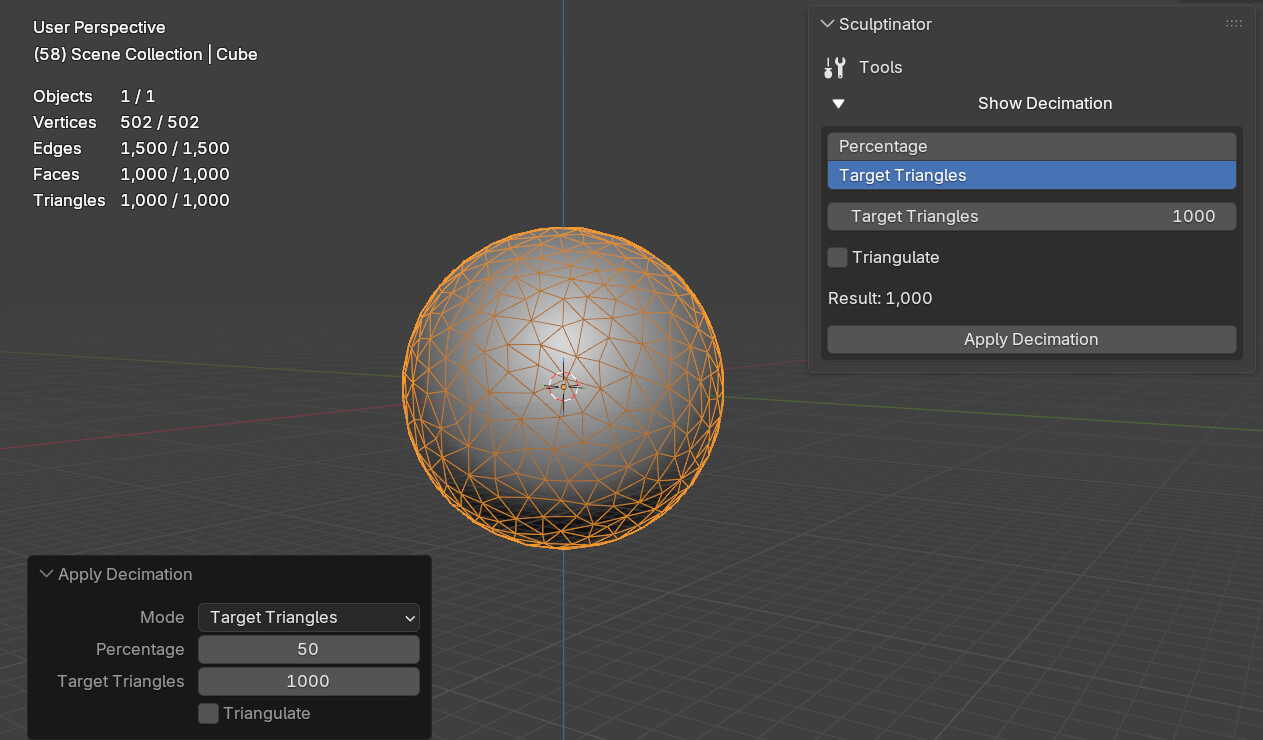
Patch notes:
- You can now collapse the menu. In case of me wanting to add new features this might become useful in the future.
- You can now choose between Percentage and Target Triangles.
- Old hard coded buttons are removed in favour of a slider where you decide just how much you want to decimate.
- Decimation count is now able to be based on triangle count instead of faces. The final result should now be way more accurate than before.
- Result is now displaying the final triangle count at all times before applying it.
- The add-on can better differentiate between a mesh and a non-mesh object.
- A bunch of underneath changes to improve parts of the code based on ChatGPT recommendations.
- While loops for applying the algorithm no longer crash Blender like in my first attempt at using that method, so I went back to that instead of doing if checks that was a workaround to the original crash.
Download:
sculptinator_2.py (7.5 KB)