you may be interested to check this addon https://blendermarket.com/products/rbf-drivers
Hum, in Maya the shape key system is different and quite powerful. Instead of shape keys you use different mesh, and these mesh can be rigged, or lattices can be added on top of them.
I don’t use maya, but this look really cool !
I’m not sure to get what you mean about non-linear shape keys. You can always change the curve of the driver so it’s non-linear.
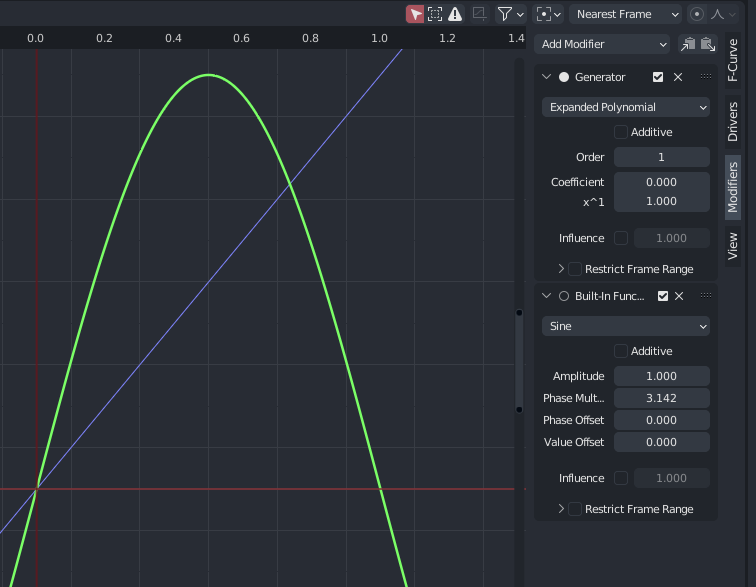
Here are two drivers, the blue one is a standard, linear, driver.
The green one is on a corrective shape key, it peaks when the variable is at 0.5, and goes down to 0 when the variable is at 1. You can use a sine function to setup this. It’s also possible to edit the curve by hand. But I think I only use these two types when rigging a character.
I totally get what you mean, you can wait for the good opportunity to start learning this. Or completely leave it, it’s not an issue either 
But it’s a great thing to look into, even knowing only a bit can help in many cases.
Oh, yeah. “Non-Linear” is not the most precise expression. What I mean is this:

If the Blender Shape Keys worked in some sense as 2D Traditional Animation, the “Breakdown” drawing (it breaks “linearity” of what would be a pure mechanical In-Between animation from 01 Key frame to 21 Key frame in the image: please, for simplicity, just ignore the BLUE DRAWINGS, as those would be “Extremes”; sorta of “Breakdowns” near the extremities of the motion; just ignore the blue ones, consider just the black and red drawings) WOULD BE the “Corrective Shape Key”. But in the animator’s method, you create a Corrective Shape Key directly, as it if it were a Breakdown Shape Keys, that would automatically breakdown the “linearity” of the shapes. In other words, you create Shape 1, then you create Shape 3, and then you create a middle (Breakdown) Shape 2; you don’t need to do anything else (mostly), as ideally (in my animator’s mind) the software should automatically morph 1→2→3. One should be able to insert as many Breakdown Keys in the middle, with as many Breakdown shapes as needed, and the result should be as automatic as when you Transform a character on the Dopesheet Editor posing Key Frames wherever you want. Currently, making this SIMPLEST thing is pretty, pretty bad in Blender (through Shape Keys and Corrective Shape Keys), from that animator’s perspective. This is because I’ve read that the Shape Keys is a “Linear” thing, A→B (while A→B→C would be considered “Non-Linear”, because of the Breakdown concept). It won’t allow for Breakdown, unless one makes a really complicated work around, that might fail…
Ok ! This nearly lost me twice, but I think I get your point !
It’s more about how you animate with shape key, a bit like clay-mation , rather than using shape key for rigging ?
Well, it could be used for both, ¿right?
The analogy of clay stop motion animation is very relevant, for verifying the current limitations of Shape Keys in Blender.
But, my main focus, was indeed for improved Rigging: so, in order to setup the Shape Keys in a more organic fashion, there would be the requirement of the “Breakdown” Key feature (imagine as if the Shape Key panel, instead of just a list, was some sort of an alternative timeline (not exactly for video animation though, but for the “inner” animations of the complex morphs themselves); of course, then we’d need different panels (or inner subpanels) of that kind, because many Shape Keys would still belong to different, unrelated morphings that aren’t necessarily on a time sequence). This would allow for much more intuitive and effective Shape Key transformational power for the Rigs; something more animation-oriented.