I already added all the base images,It’s my first time to write wiki 
3 Likes
this is inceredible. I want you guys to become part of the Blender Foundation so the Everything Nodes team cam grow
4 Likes

A city layout generator with find shortest path and loops, I cant wait to curve nodes to extrude it!
Thanks for your work @aachman98

4 Likes
Generate it from a vertical edge rather than a vertex extruded around and use solidify on it? Might need to boolean the different path volumes as another step perhaps.
2 Likes
I know…
I myself forgot how it worked when I was making that example 
The problem with this kind of node setup is that it executes nodes from right to left, unlike in UE4 blueprints (exec pin manages the flow).
If you think of node network as a sideways tree structure with (input sockets as children) then it proceeds in post-order manner (children first, then the parent). Meaning “End For-Each Loop” node is encountered first, even before “Begin For-Each Loop” node (even though it is the last node that functions).
That is why the array input socket is in the end loop node. And there is also the problem of repeating the nodes which are IN the loop, but not any other node. That is the reason for providing “In” & “Out” sockets on each node. That data will remain constant throughout the loop. You can either pass an obj ref or an array of numbers, and they will retain their value (unless explicitly changed).
Don’t worry, I’ll provide more info in the documentation.
And speaking of…
Thank you @Felix_Kutt & @huiyao for updating the Wiki! I really appreciate the effort you put in. The layout is nice and the images of nodes are a big help. I’ll start filling in the description of nodes as soon as I find the time (any time this week perhaps)
Adding it to the list.
After taking a look at AnimationNodes and ParticleNodes projects, I’d say it is in good hands  . Just hoping that new API allows addon developers more control over the internal data.
That is awesome! How do you plan to create roads using edges or curves? The skin modifier doesn’t provide with good results for the roads. Converting it to curve and extruding gives a weird result:

Only a few of them are extruding in the correct direction.
1 Like

@aachman98 With curves, extrude and mean tilt. I guess I´ll need a node to change the mean tilt property. (I don’t know why exactly, but the extrude in my curves goes in the same direction, I guess because it was from the same plane? I don’t know  )
)
Oh, @Felix_Kutt, I tried your way but it completly screwed with the normals, and solidify the mesh in random directions 
2 Likes
Mine assumed everything would be done as a mesh, no curves involved.
1 Like
You got it 
The roads are looking great btw…
1 Like
Hi again @aachman98, first things first, thanks for all your quick answers and development!
I was thinking about the future of sorcar and the concept of variables that you mention in the roadmap. Would be possible to implement a system where a variable could “drive” a Nodegroup automatically in the Shader editor? so that we can control materials with the variables in Sorcar and use them in procedural shading too, something like this mockup I guess:

Thanks! ^^
PS: Oh , and I was looking into the documentation, I want to contribute, but I think that for the internal operators and actions of blender(wich are the vast majority of the nodes) you could redirect to the official documentation, or blender 2.81 api. Or… Anyone know an easy way to copy the text AND style from here: https://docs.blender.org/api/current/bpy.ops.mesh.html?#bpy.ops.mesh.average_normals and paste here easily?:https://github.com/aachman98/Sorcar/wiki/Component-Operators
I have like 0 experience with git and documentation(and I’m a bit lazy)
4 Likes
Well, if it’s possible using the console, then yes. I’ll add it to the list too

Simply copying the HTML source would do the trick as it is supported by markdown. Redirecting to blender docs would be a better solution though. They tend to update it with every release, and it would be a very boring job to fish for changes.
For custom nodes, I made this layout:
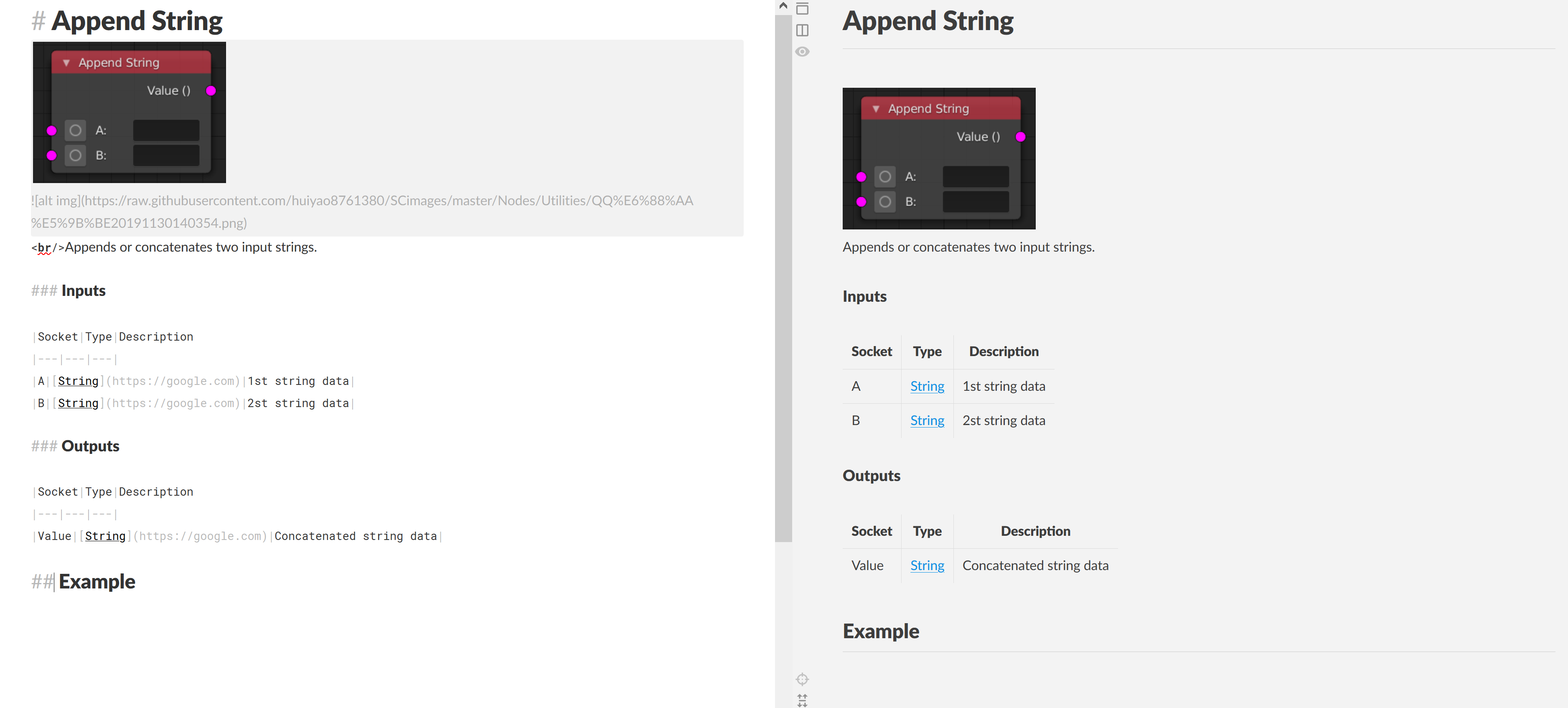
Easy, simple, informative and lazy-friendly
3 Likes
I solved my own procedural texture problem: First,I followed mechfy project and BY-GEN addon, to rebuld Modifier in SC node,First I don’t know the Bevel Modifier can use material,so I link node like this
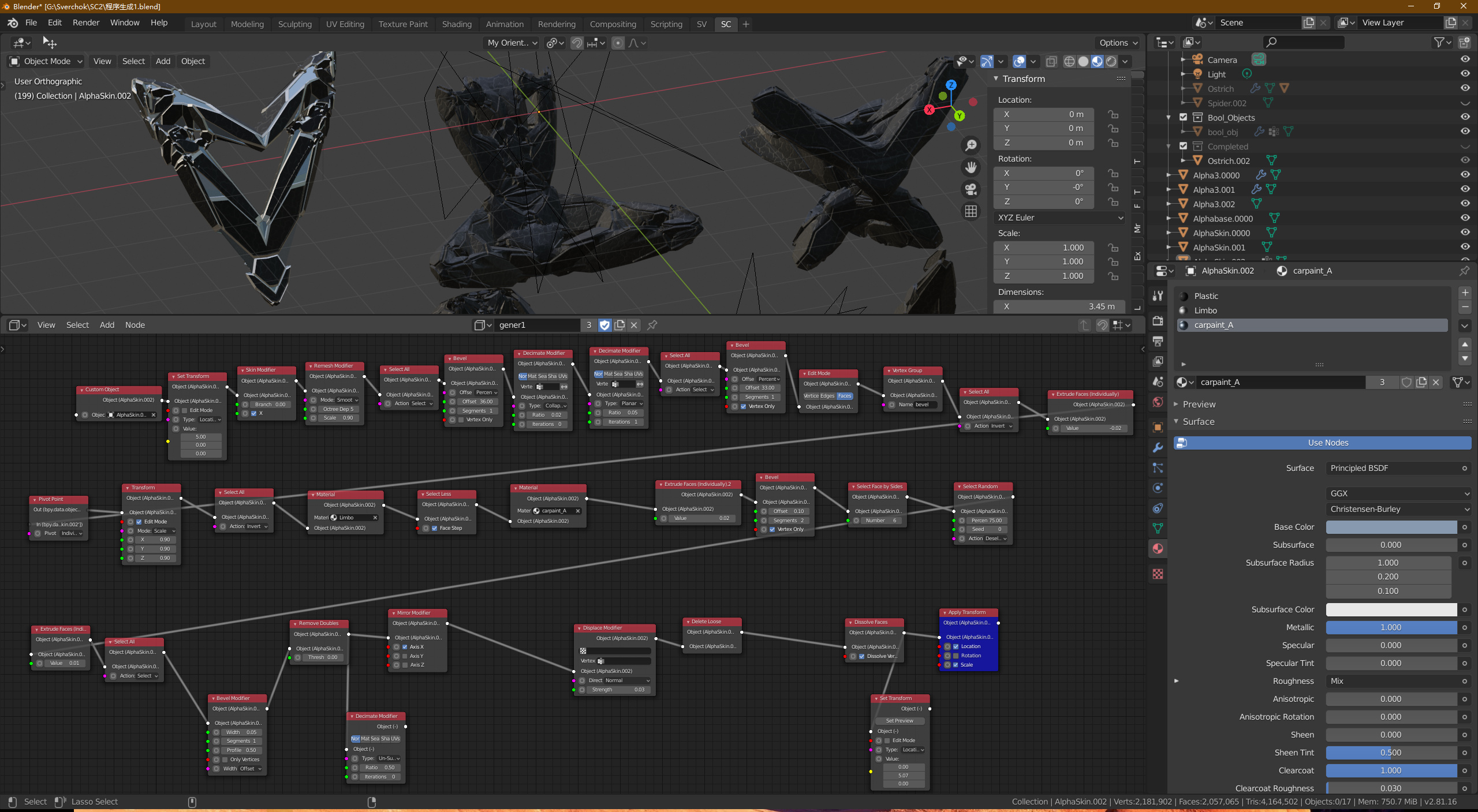
Then I watch again his Modifier,Finaly I find my problem.

2 Likes
Updated Utilities nodes Wiki page: https://github.com/aachman98/Sorcar/wiki/Utilities
Will be adding examples soon.
@putr_corps I just remebered that “Custom Python Node” can access the material data:
2019-12-08 15-46-07.mkv (528.9 KB)
4 Likes
Just want to add my thanks to you @aachman98 for making such a brilliant tool in Sorcar.
So thank you very much.
I’ve had a lot of fun making BY GEN style geometry bashing rigs but looking at the amazing examples posted in the thread I have some catching up to do!
3 Likes
Sorry for that lousy example…
Here’s a better implementation:
You can access other parameters like tiling, offset, etc. using this too.
Thanks for trying out Sorcar!
3 Likes
Hello @aachman98 , I am new to this website and your amazing addon, and I found something that seems to me like a bug.
I created an input-UV Sphere node and set preview (must be a UV Sphere, I tried a Cylinder and it did not produce the same bug), and use Selection-Select Manually node and selected an edge loop, then I saved the selection. Now here is where the bug comes in. Add any node, don’t plug it in, don’t set preview, just add it, then click on a number, but leave it the same, and click off, the selection just messed up. But the node was not even plugged in, not even set preview, I don’t understand what happened, thinking this could be a bug, and trying to report it.
BTW, good work man, love your addon so far. The only problems I have were the bug above and I cannot find a node for Object Data Proporties-Normals-Auto Smooth, and the Subdi Modifier doesn’t have Adaptive Subdi. Except for the bug, I can bear with them, but the bug is just… annoying, hope it will get fixed soon.
EDIT: Ok, I just encountered another problem. This problem applies to all objects, not just UV Sphere. Add Input-(any object), set preview, and add a Transform-Transform, and connect the UV Sphere to it. Set the mode to rotate, and tweak the values, then you will see only the X value has an effect on the object. I call it a problem, not a bug, because I figured Transform-Set Transform node’s rotation actually works, but that node has less function than the T-T node, I wonder what’s the difference between them?
1 Like
Thanks for trying out Sorcar, and welcome to the community. It is really unfortunate that you had to encounter this bug (known). I was hoping that it would get fixed in Blender 2.8. The UV Sphere object is created internally by Blender, but the indices of the components don’t remain the same. That is why, your manual selection node fails to work as expected. Look at the selected faces:
It doesn’t happen with other primitives though (not even with Icosphere).
Auto-smooth functionality can be found in the “Shading” node:
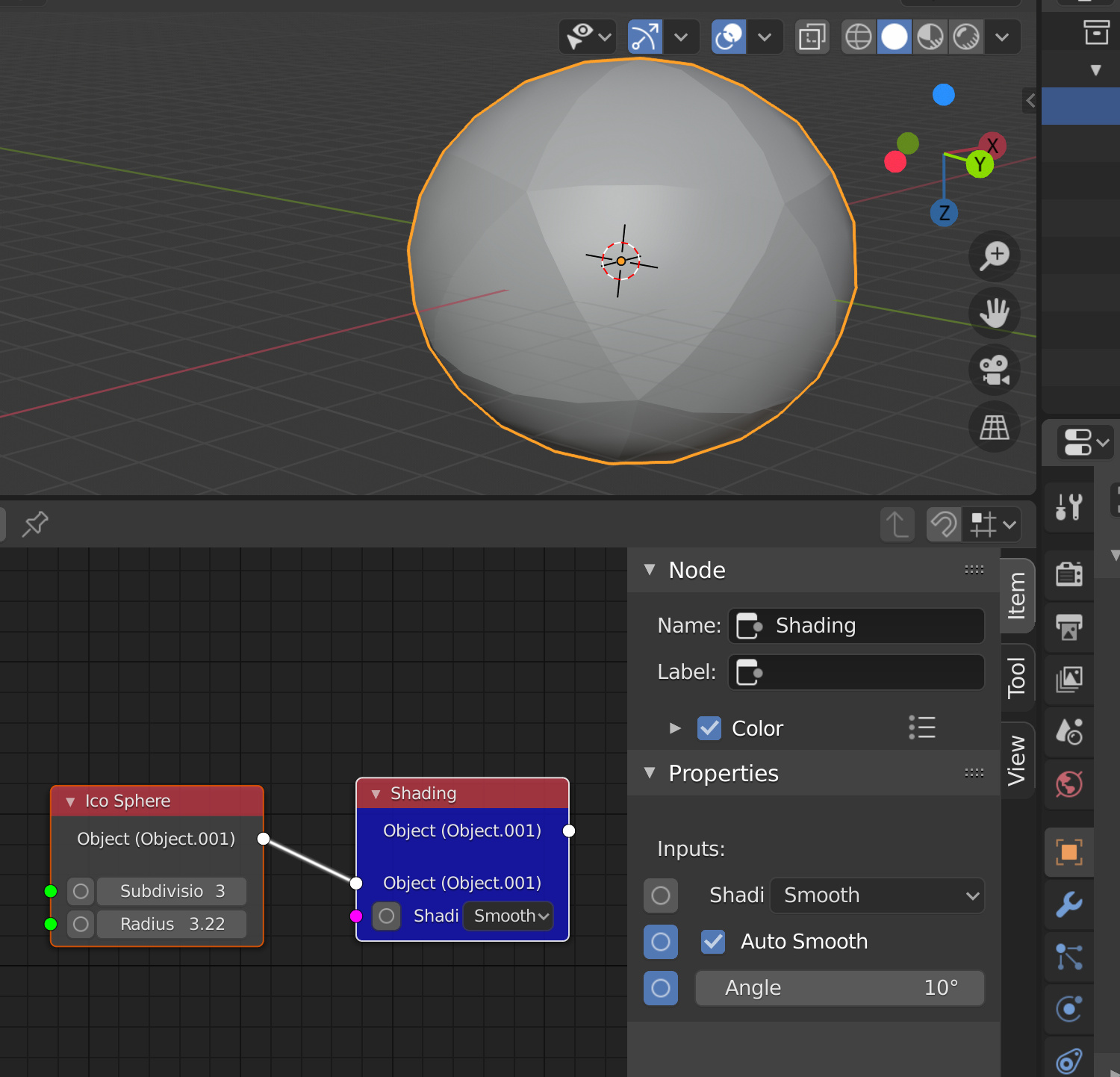
I made the node based on this:
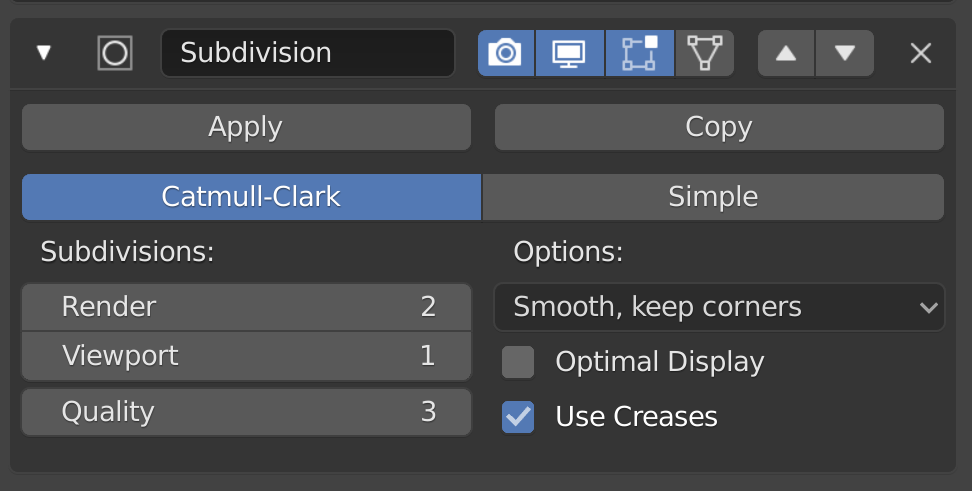
If there is an option for adaptive subdivision somewhere, just let me know. I’ll add it by the next release.
There is an option to change the axis of rotation:

It’s how the function works (https://docs.blender.org/api/current/bpy.ops.transform.html#bpy.ops.transform.transform).
1 Like
Thank you for replying, that was very helpful. To use the adaptive subdi in blender, the render engine needs to be Cycles, and feature set needs to be “Experimental” not “Featured”. After that, you can find the adaptive option in the Subdi modifier.
1 Like
Added in the list:
1 Like
Sorcar v3.1.1 is out
Changelog:
- Added addon updator by CGCookie
- Fixed issue with realtime update checkbox in “Scene Info” node
- New socket type: Selection Type
- Ability to change selection type directly though selection nodes
- Added issue templates for bug report & feature request
Finally, no more manual downloading on every release (after this one  )
)
I still remember the crappy code that I wrote to update the single __.init__.py file, and the peeps who were annoyed by it…
Anyways, I’ll be working on Sorcar this month as before, so you can expect a couple more releases. Will probably have variable set/get nodes by version 3.1.3 or 3.1.4.
As usual, track the progress here: https://trello.com/b/aKIFRoTh
Updated the GitHub repository, readme and releases too.
Cheers
-PA
13 Likes
Therese a nice NPM plugin for anyone interested that updates all git repos cloned locally in a directory. It’s called git-pull-all. That’s what I have been using and it works great (only wish that blendermarket and gumroad releases also gave git access)
1 Like