Your scene might just be too simple and the render settings not demanding enough.
my scene is not simple but can be the parameters!
Your experience made me curious about how tile sizes/number of tiles would affect render times. In the benchmarking that I’ve been doing, I’ve generally found around 128x128 (~135 tiles) to be a point where the scenes I’m testing are about as fast as I can get.
I went ahead and tested the Classroom scene at 12 tile sizes from very low to very high to see what it looked like. In every case, Optix was slower except at the extreme of 1024px (4 tiles) where there was a tiny lead by Optix.
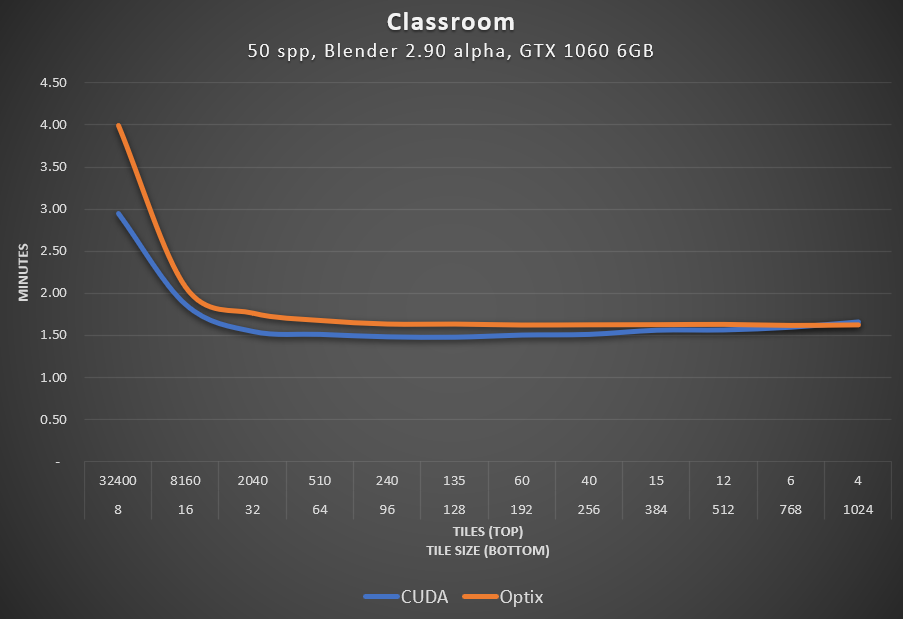
This was tested with 50 samples, but I did try a few runs at 300 samples to see if higher samples might yield a different result. Because it would take about four hours to run all 12 sizes with CUDA and Optix, I choose a small tile size (64px/510 tiles) a medium (128px/135 tiles), a large (384px/15 tiles), and a huge (768px/6 tiles). As you can see, the results are the same. Optix was always slower, though better with larger tile sizes.
64x64 Optix 12.5% slower
128x128 Optix 9.7% slower
384x384 Optix 3.33% slower
768x768 Optix 0.3% slower
I’ve chosen these demo files because they were made with Cycles in mind and are available to anyone to replicate my results or do their own testing. They are also complex enough to represent a real world project (the apples scene is the simplest). On forums and on YouTube, I often see people create a test scene with a few primitives, a light or two, and some reflective/transparent materials. Scenes like that are not generalizable due to their simplicity. How often do we ever create projects that simple?
I’m not sure of the characteristics of your scene that you tested, but in the scenes I’m testing I have yet to see Optix come out ahead. If there are ideas as to how to change my testing method or a specific type of scene that seems to benefit from Optix, I am open to test differently.
I did restart the computer after installation and the Optix kernel compilation was successful. The GPU usage reading was taken from the Task Manager panel (with default setting) and realized that it was the cause of confusion in GPU usage.
The Windows Task Manager GPU monitor is default to show “3D” which shows around 10% in my case. After switching to show “CUDA”, the usage nearly reach 100%.
On the whole, the rendering speed in Render window has no major difference from CUDA.
I’ve found that the only reliable way on Windows to see GPU load is with GPU-Z open to the sensors tab. On Linux, you can just use nvidia-smi
I used the BMW benchmark scene initially, then switched to one of my own.
I have just tried with the Blender material preview scene and in this case Optix was slower even with 16 tiles. It does seem to be very much scene specific.
Thanks for sharing. Over time maybe we’ll figure out the pattern of what is faster vs. what is slower with Optix on GTX.
I’ve stopped using the BMW scene for benchmarking. It’s not complex enough to really tax modern CPUs and GPUs, plus has pre-2.80 foibles.
interesting set of results, and it seems to show that the older 10-series cards work better with cuda instead of optix (which is to be expected really).
However as others have said, the real benefit of this is for people who have two GPUs (like me). I have a 2070 super and a 1070, and I either have the option of running Cuda (which uses both GPUs and my 3950x), or running Optix on my 2070 and my 1070 doing nothing (my 3950x still seems to get a lot of use in Optix renders, not sure why, maybe its overhead or something to do with denoising?).
I tried GTX 1650S on 2.91.2
GPU + CPU = 70 sec. (32x32 samples)
Optix = 57 sec. (512x512 samples)
Optix is 22% speed than GPU+CPU rendering.
wow… and what about same tile size. Is there a notable difference?
Tile Size is “256x256”. Decreases render time approximately 20% to 30%.