does anyone else have this issue - i did a search but couldn’t find this particular issue, so not sure if this is the right place for it
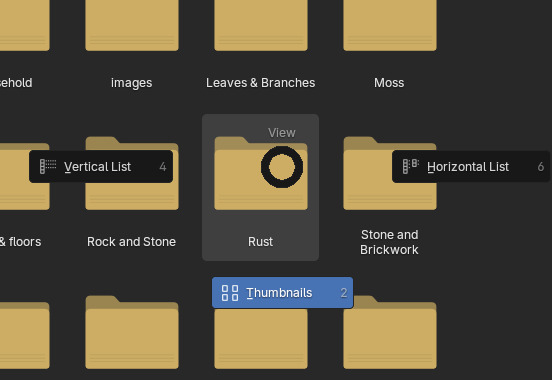
i’ve downloaded fresh copies of 5.2 and 5.2.2 and tried installing a few times, but keep hitting the same issue, namely, when i try to select a file or folder to say, import texture images/maps, i get this pie menu which selects a folder and attempts to drag it somewhere… i have given up in frustration… please help, thanks
This pie menu is just about the chosen display of data in file browser.
If you prefer to see folders as a vertical list, an horizontal one or as thumbnails.
Blender supports click and drag for a lot of cases. But not this one.
Near, each path indication, there is an icon representing a folder. You have to click on it to open such file browser window. Then, you have to select the folder and validate it as path, by pressing Accept button, at bottom of the window.
thanks, but i think you’re missing my point - instead of being able to select a folder or file, all i get is this pie menu - it won’t let me select anything
thanks, Tony - that did in fact work - it’s always the obvious that one misses - although how that pie menu got there in the first place is still a mystery to me - i am using the Pie Customiser add-on, but only have it configured for modelling and texture painting, nothing else, so no idea how it got that way, so thanks again
i’ve just realised that i hadn’t set the add-on up in the latest version yet - i run several versions concurrently, so the add-on was only set up on 4.2 and 5.0, so no idea how how that bug got into 5.2 - i did a factory reset but the add-ons i’d already set up were still there… odd - either way, problem solved - thank again