Is it possible that you set the URL command to a new tab or window, it’s annoying if you click an URL and it overwrites the forum.
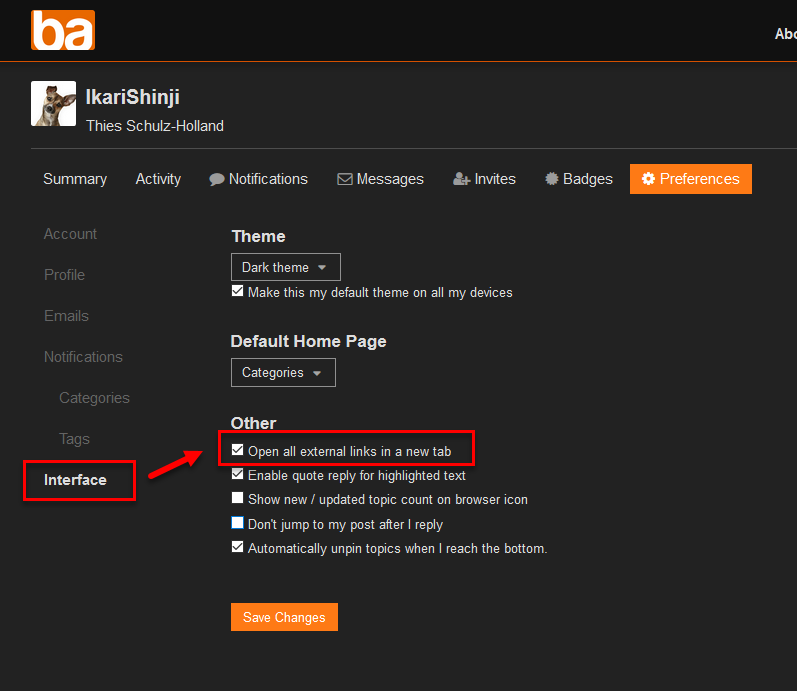
it doesn’t work to me
Works fine here in Firefox and Chrome…
What browser / OS do you use?
Safari on OSX
FYI: On desktop browsers: Alternatively you can press Ctrl + Click on a link to open the link in a tab, or middle mouse button click on a link. This I believe is supported by all major browsers (Chrome, Safari, Edge,…).
I just tested in Safari/OSX and it works fine for me. Be sure to set the preference as @IkariShinji pointed out.
I have the option checked in preferences, but it doesn’t work, even if the status bar says ‘open link in a new window’ when I hover the link.
Thank you
Clear the cache…
Yes, and reload the page. No repro here, so it has to be on your end.
now it works, clearing the cache did the trick. Thank you both!
What has confused me is that I have this behavior from the beginning of this forum (ie the status bar telling me that it will open the link in a new window and then it never worked) so I did not think to empty the cache.
Thanks! this is really help full.
This is an automated message - since the last reply was more than 3 months old, I auto-marked it as the solution. If you still need help, just post a new reply.