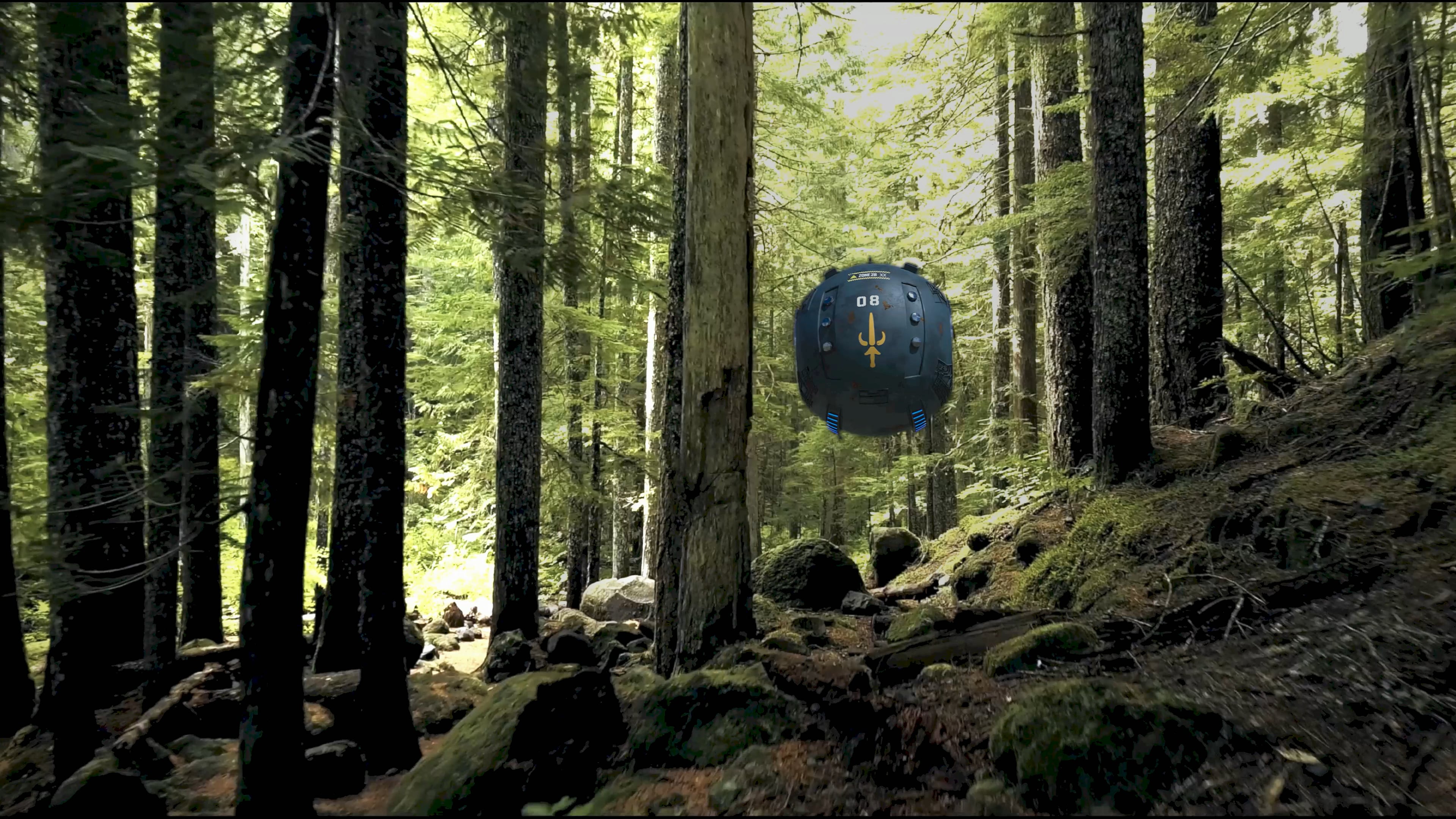
In this complex VFX composition, a green spherical reconnaissance droid—featuring a distinctive yellow blade (a nod to Taarna)—hovers silently among the trunks of a dense evergreen forest. The droid, a digital asset integrated using motion tracking techniques in Blender, carries out its exploratory mission within a challenging environment. The scene was strategically selected and crafted to push the boundaries of camera tracking and lighting integration.
Technical VFX Challenges:
The complexity of this scene stems from several crucial factors:
Obstruction and Parallax: The forest features numerous tree trunks of varying thicknesses that the droid must “navigate,” passing behind some and in front of others. This demands precise depth tracking and flawless occlusion management to maintain realism.
Lighting Variations: Strong, direct sunlight (dappled light) filtering through the dense canopy creates a constant interplay of light and shadow. The 3D droid model must reflect and react to these shifting lighting conditions in real-time as it moves through the forest—a complex rendering and lighting integration challenge.
Simulated Downward Movement: The scene simulates a downward trajectory through the forest, as if the camera were descending from above. This adds an extra layer of complexity to the camera tracking, as the perspective and relative sizes of objects (trees and the droid) shift dynamically.
Droid and Environment Detailing:
The environment—with its moss-covered undergrowth and filtered sunlight—evokes an atmosphere of mystery and exploration, perfectly suited for a reconnaissance mission. The integration of the digital droid into the practical forest setting is seamless.
Not really the most humble review of one’s own work I have ever read
The description also does not match the work. What downward movement? The camera moves up.
Where does the thing pass in front of some trees and behind others? How does the droid really react to the lighting? It must be subtle, I couldn’t tell.
I don’t get this. It’s a nice beginner experiment. It’s not pushing any boundaries though.
It’s just an experiment. At the 00:05 mark, you can see the downward movement begin, and at 00:11, you can see that the ground-level height is different.
It would be a lie to say it was easy. The scene looks simple, but the execution is complex.
But thanks for the observations; I’ll put in more effort. I realize that anyone could do this kind of work and that my skill level is far below that standard.
Just a reminder… the goal of the post was to spark reactions, so thanks again.
This is an older project that I completely reworked.
I used Blender’s motion tracking, but I was using version 4.5 and didn’t get satisfactory results—largely due to the scene’s complexity. The tracker couldn’t handle the camera movement when the droid started its descent; it would lose the track and produce poor results.
Tracking requires reference points to follow an object; without them, it loses its way, and the scene didn’t offer much help in that regard.
The video itself was also an issue because its color scheme was a bit unconventional. I had to do some color correction in After Effects, using the OCIO color scheme to adjust the footage. Once the video was ready and adjusted, I inserted the object into the scene (back in Blender)—again using the OCIO color scheme and exporting as EXR—this time using Blender version 5.2. With the motion tracking complete, I rendered the EXR images along with the video and returned to After Effects for final adjustments and effects.
Was that the answer you were looking for? If I missed anything or if you have any doubts, please let me know. Translation can sometimes be tricky, so don’t hesitate to ask if anything is unclear.
Hi thanks for info. Just wondered what your process was wirh this shot. Lots of trackers stopping and starting with overlaps on those trackers I guess. Alot of work involved. Are you working on another shot?
True, it’s quite complicated. I tested other tracking methods; I used After Effects—it only works for short clips, and then you export the result to a JSX file and import it into Blender.
I used Boris FX’s Synthetic Eyes—undoubtedly the best, though it has a bit of a steep learning curve, and most importantly… it’s very expensive, so it’s not an option for me. The results are excellent, though.
I can’t answer that question just yet; it all depends on the response to this video. If there’s an audience for it, we might consider something.
The tracking seems fine. It’s a nice model and video. My main comment to improve it would be to use an HDRI forest skybox for ambient lighting beyond the main lights and tweak the contrast in the render to match the forest. There are some deep blacks in the tree trunks, both in the foredground and further back in the woods. The drone does not get have those blacks, so looks a little separate from the video.
You’re right; at the 00:12 mark, I lit up the drone to highlight the weapon animation and its movement. In doing so, I lost what Adobe calls “harmonization”—that is, making the object blend with the background so it doesn’t look out of place in the scene. After motion tracking, harmonization is the hardest part.
Another point you rightly noted concerns the black and white levels. I struggled to get an optimal result there—specifically regarding the film look.
As for the drone, I adjusted it throughout the animation to help it blend with the background, though I admit it still needs more work.
Like I said, it might have been better if I hadn’t lit the drone up like that; it kind of broke the video’s “magic.”
at 0.13 and around 0.21 is where it screeches big time, first the jerkiness and then the drone intersecting leafs, But it only points to the conclusion that You are on the right track.
No, I don’t think you lost 'harmonization" (fancy big word there) because you never had it to begin with. How are you lighting the drone? Lights around the camera pointed at the drone? Thru the entire video the lighting is the same and the drone seems equally lit at all times.
The footage is of a forest in the middle of a bright sunny day. So you probably need a Sun light above your drone. Top of the drone will be bright, the bottom will be shaded. Then, because your are in a forest, most of the sun’s light will be blocked by the trees.
Here, watch how this helicopter is affected by the light. As it flies around, parts of it are shaded darker or brighter because of the trees around it. They are blocking the sun’s light here and there. I did this by adding a plane object between the helicopter and the sun light. Subdivided the plane several times, then deleted faces here and there. That blocked the light so some of the helicopter is shaded and some of it is bright as it moves around.
Here, watch this video at about the 12 min mark. It shows a great way of adding in shadows on a 3d object.
As to the motion tracking, yes that all looks good, the drone isn’t sliding around.
When I created this model, I didn’t think it was necessary to add shadows beyond those already created by the lighting variations. But now that you’ve pointed that out, I think I could indeed add more shadows and lighting variations to the drone.
In this video, the drone relies solely on the scene’s HDRI lighting; there are no other lights or objects alongside it. I liked your tutorial good job.

 thanks for info. Just wondered what your process was wirh this shot. Lots of trackers stopping and starting with overlaps on those trackers I guess. Alot of work involved. Are you working on another shot?

