yes, I misread you. Ive just tried to remove it from the installation path, but no difference.
It still lists the old one?
no, it lists none, when I search for “coat” (whereas, before it listed that one)
Oh, thats something different. And if you open the console, whats the error message displayed after you try to install it?
Modules Installed () from ‘D:\- WORK -\3D\blender addons\simplecoat.zip’ into ‘C:\Users\marco\AppData\Roaming\Blender Foundation\Blender\3.0\scripts\addons’
For clarity, I have downoladed the two files:
__init__.pysimple_coat.py
placed them in a dir called “simplecoat”, zipped it, so that the dir is inside the zip file;
cleaned up the addon directory from the previous copies of those files and directory;
when installed the directory with the two files resides in the addon folder, correctly.
But the addon is simply not registered.
Well thats exactly how I meant it, you have to activate it to complete the process, but if the entry isnt there thats a problem.You can restart blender and check the console outputs and the addons list again. But thats indeed strange now.
Ok if there is no error message, then I am also abit stunned.
@Metin_Seven : Sorry we were derailing the thread a bit. Feel free to split and move it to the support section if you want.
2 Likes
Yes, sorry for the derail; I’ll write directly in the applink thread in 3DCoat forum
Than you for your help @Debuk to at least clarify I did nothing wrong on this side 
1 Like
No prob guys. This is a thread dedicated to 3D Coat as a companion for Blender, so it wasn’t off-topic. 
2 Likes
A first build of 3D Coat 2022 is available. It can be downloaded from here:
If you’ve already installed version 2021, just rename your Documents ➔ 3DCoat-2021 folder to 3DCoat, then update via 3D Coat’s intro dialog.
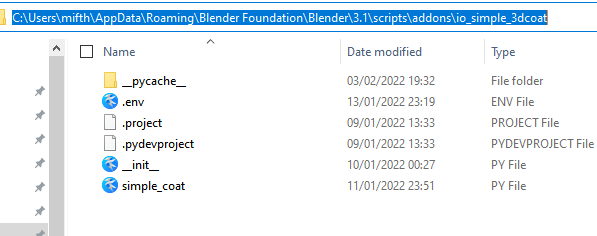
I have Like this. (Don’t look at .env, .project files)
I have Blender 3.1. It works for me.
1 Like
I’ve copy pasted the content from the files in the repository inside the files in the addon directory, and that did the trick! Now it works as intended.
The previous files, while were from the same exact location as linked in my previous post had different content, I have no idea whether they were corrupted by the download from git, or if I did something else wrongly, but this is at least solved now.
Just FYI, if you are not used to GITHub: as the repo in object don’t allow cloning to get the files, the way that worked for me was to create two empty text files with the expected name and phyton extension, and copy / paste the code from the repo directly in those two.
2 Likes
3DCoat 2022.03 has added an Inflate brush similar to the Inflate brush in Blender or ZBrush. This was still missing in the brush arsenal. 
3 Likes
Added MagicaCSG as an option to the initial post, although it is not yet feature-complete (at all).
2 Likes
This looks like a fascinating development. It seems that 3D Coat is continuing to grow in it’s own unique way and is still on it’s own independent path.
Sending best wishes and thoughts over to everyone at Pilgway.
3 Likes
I have just seen that there is recent word from Andrew

Recommend checking his Twitter feed as well for more.
5 Likes

4 Likes
3D Coat 2022 has been officially released. Here’s a video overview of the new features:
I’m still a frequent 3D Coat user. Once you really dig into it and watch a lot of videos about 3D Coat functionality, you discover that it’s really an underestimated tool with lots of powerful functions.
3D Coat info and links can be found in the original post.
Let’s hope that the Ukrainian developers will remain safe in these crazy times. War is madness, it should stop a.s.a.p…
8 Likes