Add Mesh addon: Select mesh object

I’m working on an ‘Add Mesh’ addon, and I’d like to let the user select an existing mesh as a starting point for the newly created mesh. So I’m looking for something like the drop down list you also find in eg. the boolean modifier (where you select the 2nd object of the operation).

I’ve been looking around on the forums, and this is what I’ve come up with. It looks ok, but it doesn’t actually let me select the desired mesh. Selecting something in the drop down list has no effect. Also, the eyedropper tool is only available the first time the addon is used in the scene. The eyedropper actually seems to work, but it closes my addon panel (because I’m selecting something in the 3D view, I guess), which is quite annoying. When I open the addon again, the mesh I selected with the eyedropper is indeed selected/remembered.

This is what it looks like:
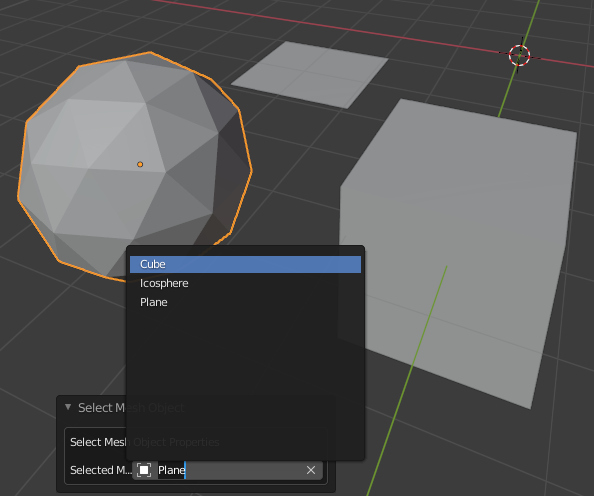
selectMesh

Below is the relevant part of the addon init.py file. It uses a PointerProperty on the Scene type, which was suggested in almost all proposed solutions I came across.

def filter_mesh_object(self, object):
	return object.type == 'MESH'

class SelectMeshObjectProperties(bpy.types.PropertyGroup):
	SelectedMesh: bpy.props.PointerProperty(name="Selected Mesh", type=bpy.types.Object, poll=filter_mesh_object)

def select_mesh_object_button(self, context):
	self.layout.operator(Operator.OperatorSelectMeshObject.bl_idname, text="Select Mesh Object", icon='PLUGIN')

def register():
	bpy.utils.register_class(SelectMeshObjectProperties)
	bpy.utils.register_class(Operator.OperatorSelectMeshObject)
	bpy.types.VIEW3D_MT_mesh_add.append(select_mesh_object_button)
	bpy.types.Scene.SelectMeshObjectProperties = bpy.props.PointerProperty(type=SelectMeshObjectProperties)

Below is the relevant part of the Operator, ie the draw() method. For testing purposes, the addon prints the name of the selected mesh object (if any), so you’ll need to look in the console window to see the result.

class OperatorSelectMeshObject(Operator, AddObjectHelper):
	"""Select Mesh Object"""
	bl_idname = "mesh.select_mesh_object"
	bl_label = "Select Mesh Object"
	bl_options = {'REGISTER', 'UNDO'}

	def draw(self, context):
		layout = self.layout

		box = layout.box()
		box.label(text="Select Mesh Object Properties")
		col = box.column(align=True)
		col.prop(context.scene.SelectMeshObjectProperties, "SelectedMesh")

I’ve attached both files for easy testing/modification. If anybody knows why this isn’t working as intended and what I can do to make it work properly, please let me know. Using Blender 2.92 on Win10, btw. TIA!

select_mesh_object.zip (1.4 KB)

The “panel” you are displaying is essentially just the undo panel which will cause several issues if you try to perform operations from it including the fact that it will disappear when anything is selected/acted upon outside that panel. I believe you are trying to create a popup in which case you may want to watch this tutorial from darkfall. The eyedropper tool normally disappears after a selection is made (including in the boolean modifier panel) until you clear that selection (hit the x or delete the text string) at which point it will appear again. I think this used to always show in blender 2.79 but does not anymore likely to save space in the panel operation.

Thanks for your answer. I’m using the panel you get automatically when you make an ‘Add Mesh’ addon. It is the same (popup) panel you get when you add a builtin mesh, eg a cube or a sphere. This panel is kinda annoying in that it disappears when you click outside it, but AFAIK it’s always been like that, and it’s ok once you get used to it.

Maybe the mesh selector is indeed not compatible with this panel, and I may want to look into placing my addon somewhere else, eg implement it as a tool or something. OTOH, this would diverge from the standard way that Blender works, so I’d rather not have to do this. Actually, ideally this addon should be implemented as a modifier, but unfortunately making a modifier in python is not possible (yet). Or probably a node implementation would be even better, but that’s really wishfull thinking for now, I guess… :wink:

The eyedropper in the boolean modifier indeed reappears when you delete your selection (click the x on the right). However this does not work in my addon; clicking the x does nothing. The only thing that works is selecting a mesh with the eyedropper and then reopening the addon (because it will have disappeared after clicking the selected object, ie outside the panel). Once I’ve selected a mesh this way, that’s it, I cannot change it. And TBH, I would be ok with not having the eyedropper tool available, but at least I should be able to select a mesh from the dropdown list. But unfortunately even that doesn’t work. :disappointed:

As previously mentioned that panel is based on the UNDO function. [Reference]( Your Own Operator | Scripting for Artists [8] - YouTube) from Dr. Sybren Stuvel’s scripting for artist series at approximately 13:30. Utilizing the undo panel really isn’t the standard since an action must be performed 1st then any change in the properties available force an undo of that action and the action is performed again with the new settings. For example if you make a cylinder then use the panel at the bottom to make adjustments every time you make an adjustment your cylinder is essentially deleted and a new one created with the new settings.

Ok, I think I understand now what you mean regarding the functionality being based on Undo. You’re saying that the changes I make to the (global) SelectedMesh property are immediately undone because the Operator senses a property has changed and issues a (global) Undo. Well at least I know now why it doesn’t work as I had hoped.

Obviously, this Undo doesn’t affect the properties of the Operator itself, or otherwise it would be impossible to change any property at all. Therefor, a possible strategy would be to bind this PointerProperty to the Operator itself, and not to the Scene type. I haven’t had much luck in doing that though; I always get a ValueError, stating that my Operator (or rather, bpy_struct “MESH_OT_select_mesh_object”) “doesn’t support datablock properties”. Maybe I have to derive from some other base class in order to be able to do this? Is this actually possible at all?

Another possibility is to not use this builtin Undo functionality and ‘roll my own’. That would be a pity (after all, this Undo thing fits the required real-time reaction to changing parameters quite naturally), but probably feasible.

Btw, thanks for the link to the Scripting for Artists tutorial series. It looks quite interesting and well made, so I’ll definitely check it out in more detail at some point.