The setting differences are all ( and only ) in Map Input Size:
The fine one that I want that animates with flicker is set to:
50,50,50
The other one that animates perfectly that could be a compromise is set to:
1,2,0.1
What I’ve tried that hasn’t worked:
Recalculate all normals outside
Set Solid
Auto smooth
No V.Normal Flip
Turning the clouds texture off, used to generate the noise
in the sand.
There’s only one plane there, no duplicate.
The only thing that works is decreasing the size in
“Map Input”
from 50,50,50, to 1,1,1 ( or anything in the lower range )
however it not longer looks like grainy desert sand, but more like american desert dirt.
So … should I give up on doing these type of textures and expecting them to animate properly or does anyone have an other suggestion?
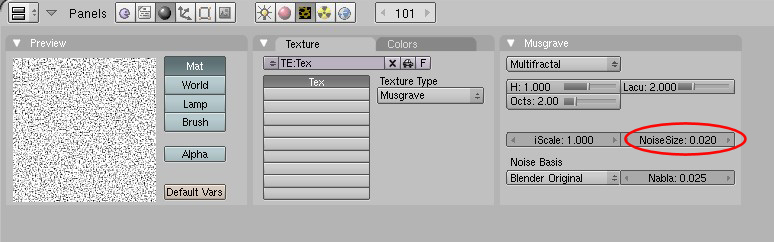
I could be wrong, but I think the trouble comes from making the texture smaller than the actual pixel size on your display. Try increasing the size in small increments to find a spot where it looks good. Also, you can change the noise size in the Texture panel instead of relying completely on the map input. Here is a musgrave texture that on my screen looks good and doesn’t flicker (map input was left at 1,1,1):
I guess I didn’t make that clear in my post. Yes, do not use the procedural texture called Noise. Use one of the others like Musgrave. Like PapaSmurf said the actual Noise texture is random on each frame. However, the others are not AFAIK.
… so I went with taking a camera shot (in blender) of the texture, saving as .png, and then tweaking in photoshop.
I’ll hit it again to get some sparkly grains in there an other day, but using an image is the way to go for this type of thing, it seems.
Shading> Links and Pipeline> Render Pipeline> Full Osa ENABLED
This fixes a procedural-texture-animation-sparkle-problem that I was getting using Musgrave. I have been chasing this problem across several forum threads for a while and nothing else that I tried (short of baking and using images) has resolved it: Noise size, Map Input size, Solid vs. Smooth.