Animation rendering help please. (temporal flicker and bokeh noise.)

Hi, I’m new to blender and i really need help on rendering animation.

there’s a project that i’m working on that needs some blender assets, so i started blender few weeks ago. it went quite well until i tried animation render.

i need to render high quality, sharp 4k resolution sequence. this scene contains fur, and camera DoF.

the problem is these:

  1. denoised sequence wobbles. (especially background.(=blurry, lack of light, textures in it.))
  2. Due to the DoF, there’s a blurry part in the background. somehow the specular parts of background has white noises even after the denoise sometimes. (over the bokeh)

few things i tried (and failed):

  • render sharp images without DoF than add the effects on After effects, hoping the effect might blur the wobbles. it didn’t work.
  • for ODIN, i don’t know why but sometimes ODIN make weird pattern over the background.
  • ‘cycles.denoise animation’ feature: not so effective.
  • separate BG layer and MainObject Layer, made it denoise first, defocused, and then combined. still wobbles.

i think the reason of all these is the noise itself: original image itself was too noisy to make solid and stable denoised sequence. so i tried to reduce it before denoising. Now i’m rendering it with 512 samples, 200% for 4k resolution, and Noise threshold to 0, still the rendered animation still wobbles after denoising, plus, it still has noise on specular part(on the bokeh). render time: 10min per frame. if i render it with 1024 or 2048 samples, it got bit more better, but considering the increased render time, it’s not so worth it. (and there’s still specular noises!)

I don’t think i can upload any image because it’s my company’s project, sorry.

instead, this is my current render setting.

3840*2160 (200%)

cycles : 512 samples, Noise threshold Off, Optix/albedo+normal (GPU)

Total bounce: 4

Diffuse/Glossy/transmission, volume/transparent: 4,3,2,0,2

(Increased Glossy bounce to 6 and there was no change.)

Caustics: Reflective Off, Refractive On (Refractive needed.)

Clamping: Direct/Indirect: 0,5.

Render time: 10 min (I’d like to cut it under 15 min, but i can optimize it after i found proper settings.)

sorry for messy explanation and my english. i’m not english speacker. please help me.
Welcome!

Your render settings seem fine and similar to what I would do in this situation, with the only exception of the clamping: if you really used 0,5, that’s very aggressive and will visibly damage the lighting (direct light would usually not be clamped, no point doing that, indirect is a bit aggressive even at the default 10, I prefer 30).

Anyway, I am going to guess it’s not the render settings causing this problem, but probably the scene itself, the materials and lighting. Does this happen to be a complex scene, like a room interior or some other scenario with lots of indirect light? Or maybe a scene with complex materials and lighting with lots of glass or many different light sources?

If it is, the solution would be to figure out how to make the scene as a whole less noisy. I would need a description of what’s in the scene to give an exact answer on how to do this, but there are often things that can be done with the materials and lighting to improve the render quality, not just with the render settings.

There is one likely culprit I can think of based on what you wrote. You say the refractive caustics are needed, does this mean you are lighting the scene through glass using refractive caustics? If you are, that’s going to be extremely noisy, Cycles isn’t good at doing this. If a lot of light is coming through a glass window or light bulb, it’s better to disable the shadow on the glass material.

In the most recent Blender version, you can set the glass material to “thin wall” mode using a Principled BSDF and that will do it.

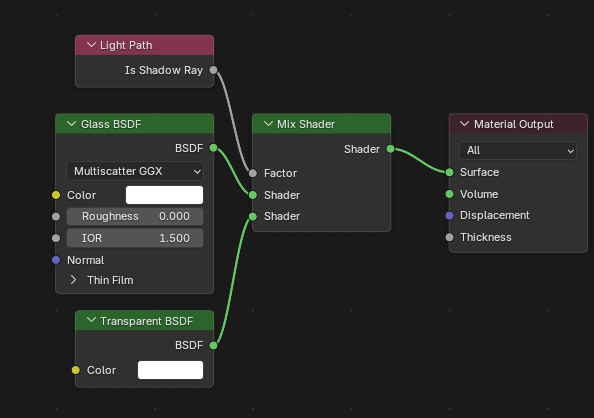
If you are in an older version or need the glass to look thick and refractive, you can instead use the shadow ray trick. The transparent BSDF will be used for the shadow of the material instead of the glass material, this completely bypasses the refractive caustics and renders as cleanly as if the glass wasn’t there.

Hi, Thank you for your help and detailed answer.

yes, it’s a huge interior scene, with shining gold decorations and swirling textures in the background. there’s one sunlight to light up whole scene, and 5 area lights to light up main object and background.

no, there is no glass in the scene. i deleted all of them. refractive caustics are needed for one object, and i don’t think it’s affecting the whole scene. it’s really small.

also, I have good update from overnight. I somehow made it way less wobbly by rendering it at 1024 samples with the previous render setting.(I don’t know why the result changed. I swear it did not work a few days ago.) but it takes toooooo much render time. almost 25 minutes per frame or more. plus I need to render the whole sequence to make sure if it actually works since i only tested for 20 frames…

maybe indirect clamping is the key. most of problematic parts are where indirect light affects strongly. i’m working on something else so i’ll try it tomorrow and see what happens.

But if it doesn’t work, do you have any other tips or suggestions I could try?

Thank you again.

Sunlight: Angle 20 degrees, Max bounce 512.
Area Lights: Angles vary from 10-30 degree, Max bounce 0 to 8. (I needed area light only to highlight the volume and depth of the objects, so It doesn’t need to be bouncy.)

noisy parts are where sunlight directly or indirectly hits. and those parts have texture+geomeric details.

Are you using complicated procedural textures? Materials with massive node trees to get the effects you are after? If yes, those are likely slow to render and you should bake those materials to image textures. Before committing to doing this, I would first test the materials to see if they are actually slow, unplug any complicated texture setups, temporarily replace the material with an untextured version and see if you get an obvious speedup as a result.

Does the scene have volume fog? If it does, that is a very slow and noisy thing to render and it’s better done in a separate render pass. Here is an explanation on how to do that. This video goes one step further and renders the fog pass in Eevee, but you benefit even if you render the fog separately with Cycles.

Is the sunlight entering through a window and making a bright patch of light on the floor? That’s one of the hardest cases to render for Cycles, because that bright patch acts as an important light source for the whole room, except that it’s entirely in the second bounce and Cycles doesn’t know it exists and should be treated as a light source.

If this is the main problem here, the official solution in Cycles is path guiding. Sadly, it’s only available for CPU for now and so it’s really slow. If you are already rendering with CPU, you can enable it and it will reduce the noise. If you are on GPU, it’s not worth switching (brute forcing it on even a bad GPU is still faster).

If the lighting in your scene won’t need to change during the animation, I have a somewhat wonky trick that can massively speed up the render and also make it less noisy. It involves baking the lighting on the objects hit by the sun patch, then using that bake to affect the indirect light. That trick has saved me in some scenes in the past.

Here is a reply in an other post where I explain the process in detail. The light patch problem was happening on a curtain in front of the window in that scene, but the trick applies on whatever object the sun light patch happens to hit, even the floor and walls of the room themselves.

Maybe you had noise threshold on before?

The threshold can speed up a render, but it’s risky in an interior scene, it can cause glitches if you don’t have enough min samples.

How complex is the animation? If it’s simple enough you might be able to actually bake most of the textures at least in the background with combined, so they get the lighting also baked. And then use those textures and render them in Eevee with emission shaders. Then only render the parts that need Cycles as a separate layer, with a simplified version of the rest of the scene with ray visibility to camera turned off to get the indirect lighting correct. Then comp them together in post. But Eevee requires some changes to dof settings to make them look fully reslistic.