Anisotropic Flowmap for Hair Geometry?

Hey BA!

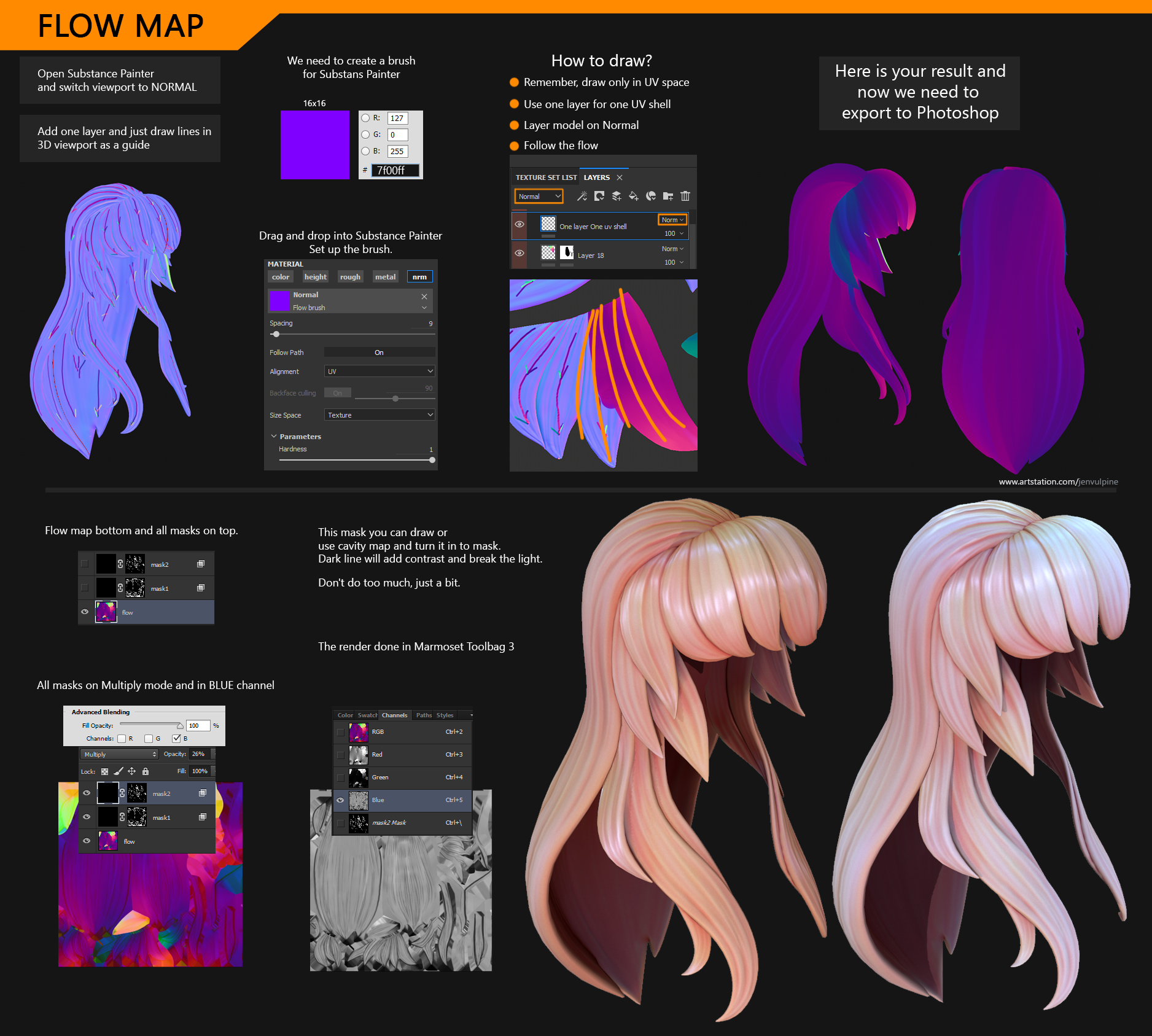
Is it possible to use flowmaps similar to the tutorial image below to control Anisotropic highlights on sculpted hair geometry in Blender 2.81?

I think for some of you why curious about my workflow that I use for texturing a hair and create a flow map or direction light map. Cool, here it is. I hope it will help with your art.
This picture will be on artstation with the 3d model as well. pic.twitter.com/oMH0tHF4Is

— limited edition (@JenVulpine) January 9, 2020

4 Likes

Yes, it should be possible. I don’t have any experience with it, though, and I’d need to see a mesh (w/ UV map) and sample flow map in order to check myself before I wreck myself (which happens.)

A flow map is a map of vectors. It seems to me that they ought to be in tangent space for a model like this, which can deform. And the fact that I don’t see any green in that pic, presumably Z, suggests that as well. So you compare them to your tangent vector in the same tangent space, which is just 1,0,0 IIRC, by normalizing (potentially both, dunno if Blender has a pre-normalized tangent, and flow maps are not necessarily normalized although they’re likely to be for this purpose), taking the dot product, then taking the arccosine of that, and then multiplying by -1 depending on which way the cross product of those two vectors is pointing (its either pointing to 0,0,1 or to 0,0,-1.) This gives you the angle in degrees, which is the rotation for your anisotropy-- although I believe you’d probably have to run it through a map range node to remap 0, pi to 0, 1, and might have to modulo the result as well. Would require a little experiementation to see exactly how Blender handles anisotropy rotation in the 0,1 range.

I guess it’s probably not for the math faint, not in Blender, especialyl since, like I was saying, some of the exact transformations require a little bit of experimentation, so you have to understand what you’re doing in order for that experimentation to lead to understanding. But once you had it, it would just be a single node group that you could reuse between materials.

Edit: I suppose since tangent space stuff like this is all basically 2D, you don’t need to do that dot product/cross product stuff, you could just take something like the arcsin of the X value from your normalized flow map. Maybe arccos, I can never remember.
1 Like

Thanks for the reply, I am definitely in the math faint category. But still may mess with the network and see what I can get. haha. I just wanted to make sure there wasn’t something simple I was overlooking. Marmoset Toolbag’s material system spoils us artists. :slight_smile:

IIRC the anistropy rotation fields in the Principled and Anisotropic shaders are 0 to 1 representing 0-360 degrees, so if you’re using UVs, 90 degrees would be 0.25 grey in a simple greyscale texture map. Not sure if that helps.

Thanks for the info Tarby!

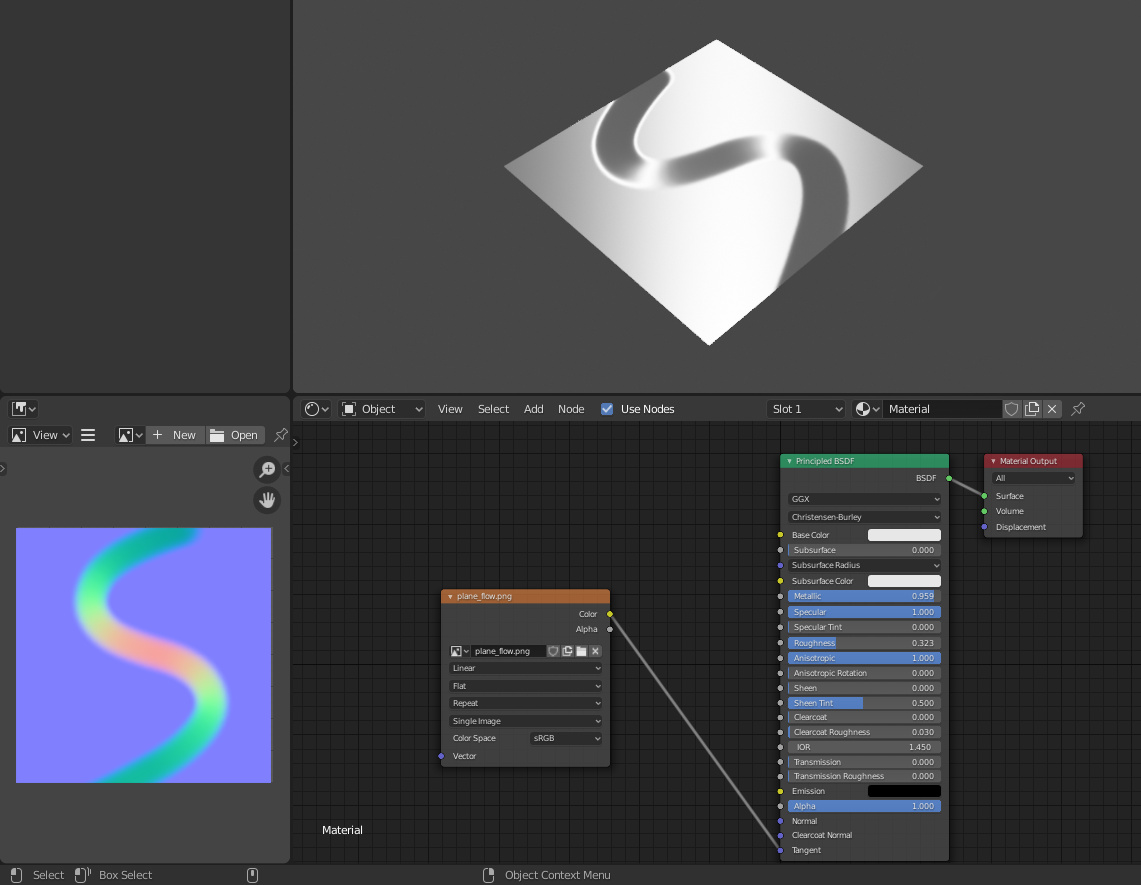
I did some more testing and it looks like maybe I was over complicating it? I created the flow map and simply plugged it into the “Tangent” input (which is linked to anisotrophy) and it appears to be working like expected.

1 Like

You know, I didn’t even really think about setting tangent directly instead of rotation. There are at least some circumstances where that ought to work fine.

But be careful about your transformation spaces. Check that it works well with object rotation and with deformation (like from an armature.)

I mean, if you’re not going to do that and you’re happy, that’s all that counts, it just something to be aware of before you get deep and discover ugly renders only after letting your computer chug for a week.

1 Like

Good call about it being rigged. I’ll do some tests and update the thread with my findings, just in case it will help others. :smiley:

Would be good if the proposed solution were compatible with tangent space normal maps (as is common for realtime models) for a more universally applicable setup like in Marmoset or most (?) hair shaders.

The great thing is that the flowmap plugs into the Tangent input and you can still hook up a traditional tangent space normalmap into the Normal input. Both seem to play nicely together too. :slight_smile:

1 Like

Clemens Beute’s Flow Map Painter (free on Gumroad) is probably worth dropping into this thread.

1 Like