The ANT Blender Landscape Addon is incredibly powerful, yet lacking in regards to actually telling you what some of the settings do.
I often find myself just clicking an operator preset, moving sliders around, pressing a random seed, and waiting to see if the mountain I got was adequate or “cool” enough to toss into the background of my scene. I’ve reached a point where I want to be more selective about the landscapes in my work, and sat down with the intention to fully understand what my pressings are actually accomplishing.
I have compiled and listed a portion of dedicated settings we are greeted with in the popup, when adding a Landscape mesh into our scene. As well as visual examples for each noise type.

 = Above Sea Level
 = Sea Level
 = Below Sea Level
Noise Basis: Noise algorithm used for octaves.
- Blender
- Perlin Standard
- Perlin New
- Voronoi F1
- Voronoi F2
- Voronoi F3
- Voronoi F4
- Voronoi F2-F1
- Voronoi Crackle
- Cell Noise
All these algorithms are the basis for how your landscape will generate. To keep things simple, the following visual examples will only use the Blender noise basis with a Seed of 1.
Noise Types:
-
Multi Fractal: Standard mountains.

- Depth — 8
- Dimension — 1.0
- Lacunarity — 2.0
-
Ridged Multi Fractal: Peaks narrowed into sharp, long ridges.

- Depth — 8
- Dimension — 1.0
- Lacunarity — 2.0
- Offset — 1.0
- Gain — 1.0
-
Hybrid Multi Fractal: Smooth mountains.

- Depth — 8
- Dimension — 1.0
- Lacunarity — 2.0
- Offset — 1.0
- Gain — 1.0
-
Heterogenous Terrain: Standard mountains. Valleys can go below 0 (using Offset).

- Depth — 8
- Dimension — 1.0
- Lacunarity — 2.0
- Offset — 1.0
-
Fractional Brownian Motion (fBM): Variable mountains allowing for valleys to naturally go below 0.
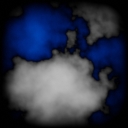
- Depth — 8
- Dimension — 1.0
- Lacunarity — 2.0
-
Turbulence: - Irregular and chaotic motion of a fluid, like air or water.
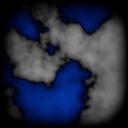
- Depth — 8
- Amplitude — 0.5
- Frequency — 2.0
- Soft
-
Distorted: Smooth mountains with warping distortion.

- Distortion — 1.0
- VL — Blender
-
Marble: Repeating waves.
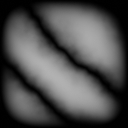
- Shape — Default
- Bias — Sin
- Sharp — Soft
- Depth — 8
- Distortion — 1.0
- Soft
-
Shattered Hetero Terrain: Shattered cracks.
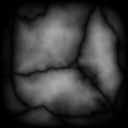
- Depth — 8
- Dimension — 1.0
- Lacunarity — 2.0
- Offset — 1.0
- Distortion — 1.0
-
Strata Hetero Terrain: Geological rock layers.

- Depth — 8
- Dimension — 1.0
- Lacunarity — 2.0
- Offset — 1.0
- Strata — 1.0
-
Another Noise: Like Turbulence.
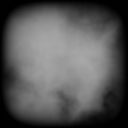
- Depth — 8
- Amplitude — 0.5
- Frequency — 2.0
- Distortion — 1.0
- Soft
-
vlNoise Turbulence: Turbulence with Variable Lacunarity.

- Depth — 8
- Amplitude — 0.5
- Frequency — 2.0
- Distortion — 1.0
- Soft
- VL — Blender
-
vlNoise Hetero Terrain: Standard Mountains with Variable Lacunarity.
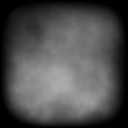
- Depth — 8
- Dimension — 1.0
- Lacunarity — 2.0
- Offset — 1.0
- Distortion — 1.0
- VL — Blender
-
Distorted Hetero Terrain: Standard Mountains with warping distortion.
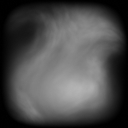
- Depth — 8
- Dimension — 1.0
- Lacunarity — 2.0
- Offset — 1.0
- Distortion — 1.0
- VL — Blender
-
Double Multi Fractal: Standard Mountains with Variable Lacunarity.
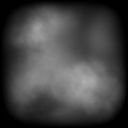
- Depth — 8
- Dimension — 1.0
- Lacunarity — 2.0
- Offset — 1.0
- Gain — 1.0
- VL — Blender
-
Noise Rocks: Rocky rocks.

- Depth — 8
- Distortion — 1.0
- Soft
-
Slick Rock: Smooth rocks.
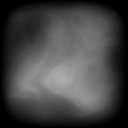
- Depth — 8
- Dimension — 1.0
- Lacunarity — 2.0
- Offset— 1.0
- Gain — 1.0
- Distortion — 1.0
- VL — Blender
-
Planet Noise: Large-scale landscapes. Distant.

- Depth — 8
- Soft
-
Blender Texture Nodes: Unsure
Definitions: Noise settings explained
Depth: Number of frequencies in the fBM. Number of noise octaves (1-16).
Dimension (H): Fractal dimension of the roughest areas. Intensity of peaks.
Lacunarity: Scale of noise octave relative to the previous octave. The gap between successive frequencies.
- 0 = None
- 1 = Matched with previous octave
- 2 = Double
Offset: Elevation of mesh from ‘sea level.’
Gain: Magnitude of noise octaves.
Distortion: Amount of warping in the noise octaves.
Strata: Amount of geographical layers.
Amplitude: Amount of change between peaks & valleys.
Frequency: Number of waves between peaks & valleys.
Variable Lacunarity (VL) Noise Basis: Noise algorithm used for octave variety. Blends with primary noise basis. [Blender, Perlin, VoronoiF1, F2, etc.]
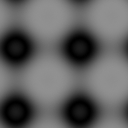
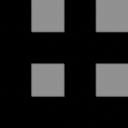
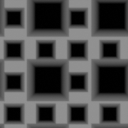
Effects: Patterns you can mix into your landscape
-
Gradient

-
Waves

-
Zigzag

-
Wavy

-
Bump
-
Dots

-
Ring

-
Spiral

-
Square

-
Blocks
-
Grid

-
Tech
-
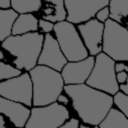
Crackle
-
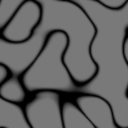
Cracks
-
Rock

-
Lunar

-
Cosine

-
Spikey

-
Stone

-
Flat Turbulence

-
Flat Voronoi

Although these patterns are not influenced by a random seed, they can still be translated, scaled, and amplified to a great degree.
I hope these visual examples & pseudo-definitions are helpful in allowing you to better craft your ideal landscapes.
If you’d like to learn more about Blender’s noise coding, here is a source I found helpful: https://docs.blender.org/api/2.46/Noise-module.html
