Auto Rig Pro: "root.x" is glitching out, "IK" fix attempt not working properly, why?

Hi, I’m using Auto Rig Pro for my rigs. If you do have knowledge about this addon, it might help a lot.

Currently, I’m facing something that looks like somewhat of a dependency issue, which is always a tricky thing to solve. I’ve reached out to the addon dev but he’s also clueless on how to relatively easily fix this.

Situation:
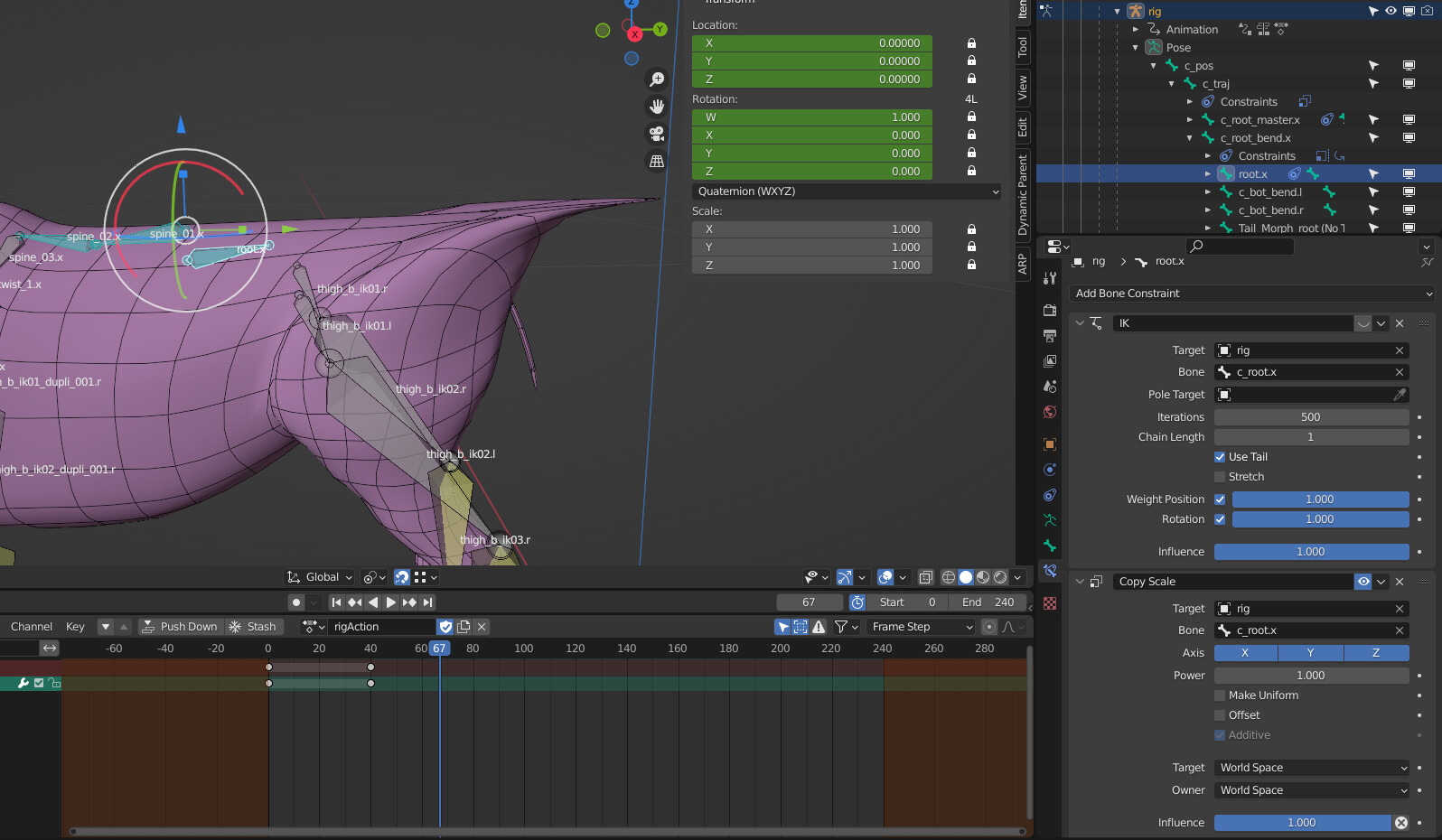

A bone called “root.x” is acting up when I move the “c_traj” bone.
When I use the shown IK setup on the screenshot, it looks okay-ish when in stills, but the issue comes when animating: The bone will glitch around between calculations, making this weird deformation (which in the first place doesn’t make an ounce of sense… the bone and the deformed verticies are widely apart).

Now, the target bone to the IK setup. It looks and functions as it should. “c_root.x” is not an actual parent of this bone, as far as I understand it, rather a sibling.

Now I wonder, why exactly is it not copying this positioning correctly? Is it because both bones stem from the same main parent?
Which would really make no sense to me.
I asked the dev and got this following quote:

[…] the problem is the current spine rig doesn’t support reversed IK chain. There may be ways to set it up, but it would require a different bones hierarchy/setup. I have researched about it, but haven’t found a decent solution yet. It seems to me only an IK Spline would work, but maybe there are other ways I’m not aware of yet.

Since I am not a pro rigger but a trial-and-error Blender user, I am a bit confused to why’s that. I don’t actually know why I chose IK in the first place to snap the bone to this position, I just did and it looked okay. (Some would scold me for this way of thinking, probably.)

My idea right now went like: Could we just pick any other new unrelated bone and make it behave like the correctly working bone “c_root.x” and use that new bone to fix this issue with “root.x”?
I’m way too inexperienced to actually know what I’m doing (lol), hence I’m asking in here. I gotten really good advice last time so I hope this will be a helpful one as well.

To those who are going to try helping out: Thank you in advance. I really appreciate it.

I don’t know autorig pro. The issues you’re describing, to the extent that I understand them, should not require knowledge of autorig pro. I think you and the developer are probably talking about different things, where the dev is assuming you have a bit more knowledge than you do, and trying to address the underlying reason for you doing what you’re doing, rather than the immediate problem you’re encountering.

If you suspect a dependency issue, the first thing you should do is to open a console window and look for "dependency cycle warning"s. There are situations in Blender (having only to do with IK as far as I’ve seen) where Blender has dependency issues and fails to provide a warning, but usually it’s pretty good about this. These warnings can be a little obscure, but they do provide some information for troubleshooting the error-- they’ll give you a path of bones (or other objects) that you can trace through to understand why Blender is encountering a loop.

I am having trouble following your description of the problem. I don’t know any constraints that these bones have, I don’t know which are IK or how long those IK chains are, etc. However, if this is a dependency loop issue, not something weird with AutorigPro (which I don’t have), then I could probably give you more information if you provided a file with an animation demonstrating the issue-- or possibly, with written steps to reproduce the bone behavior you don’t want.

Thanks for your reply. I opened the console and found no issues for this particular bone or any of the related ones. Meaning it isn’t a dependency issue, after all.

I try to make a list of those that I deem relevant, which also do have constraints.
c_traj is a disconnected child bone of the c_pos bone and does have a constraint, but only to copy scale.

c_root_master.x is a disconnected child bone of c_traj with a copy scale constraint.
c_root.x is a disconnected child bone of c_root_master.x without constraints.

c_root_bend.x is a disconnected child bone of c_traj with a limit scale and limit rotation constraint.
root.x (our problem bone) is a disconnected child bone of c_root_bend.x with originally only a copy scale constraint.

For some reason, when c_traj, the parent of all of these gets rotated, c_root.x which is at the same base position and rotation as root.x, c_root.x is correctly positioned, but root.x is not.

I wonder if the limit rotation and location constraint of the parent bone “c_root_bend.x” is the issue? It shouldn’t be, right?

You didn’t mention any IK constraints, which you mentioned in the original post. IK does not have to be on a bone to affect that bone; it will affect up the hierarchy the length of the chain.

I’m kind of loathe to just take anyone’s description of a rig at face value. By the time people are having trouble understanding why a rig is behaving as it is, it’s because there’s something that they’re missing. If they could figure out what it is that they’re missing, they wouldn’t need any help. So a file, to recreate the problem, is a lot better way to solve the problem.

My bad, yeah there is an IK constraint on the root.x bone with a chain length of 1. Which by default is hidden. I wonder if it’s because it’s broken?
I could remove that, but it makes the bone lose its position, somehow.

What I don’t understand is why a bone that’s following the same hierarchy as other bones that work is going in such a weird position and why copy transforms or copy rotation doesn’t work at all, having no effect on the mesh deformation itself. Doesn’t a bone inherit positions, rotations from its parents?
It’s like the IK here is a “fix” but actually just a band-aid instead of a resolve for the issue.

I looked for any IK constraints within the chain of bones. This is what I found:
grafik
While this is the described IK constraint.
grafik

Here a gif how it behaves within the editor when the IK is active: https://gyazo.com/30a5ce85f576a80693359579ef622ad8

I wonder, is a replacement of the constraint feasible? Could I put it as a child of constraint instead? Copy rotation/location for “c_root.x” or copy transforms did nothing. I wonder why, I don’t understand what actually makes it not do anything. Why actually IK is the only one close to “fixing” it. Maybe somebody can enlighten me.

My apologies if I totally get things wrong here. I’m just starting to understand the situation myself.

I really can’t tell you anything without a file.

Usually. Depending on bone settings. Which can then be overwritten by constraints.