I was just wondering if someone could help me out with this problem I often run into.
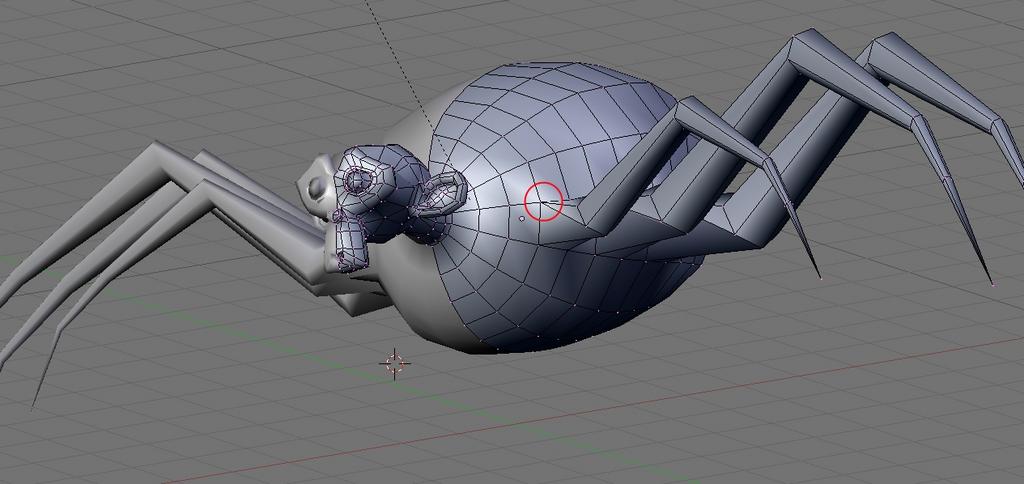
How to avoid multiple edges meeting at the same vertex. I’m not sure buy maybe this is unavoidable in some cases? I know these vertexes are usually my trouble spots and try to avoid them as much as possible but sometimes I just can’t seem to get around it. Even if I were to subdivide the edges on the body to the same # of vertices before merging I still get triangles.
I just need an experienced user’s opinion because I’m still new to this and I don’t know good practices yet.
thanks
I don’t have that much experience,
but when I get triangles, I delete the faces
and try and re-form them as quads, adding
vertices if I need to. Also, after filling,
try using Alt + F (beautify fill) and Alt + J (remove triangles).
Or, you could just try using Alt J, though it doesn’t always remove triangles.
Hopefully that helped.
Sometimes it is unavoidable to get triangles but you can do alot of good by moving edge loops around until you can join trianges together to make quads. Quads are prefered mostly because they look better with subdivision. Alt F, Alt J will get you quads most of the time. Also you can select edge loops Alt - right click on an edge and you can delete the entire loop so that you can get rid of triangles at the ands of the loops.
A couple of spots where poles crop up (a pole is a vertex with more than four edges) are places where a face is extruded out from a plane, and places where two face loops head off in different directions.


toontje’s sticky, Poles and Loops probably has more than you’ll ever want to know about the subject, but it’s worth studying.
tris can be avoided by adding another edge to the perpendicular side.