I’m wanting to use Blender over a school network running Windows 7. So far, I have had Blender running as a portable on a networked drive which all students can access. The portable version enables me to update Blender rapidly rather than individual client installs.
I have found that if I get students to open a blend file with locally linked textures, some accounts appear to lock up at start (they have trouble locating the texture files) possibly because there is a discrepency of the default home drive labing; some students have H: (this is correct) whereas others have C:\Windows\Users
amehere (etc - this is not correct). Not sure when techs might get around to resolving this.
I think I might be able to fix this problem by doctoring the user preferences so the default dirs are H: Trouble is, I don’t want to have to do this individually for all students. Is the original B.blend file hidden somewhere in the ziped version Blender folders? I can’t seem to find it.
It is no B.blend anymore, it calls startup.blend now.
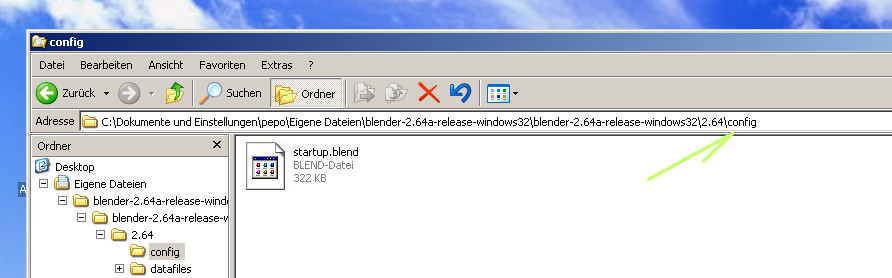
If you create a folder “config” in your …\2.64 folder on your network drive, the user startup.blend is not used.
You lost your User Preference settings because blender create a new startup.blend in this \2.64\config folder.
Cheers, mib.
Change of name? Interesting. The only blend file I can locate in the install dir (that is, R: drive where I’ve unzipped the portable Blender for students to run) is data.blend from the Object Fracture script.
Is there an appropriate place for me to insert my own start up file for a network access install to make the initial B.blend / Start.blend file?