Yes! If we can get nodes into groups in the asset browser you got gold! Thanks for making this.
While you can’t currently do just one material, if all your objects just have that one material and you don’t specify that they should be split in any way, then every object will be baked to the same texture file.
Hi,
I was wondering if this could be designed better:
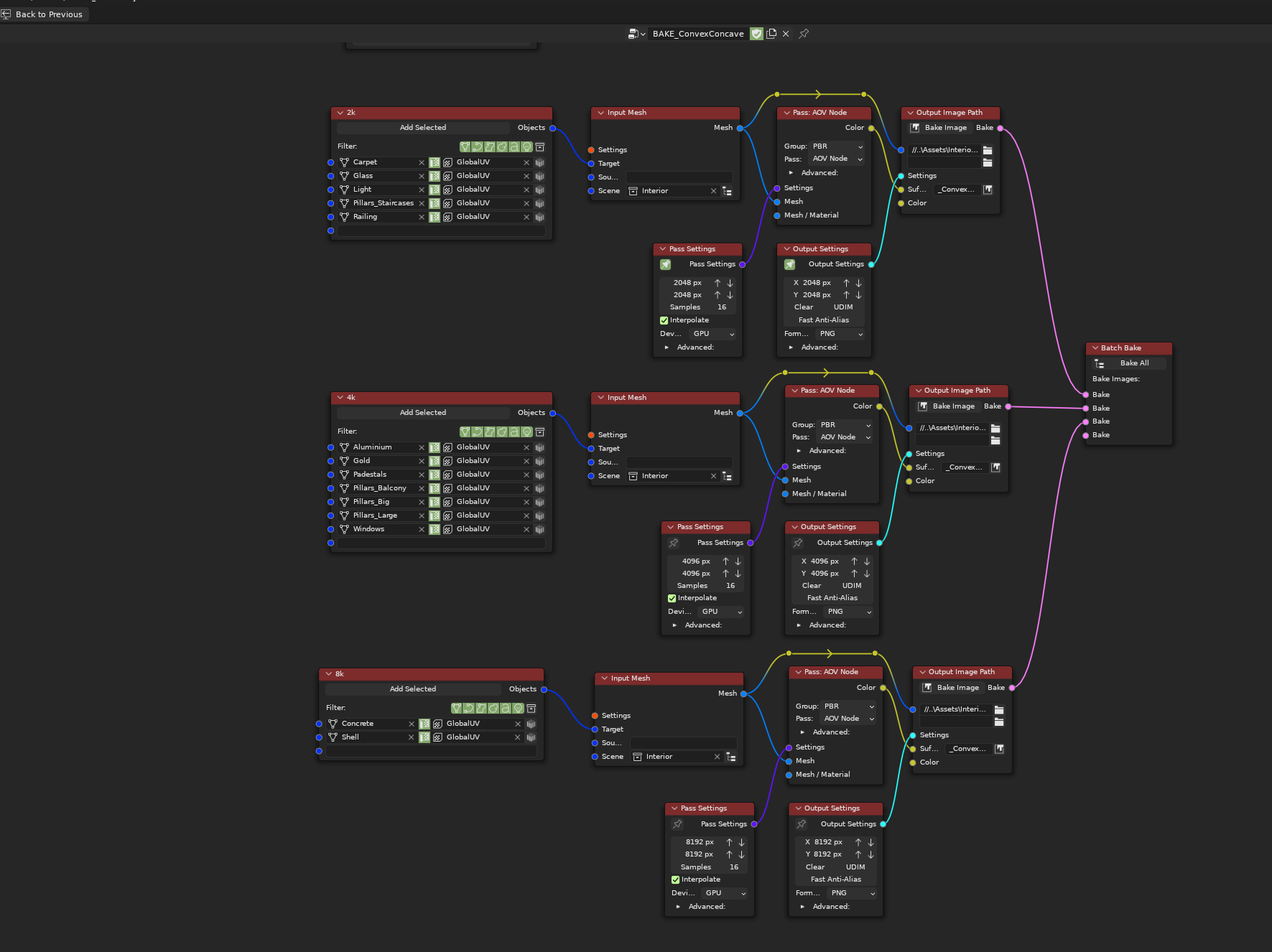
I am running into some management issues when baking sets of objects of different resolutions. There’s lots of duplicate nodes which need to have their settings manually synced every time I want to change some of them.
1st issue I keep running into is the annoyance of keeping pass resolution and output resolution in sync. It’s very error prone. Most of the time, users will want to render and output the textures at the same resolution. Subsampling or supersampling them is kinda niche use case. I think that either pass resolution or output resolution should be an override. So for example if pass resolution would be override, then the pass node would have no resolution setting unless override is enabled, and the Output resolution would always be used as pass resolution too. This alone would allow me to cut down all these AOV nodes down to 1, so I would no longer have to keep them in sync.
I’d still have multiple Output Image nodes. This is a far stretch, but I wonder if it would be possible for Output Settings node to have toggle between manual resolution, and Attribute based resolution. So I could then specify bake resolution as an attribute on the objects:

Something like this.
That way, the node tree would end up even simpler.
And my last request, but that one is very complex - If we could have node group support with resolutions and paths being exposeable as node group inputs. I am spending way too much time appending or recreating complex bake setups, when things that usually change are only export paths, resolutions and the objects to bake. I would love to be able to make a reusable nodegroup baker.
I imagine something along the lines of a node group, where the top level has only a socket for the Object list, socket for the export path (the suffixes would be already specified inside the node group) and socket for resolution.
Yes, having the two size settings isn’t that useful and becomes an extra node if you want to use multiple sizes. I’m not sure how much people use different bake and output sizes but a redesign of the pass settings node is probably in order.
I’m actually wondering if a single settings node wouldn’t be better, with drop down sections for each group like I have for ‘Advanced’ currently…
Custom properties could be used, I think there is a way to add a tab which could have override settings for some parameters, not sure what ones would be useful other than the render size…
I’m not sure how or if it’s possible to do node groups for custom nodes and sockets, but it probably is. It would require some changes to the logic, but it might not be as difficult as it looks…
@netherby A feature idea :
Would it be possible to have the addon automatically populate the Suffix properties of the Output Image Path node based on the type of Pass connected to it? That would be really neat and save a lot of time in the long run. (Disclaimer: Haven’t bought the addon yet, so maybe there is functionality for this already.)

I know these changes aren’t trivial. My overall biggest issue with NW right now is a UI clutter. So I am wary of something that would add even more of it, such another dropdown section or another override settings.
In fact, I think the advanced dropdowns should go away. Even the most basic of setting such as setting color space to linear or non-color for essential PBR passes like roughness is hidden behind advanced rollout, despite not being anything advanced.
I think the amount of UI elements could be cleaned up and reorganized to about half without NW losing any functionality.
@HCederblad I would like to improve the auto naming abilities, probably by adding tokens that get replaced. The problem with the pass is in situations like this recipe I have for UE:
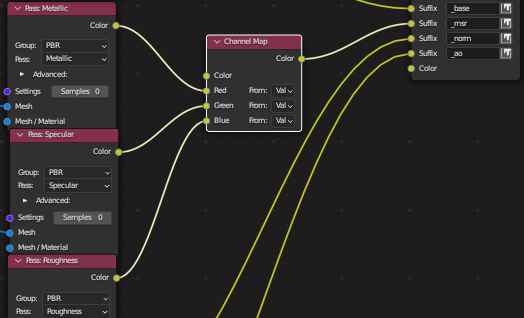
I have 3 passes ending in one output… Which one is the pass?
@rawalanche The main reason for the separate settings nodes with hidden parts was an effort to not having crazy big nodes. We could have all the settings on one node and the sections could all start expanded, then you can just hide them if you want. There is also the option of having UI in the ‘N’ tray but that can be confusing…
Node groups could let you hide a bunch of the clutter. What would be you preference for changes to the settings nodes?
1 Like
Maybe this is a silly question but how do I get the normal map to bake the normal map that I’m applying in the shader? It just seems to produce a smooth map of the geometry normals. I don’t think I’m doing anything too crazy.
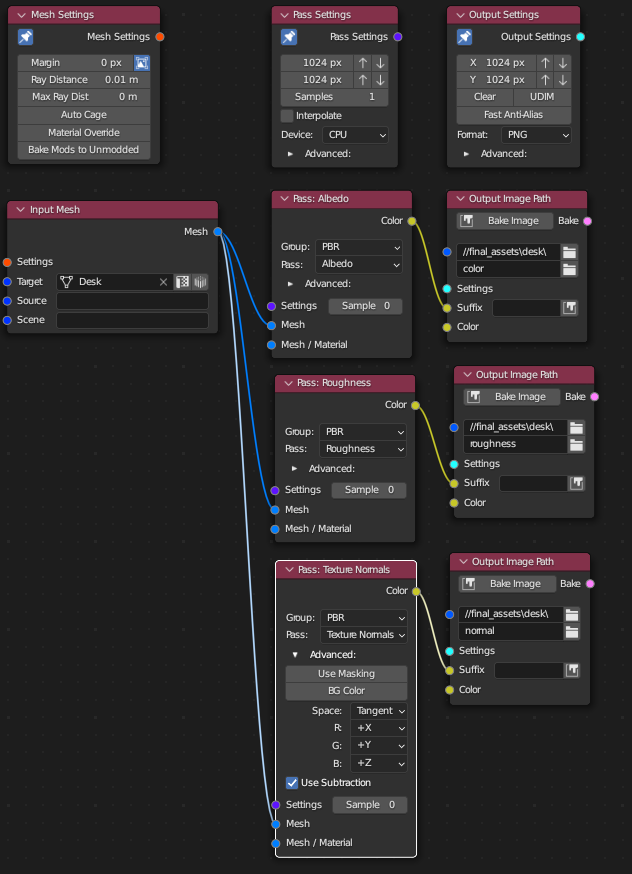
In your case the texture normals would be the same as the output from the normal pass. If you switch to using the standard normals pass do you get what you want?
Which one is the “standard normals pass”?
Under the Blender group called Normal.
Alright, thanks. I did end up testing that along with the original one I used and a bad normal map texture that would obviously show signs of coming through and things are working correctly and that texture is properly visible. I think the resolution of the original normal map I tried using and the scale of the UV area is just causing it to be really subtle or non-existent.
What’s the difference between the PBR and Blender pass groups? Which one should I be using for games? I just used the one that BW defaulted to and changed the pass to the one that made the most sense.
For most game engines you want the PBR group, except for normals. The normal passes in the PBR group are just for edge cases where you want to isolate the influence of textures or mesh from each other.
From the Blender group you probably want Normal and Ambient Occlusion. I suppose I could add them to the PBR group as well to make clear they are part of the PBR work flow. It’s just that those are built in to blender which is why they are in that group.
Thanks a lot! This is my first time really getting into baking and Bake Wrangler is making it super easy when I know it’s anything but in Blender.
Hello ! Will baking help with large project? Render time or consume less memory? I am a newbie to baking. Isn’t the PBR with Normal map have been bake with the texture already? Now I have hundreds of duplicated objects in the seen; will baking help?
Really depends on what you’re doing… PBR is more for game engines, not scene rendering. What you can do it bake all your lighting information into a texture (with like Combined pass or such), then you no longer have to calculate that stuff every time for that object which can make things much much faster. But again it all depends on what you’re actually trying to do.
Complicated materials with a bunch of procedural stuff can also be baked into a static texture which can give you performance improvements. Some of the materials nodes add quite a bit to render times.
Thanks for the answer.
Is it possible to bake the render output to a texture? I’ve got this and I just want to get this look into a texture I can use in a game engine. I’ve tried a number of different passes but I just get a solid color or black. It’s a cylinder with transmissive material and a bunch of point lights.

Yes, you cannot get perspective (it will bake orthographic projection) but you can bake that to a texture. You need to create a plane which is your ‘camera’ essentially, shaped such that it will ‘see’ the whole object. Set that plane as your target and the cylinder as source. All your lights need to be added to the scene input.
Bake type should be Combined with all boxes checked. You will need probably 50-90 samples.
You could also try the Billboard input node, but I don’t remember if I made that work with lights. I think I didn’t…
Baking from a camera is something I sort of want to add, but it’s kinda a pain 
I should point out that what I’ve outlined would give basically the same results as using an orthographic camera and rendering it. So maybe I’m missing something about what you want?
1 Like
Hi,
I just updated to 3.5 and the problem where the addon nodes are found in the search results in other node editors is still there.
What needs to be done for that to be fixed?