Hello. I found some tutorial for making a glow stick like Yedi, but in my Blender I can’t find the settings that are in the tutorial because it’s an older version. E.g. setting Halo emission of light from vertices. In the end I settled on creating the Emission material and set the background close so the light background is visible but the point is
that when I want to render the image, the rendering does take a long time, but the image is poor and looks like a painting from the windows editor, the background is all gray, even though it should be black or I have some color set. I’m also having problems with the material settings, as all of a sudden a lot of settings have disappeared and it seems
that the changes I made have little effect. I also don’t understand the RENDERING menu, I can’t control it in any way. A smaller grid appears in place of the image. Please explain why this is happening. Thank you. Tomlib
Welcome!
If you found a tutorial that uses the halo feature, then it’s a really old tutorial. You should find an other one, because rendering has completely changed since then.
If you search for “lightsaber tutorial”, you will find multiple that are more recent (that is what you are trying to make, am I understanding correctly?).
If you can’t understand the rendering menu, you might have to also just learn rendering in general. Blender has 2 renderers: Cycles, which is slow, but realistic and Eevee, which is fast but less accurate and is also used as the viewport. You would have to look for tutorials about both of them. It’s a complicated topic, which you will learn over time.
If I got you right, you better watch these tutorials below:
Thank you. I discovered the settings of Evee and Cycles. However, it seems to me that the lights and material settings are not applied after pressing F12. The sun shines from a different side than where I placed it. Spot lamp functions are almost not used. The Metallic material effect does not apply to a cube, for example.
In the case of this light stick, I have Shading on the Blender desktop in Layout Viewport and the image is rendered in real time, but if I enter F12 and want to output, the rendering takes a long time and the image is completely different and poor in shadows, 3D graphics, space. Where am I wrong?
Thanks for tutorials. But it´s for me to fast and complicated. I prefer no video tutorials od combined tutorials. But solve the piece of problem was similar to my.
If you mean you want more understandable tutorial, take a look at this one below:

Thank´s but now I need to resolve problem with rendering. I make some cubes but after F12 it looks so darker than it is in world, and lamps take almost none effect. Probably I have something bad checked.
Will you try to advise?
Drop your blend file and I’ll take a look at it
I can´t upload yet as new user. But it´s only simple picture with some cubes. Yesterday I try to set some checking for look what effect it will take, but thik that it is not my guilty. I need to know where find details of settings the render output. It can´t be nothing other in layout editor it now seems look good. I checked the scene world setting and picture is lighter, but the spot light rotation seems to take no effect.
Sorry, but it would be difficult to find the cause of your problem without viewing the actual file. If you wish, you can upload it on a cloud storage
Besides, make sure that in an Outliner there is nothing that might’ve been hidden from render.
It’s hard to say without seeing the scene, but make sure you didn’t get confused between material preview and the actual render.
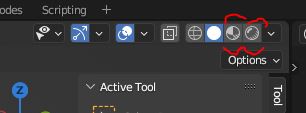
The material preview mode has a lighting of its own, which ignores your lights.
I hope I didn’t confuse these two mods. I used the render mode, but in the Layer view the scene is lighter and after pressing F12 it is darker. I think the Output setting must do it, because the Render setting is already applied in the render view on the Layer. However, in none of them does it seem that moving the lights has no effect.
Most likely, I will stop working on the problem or try to restore the installation, or try some books where the settings and their resulting effects are described in detail. Unfortunately, in our country they are only in English and are quite expensive. I’m from Czech Republic.
I have nothing hidden here, but I have similar problems with other files, where apparently the settings will be a problem in Blender, not in the file.
I think we have already addressed the problem enough together and I will try to return to it in some time.
Thanks for the effort.
Tom - Liberec - Czech Republic
You’re welcome
Cheers,
Sergey