I’m a complete blender beginner.
What beginner video tutorials are recommended?
I’m mainly interested in modelling but also to learn the different material nodes (and geometry nodes) and also compositing. I hope I say this correctly
As I understand correctly, it’s best to use EEVEE in order to see real-time results?
(animation, sculpting and texture painting is not for now)
You’re going to get answers saying “BlenderGuru’s donut tutorial”, but I personally don’t think you should start there. Once upon a time that was the gold standard but his 3.0 series donut tutorial is horribly organized and way overcomplicated for beginners.
Instead, watch Grant Abbitt:
Once you’ve worked through this tutorial, you can start to specialize a bit more. Do you want to focus on modeling, sculpting, texturing, or animation? As a beginner, you just need to get your feet wet, and that’s a great series, but once you have some more experience, we can guide you further on your learning path
hi ,
Grant Abbitt tutorials are verry good to start with , they are simple , short and easy to follow .
you can also also follow this course on my youtube channel . those sre tutorials that i did for my student to learn how to use blender for concept art .
Thanks! I start with those.
My goal is to learn modelling and then make things to which I add water, smoke, etc which are built-in in blender I think. I read somewhere those can be made very easily.
I read something about a realtime compositor somewhere, but can’t find it.
This is maybe not finished yet? I use version 3.2.2
In my opinion start with the basics firt, get use to the user interface, moving objects, edting them etc … before you start complex stuff like compositing, coplex shaders etc …
Good luck
I have one advice thou - for beginners it is usually not recommended to start from smoke and fluid simulations. Those in Blender are not very well optimized and have steep learning curve. Your decision to start from modeling is very good. Stick to it for some time and then try sculpting and making simple materials. This should give you plenty of things to learn for at least couple months.
I’m not saying that you should not make smoke or water simulations - just beware that this might not be easy.
My PC I use is a gaming PC of several years old.
Can somebody tell me if would be able to do most common things in Blender using following hardware or is upgrading of something really needed? I’m not planning to make huge things or make my own animation movies Just some small to normal size models.
You’ll be completely fine with those specs for normal modeling
You’ll probably want to upgrade someday, but you have enough RAM and a decent GPU and CPU. I was running a worse GPU than you with 16 GB of RAM for 2 years, up until very recently, and I was able to do quite a lot
What things will be speed up when I have faster CPU or GPU?
I’m trying to understand what features and where in Blender will be faster.
For example: when you bought faster GPU, where did you see speed improvements mainly?
I found you can view the Memory (for me 16 GB max.) and VRAM (for me 8 GB max.) in the right lower corner.
Is the size of the scene limited by the VRAM value or Memory value or a combination of both maybe?
A lot of good questions here, I’m going to try to answer them all, I apologize if I miss anything.
Everything will be faster with a better CPU or a better GPU. CPU = faster rendering, faster operations. GPU = faster rendering, faster viewport performance.
Currently, I have a 3070, Ryzen 5900, and 128 GB of RAM. I got the CPU and the GPU at the same time, so it’s hard to say exactly, but I get much better performance, faster renders, and much less lag than I did with a Ryzen 5600x and a 1660 Super.
Yep, both. VRAM is arguably more important for rendering, but RAM is necessary for large scenes. Ultimately you need both. Textures are stored in VRAM as are shaders, objects are stored in RAM. 8 GB of VRAM is quite a lot, you should be fine with that. 16 GB of RAM is… not very much. I’d recommend at least 32 GB for Blender, but you’ll be fine with 16 GB. You might have some viewport lagging and experience limitations to polygon count or modifiers you can use, but you’ll survive
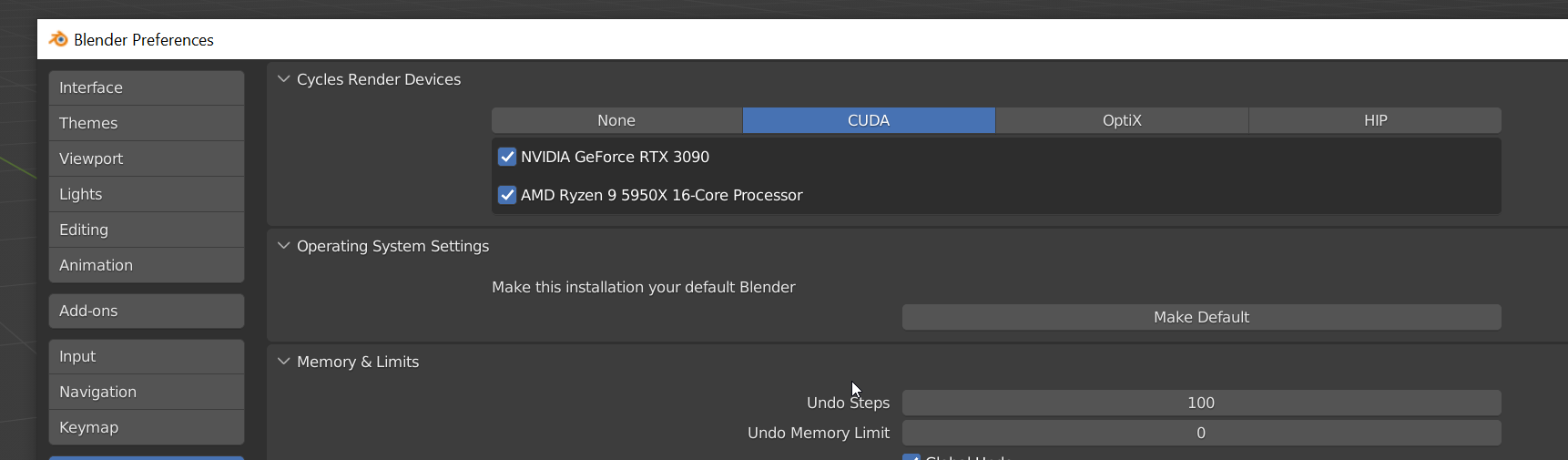
for Evee just make sure you check nividia check box in cuda window , or optix if you have RTX 30 series. you can also chech the CPU check box , i think it helps also for evee and cycles .