Best and fastest workflow from Blender to Unreal Engine?

Hi
What is the best and fastest workflow (baking,…) to transmit Scenes from Blender to Unreal Engine ?
I’ve seen alot of tutorials and Addons to solve
that task. But I’m a bit confused because it seems to me still like a very timeconsuming, unnecessary process. There is a Plugin for 3D Stuido Max which supports Datasmith and Datasmith in some cases reduces the process from one week to one day of work.

Is this possible with Blender as well ?

Kind regards
Alain

Is my question to stupid ?
Who has an answer to my initial question ?

Kind regards
Alain

I always model in Blender then bake and paint in Substance Painter and then export the textures from Painter to Unreal Engine because it’s easier than doing it in Blender and the capabilities of Painter reduces the painting time drastically.

Hope this helps.

Both Datasmith and Pixyz (Unity’s advertised solution) target non realtime 3D artists such as architects, engineers or industrial designers. These tools crunch models, optimize typologies, reduce vertices etc. with the hope of reducing the workload of converting assets manually.

Personally I have some doubts on these solutions since it can end up being a black box and it becomes more tricky to fix conversion or automation issues should they happen, e.g. I read that DataSmith frequently replaces UVs and automatically unwraps instead.

But to answer your initial question: No datasmith is not designed for software like Blender. And the best option you have to automate tasks is one of the several addons. I heard good things about Capsule , then there is Blender For Unreal Engine which I am sure you have already looked at.

.

Personally I work with Unity mostly and I am mostly frustrated with having to re-assign materials, merge meshes or export object by object or sometimes just fix rotations because of Y-Z being swapped.

At my previous work I used to create the pipeline tools for the team, we used 3dsMax
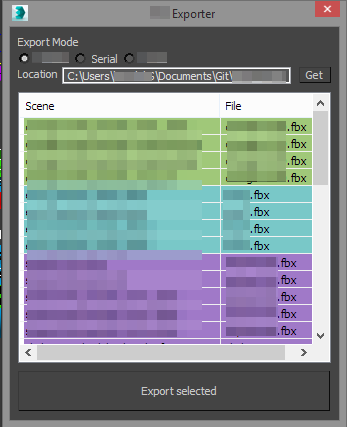
The idea was to select objects and then just press a export button and objects were matched in file bundles. In the screenshot you can see each bundled fbx file as one color. Having this realtime file splitting preview as you select objects was very valuable as it made sure artists would name their assets correctly.

When I switched over to Blender this year I started creating a similar addon for Blender called FBX Bundle which we use at work for the team to export and update 3D assets.
This time it matches objects with more options such as matching names, same group, same parent, scene,… and bundles them again into FBX files of each group.
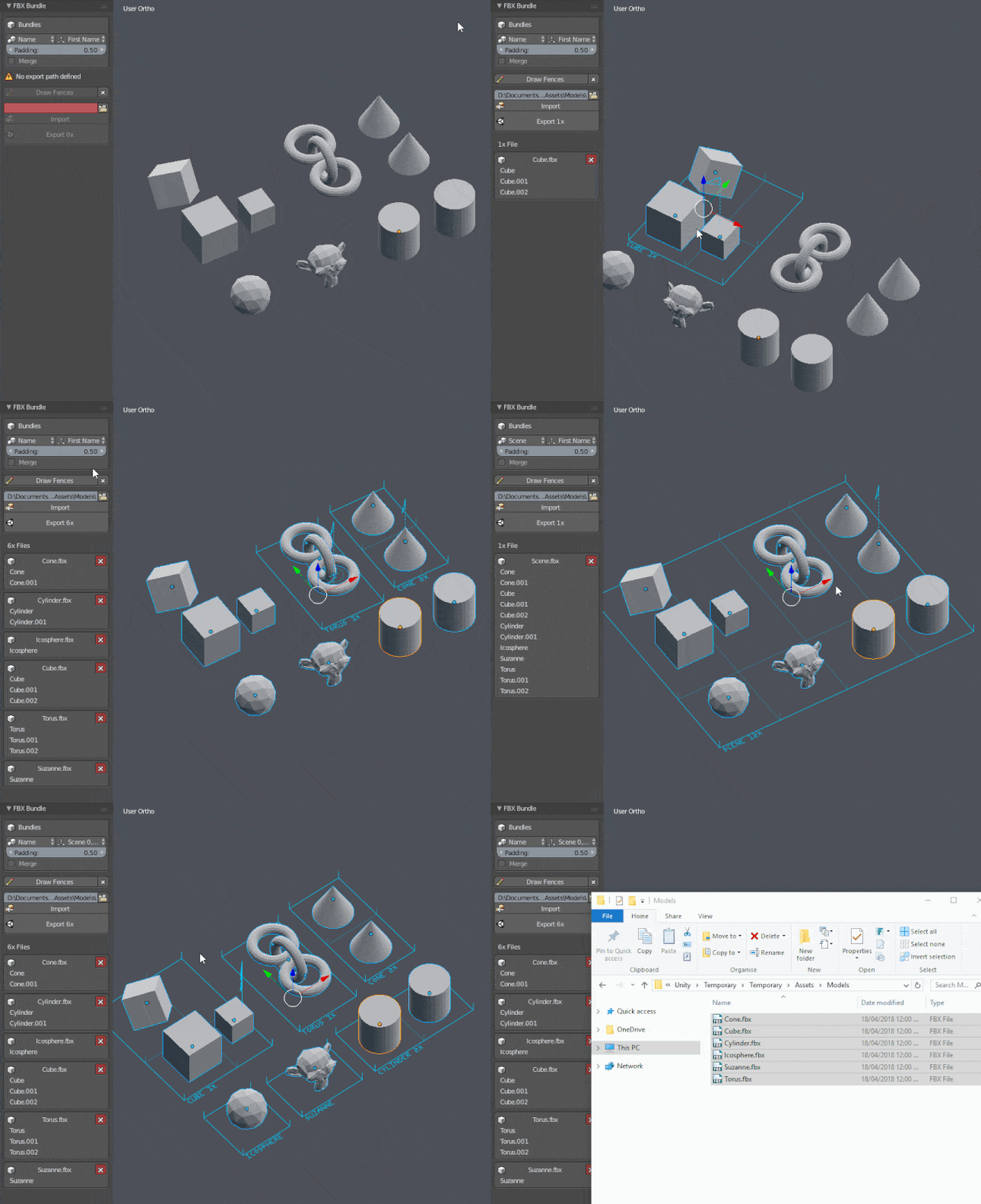
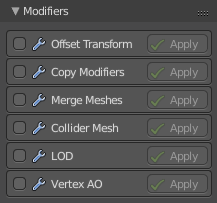
I have been using this work flow in this year for many projects with my team very successful. With the addon we even have automatic material assignment (Editor script in Unity) and with the upcomming modifiers can even create LOD, merge meshes etc. but everything at a artist control level - no black box.
Below is a screen of a VR project I used this with, the whole scene setup is done in Blender including material assignment to objects. The cables are still curve objects. With a single click of a button I can update all of the geometry inside Unity: it literally takes a second - and then I press alt tab back to Unity and its updated.

Its great in particular with VR where you can keep the game running in VR while updating the assets just like that - so iteration speed becomes part of the workflow. We ported the project to Oculus Go (mobile hardware) and because of this pipeline were able to automatically reduce all of the asset’s geometry using Blender’s build in Decimate modifier and the export addon.

Anyhow if you are curious about the addon or have questions visit the thread or message me- happy to give input. You can find the addon on the forum thread or here at bitbucket
https://bitbucket.org/renderhjs/blender-addon-fbx-bundle

In recent days I have been trying to familiarize myself again with the Unreal editor because of the addon to also support Unreal. To be honest the model import popups / wizards in Unreal are rather annoying to me and time consuming but I have seen some Blender addons that generate scripts for unreal (using pyton inside Unreal) to automate that part. I imagine once you do the painful process successive exports won’t trigger wizards anymore.

I’m not expert in this area but using glTF file format is superior in my opinion. Take a look at this post in UE forums.

UE4.19 preview has a experimental importer for it, and right now its extremelly promising. This is an open format, that, once final, should work better than FBX, and actually work great with Blender.
I went to test the 4.19 preview and started doing a few experiments with it. Right now its much superior to FBX for some simple cases.

The cool point about glTF is that the same file holds a full scene, with multiple 3d objects, each of them with animation, and each of them with materials, and each material actually imports as a material graph, and with textures.

This means that glTF is one click import and it setups every single mesh in your scene with correct materials and textures, from one file This allows you to setup your game assets in blender, with a blender material graph and textures, and import it directly into ue4, with everything getting translated.


You basically enable glTF plugins in both Blender and UE4, then export/import as necessary.


Maybe we can see a glTF Bundle addon in the near future @renderhjs ? :hugs:

@filibis glTF is already available in the latest git source version of FBX bunlde. Works with everything else tge addon offers like modifiers. Next public release downliad is very close around the corner.

Thanks alot guys for those useful informations. I will test some things as soon as I find some time :slight_smile:
Kind regards
Alain

Datasmith exporter for Blender is being worked on by Andrés Botero:

It looks promising even at this early stages, it imports parent hierarchies and lights properly along with simple materials and textures…

You can show this plugin

Im using Andrés Botero’s addon right at this minute. I got a request to give Twinmotion training and hammered out a scene with an interior. Twinmotion uses the Unreal engine but it is a sealed package. There are loads of presets: mateials, characters, vegetation to name a few. Twinmotion has Bimotion which means you can control lighting and weather conditions via sliders in the final exported player. Clients can walk or fly through their scene and control the speed with a dropdown. Its great software. The exported player weighs in at an average of 6gig though. Folks are producing fabulous stuff with it.

Datasmith is really one step further depending on what you need it for. The system is built on top of the unreal engine. That means you are using the engine like you always have, just the import system is heavily modified bringing models, pivots and textures in at the right size and position and placing collision object in your models by default. Where 3d max is concerned datasmith is geared toward vray. The system does a great job of translating the materials, I dont have vray so I am having to do most of my material work in the Unreal material editor. The Beta also comes with a substance material stock that is pretty breathtaking.

Datasmith is great because you can combine your level with all the features of a game engine: first person, 3rd or flythrough, opening doors, working elevators, you name it. Compared to the usual way of getting out a product in the engine, its real quick.

Would I use it for a game, I dont know exactly. As has been said above it inserts alot of stuff that wouldnt really be efficient for a game. On the other hand it would really depend on the setting. For anything truely custom you make it the same way as you ae now, but you can combine the two work approaches seamlessly it appears.

Datasmith for: blender for unreal already works?
what is the most current version?