How/can I crate billboards in Blender 2.49?
(By billboard I mean a textured plain that always faces the camera.)
How/can I crate billboards in Blender 2.49?
(By billboard I mean a textured plain that always faces the camera.)
Moved from “General Forums > Blender and CG Discussions” to “Support > Animation and Rigging” on the assumption that your question refers to a general case (rather than a specific case like particles or the game engine).
You’re looking for a constraint… depending on what you’re trying to do, it would be the Track To constraint or the Locked Track constraint.
I got my billboards working but how do I make them smaller?
Select your plane object.
Move the mouse into 3D viewport.
Press the S-KEY and move the mouse to adjust the size. (Optional SHIFT and CTRL keys work in this mode as well)
Click to lock in your value or press ESC-KEY to abort operation.
WTF… I know how to re-size objects in blender, I don’t know how to make the billboard plains emitting from my emitter smaller.
And no, re-sizing the emitter doesn’t change the billboard plain size.
The particle system has a size value. Have you tried changing that?
Where is the size value? I can’t find it.
Sorry, it’s Scale, not Size. There are two values, one for X and one for Y. They’re in the Render panel of the particle settings, a few lines below where you selected Billboard as your particle type.
Okay, this is a particles thing… moved from “Animation and Rigging” to “Particles and Physics Simulation”
We like making you chase wild threads across the boards Fweeb. Gotta stay on your toes. 
Here is the panel, I don’t see any scale option:
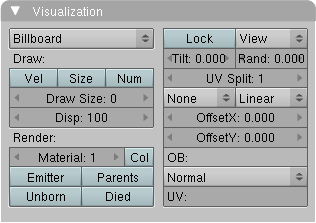
Oh, I missed that you were using 2.49. I have no idea. I haven’t used that version in years. You should probably upgrade.
Meanwhile, have you tried changing the Draw Size value? Any time there’s a size, scale, or quantity value in Blender that defaults to zero, there’s a good chance 0 just means “automatic” and any other value is a real value.