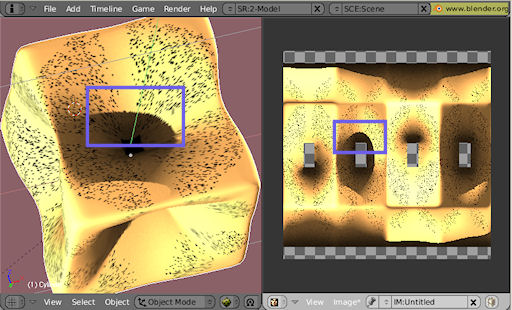
When i bake the textures for my objects using “Full render”, i very often get black pixels, which completely ruin my surface textures (see first image). These black pixels do not show up when i “render ->current frame” (see secnd image) or when i render “textures only”.
The object has a low poly-mesh and i use subsurf to get a smooth texture. But i always get very rough shadow-edges as you can see in the detail images. When i raise the subsurf level above 4, then the whole texture renders nearly black with some spots where the original material shines through.
This example has been created with blender-2.48-4, but the black spots appear in my work since a long time. So i doubt it is an effect in the particular release, but an error i make in my way to setup materials …
But i have no idea how i get blender to behave in the described way. Can anybody give me a hint ? I am sure, it is a simple thing that i overlook… I added the .blend file if that helps to find an answer.
There was something wrong with uv map. I rewraped mesh and dots problem disappered.
As for the nearly-black rendering, you have two materials assigned to the mesh. One is yellow and other is black. I don’t know if you have intended to have two materials on one object, but removing one of them solves the prolem.
Hi, Krizas;
Thank you for your quick response. I have some questions though:
Do you know, what exactly was wrong with my UV map ? And how did you rewrap the mesh ? is your UV map a perfect square with no holes as the “original” uv map ?
Concerning the 2 materials: Yes that is on purpose. Using 2 materials makes it very easy to apply different surface properties to different faces on the mesh. That is what i want. And from what i learn from the blender wiki, there is nothing special with this approach and it looks like it is well supported. At least i see no problems at all when i render the current frame… So do you say, multiple materials are NOT supported or buggy with texture backing ?
ok, i have digged a little bit deeper and i meanwhile have an idea what possibly could go wrong, while i still do not know where it goes wrong:
I have removed the subsurf modifier and rebaked. Now the texture is much rougher, but the black pixels remain. So i looked at 2 triangles (“1” in the picture) and examined the corresponding part in the texture (“2” in the picture). When i zoom into the texture, then i can see, that all “black” pixels are aligned along the triangles. After examnining the whole texture, i come to the conclusion, that this is true for every miss-colored pixel. But the opixels are not black, they are only much darker compared to their neighbour-environment.
Now … as the effect occurs at the triangle edges, it must be something with the lighting calculations (of course…) and since the effect happens on the edges, there is probably some alignment issue here. Since the rewrapping of the uv map seems to cure the problem, now i suspect it is a precision problem in the calculation of the uv map.
How can i verify that ? Is there any way to see, why the uv map behaves so badly during texture baking ?