Hi there!
I’m having some issues with Command Line Rendering.
I’m currently using Blender 2.93.6
Blender 2.93.6
        build date: 2021-11-17
        build time: 00:50:06
        build commit date: 2021-11-16
        build commit time: 14:54
        build hash: c842a90e2fa1
        build platform: Windows
        build type: release
        build c flags: /W3 /w34062 /w34115 /w34189 /wd4018 /wd4146 /wd4065 /wd4127 /wd4181 /wd4200 /wd4244 /wd4267 /wd4305 /wd4800 /wd4828 /wd4996 /wd4661 /we4013 /we4133 /we4431 /w35038 /DWIN32 /D_WINDOWS /W3 /nologo /J /Gd /MP /bigobj -openmp
        build c++ flags: /W3 /w34062 /w34115 /w34189 /wd4018 /wd4146 /wd4065 /wd4127 /wd4181 /wd4200 /wd4244 /wd4267 /wd4305 /wd4800 /wd4828 /wd4996 /wd4661 /we4013 /we4133 /we4431 /w35038 /DWIN32 /D_WINDOWS /W3  /EHsc /nologo /J /Gd /MP /EHsc /bigobj /permissive- /Zc:twoPhase- -openmp /std:c++17 /Zc:__cplusplus
        build link flags: /MACHINE:X64  /SUBSYSTEM:CONSOLE /STACK:2097152 /ignore:4049 /ignore:4217 /ignore:4221
        build system: CMake
I have a scene set up with a camera and some object. I want to note that in the GUI, everything works perfectly as expected.
I am trying to render a specific frame from a blend file from the command line. I know that there are many ways to do it from the GUI as well, but I need it done from the CLI In the background.
In the GUI I could do this here using [MENU] Render > Render Animation
This then opens the Blender Render window, loads Importance maps and so on for a few seconds (!!!) and perfectly renders the scene giving me the desired result. With all workspace settings respected
Now, for the command line.
blender -b icewatch.blend -f 1
→ I expect blender to open in the background, load file icewatch.blend and render frame 1 with the set workspace output settings.
However, the ouptut is as follows:
Fra:1 Mem:3454.34M (Peak 3454.34M) | Time:00:01.03 | Mem:0.00M, Peak:0.00M | Production, View Layer | Synchronizing object | Plane
Fra:1 Mem:3454.34M (Peak 3454.34M) | Time:00:01.03 | Mem:0.00M, Peak:0.00M | Production, View Layer | Synchronizing object | Marble
Fra:1 Mem:3457.01M (Peak 3457.38M) | Time:00:01.04 | Mem:0.00M, Peak:0.00M | Production, View Layer | Initializing
Fra:1 Mem:3452.57M (Peak 3457.38M) | Time:00:01.04 | Mem:0.00M, Peak:0.00M | Production, View Layer | Waiting for render to start
Fra:1 Mem:3453.61M (Peak 3457.38M) | Time:00:01.04 | Mem:0.00M, Peak:0.00M | Production, View Layer | Loading render kernels (may take a few minutes the first time)
This keeps going for at least half an hour, while in the GUI, clicking ‘render’, start in seconds and finishes within 20 minutes.
I have tried replacing -f 1 with -a to no avail. My animation is only one frame and output is set to png.
If it is needed for any reason, these are the current render settings set in the GUI:
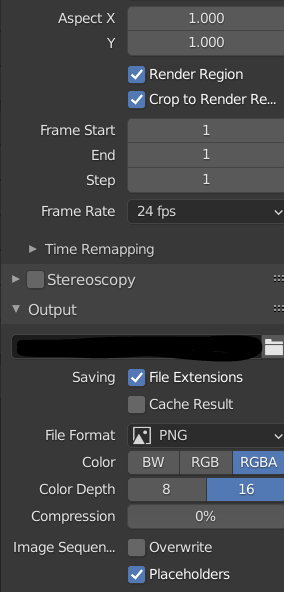
I have checked multiple times, these settings are saved and are in fact set correctly (in the GUI it renders and executes fine!!!)
How do I tell blender to follow the in-file output settings/not do whatever it is doing?
I can’t find information on this anywhere but this is really annoying! Why does it not work like it does in the GUI? What am I missing here?
Thank you a lot to anyone who can guide me in the right direction here, I have no clue what to do.