EDIT: forget what i just wrote, on first look it looks fiine , there should be no more than 15 requests per pageload. the problem is probably deep inside the beautiful soup library, otherwise i cannot explain the many requests.
IS IT REALLY TRUE THAT THERE ARE 1000s of requests/s ??
when you check page load with a browser there are merely 15 requests to blender.org for the daily release page and most of them are even cached.
maybe just urllib will work better but soup seems to be just a html parser and search tool(scraper)
the html code has all the download links. the links contain all important parameters, but one could also just analyze the parent elements and siblings for the data … can all be sorted with client side code entirely (and seems like it is).
is this maybe run more than once ? there should be no problem and blender.orgs comments (if they really exist) are farfetched and overdramatic.
its practically just like loading the page in your browser. they dont have a problem with that either… like i said , setting the intervall to 12hours should do the trick. thats like reloading the blender.org page every 12 hours .
or do the 1000s of request per second result from the launcher doing the check at the same time on every computer its running on ?
then you could implement the 12 hour intervall computed from the last startup time or pc wakeup time (or both). that will randomize it for every user and blender shouldnt have 10.000 people(number of people who use blender launcher , are probably quite many) refreshing the page in the same second.
you can also block some content , like images and the blender analytics script , the 2 or 3 css files. seems calling this from python would always reload all these files (compared to a browser which uses its cached files instead)
As a workaround, you can manually download and unzip the portable version of Blender from the archive, and then add a .blinfo file so that Blender Launcher can find it.
The Blender Launcher was not responsible for the DDoS attack, the program is just creating too much load for what it really needs, but not at the point of DDoS the Blender website
All the issues with build gathering have been fixed, Stable builds are not available because BF blocks the web request from the BL on this website for the reason explained in my previous message. Hopefully, this will be fixed during the week. You can still use the BL for Experimental and Daly builds and use the workaround you explain in your message for the stable one
It seems that @DotBow, the original developer of Blender Launcher has archived its Github repository, making it ‘read only’: This repository has been archived by the owner on Nov 28, 2023. It is now read-only.
Sadly, in the process, DotBow removed all bug reports and feature requests that have been posted in the Github Issues page.
DotBow, if you read this message, (I don’t know if it’s reversible) but please can you leave the Issues accessible (even if they are only readable)? I do hope they are not lost.
Some of Blender Launcher users have spent a few hours creating and reporting them (I am also talking about the GIF mockups and suggestions).
This is not correct; your browser does not need to check a link in order to know if it has visited it before - this data is stored locally. You may be confusing this with the cache header checking when loading a new page.
From what I’ve seen, this data-scraping per client is a very inefficient solution, and as mentioned this should be centralized. Does it at least respect the robots.txt so that websites can tell you to not do that to them?
Does the app only check at launch, or at scheduled intervals? If it’s set to schedule, say, on the hour, then ALL apps will launch a re-check at that time, and the refresh timing should at least be randomized.
Agreed, nothing I’ve heard points to this: the absolutely MASSIVE spikes that came and went, the ever changing IP addresses. They point to a botnet, not one app.
It has an option for automatically checking every X minutes (presumably from start up or the last manual check), which the user can define. Victor’s new fork has this off by default to avoid overloading the Blender servers. Perhaps he could rejig it to make it an X hourly check, since I doubt many users are likely to do the maths to work out larger numbers of hours in minutes, and no one needs to auto-check in sub-hour intervals (I have mine set to 720 minutes— so every 12 hours).
Agreed, manually checking more than once a day is unnecessary and wasteful. This add-on sounds cool, but everything about it suggests it didn’t plan for scale and efficiency.
Hi,
I’ve tried to update 1.15.0 to v1.16.1 manually on Windows 10 (by replacing file)
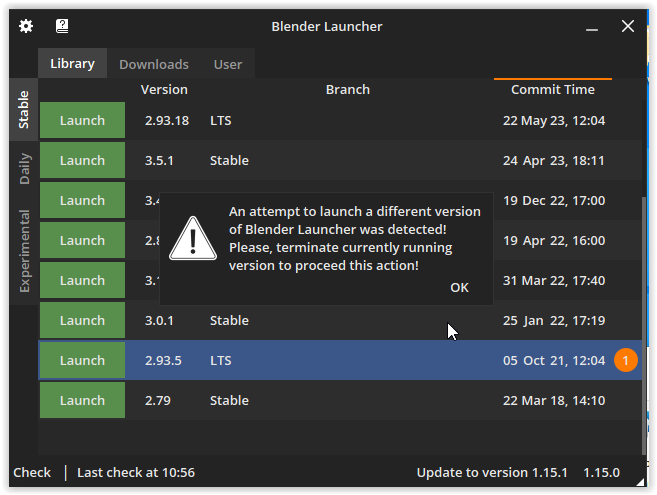
I’m pretty sure that i did quit running instance of Blender Launcher, bu when I run this new file, I still get this:
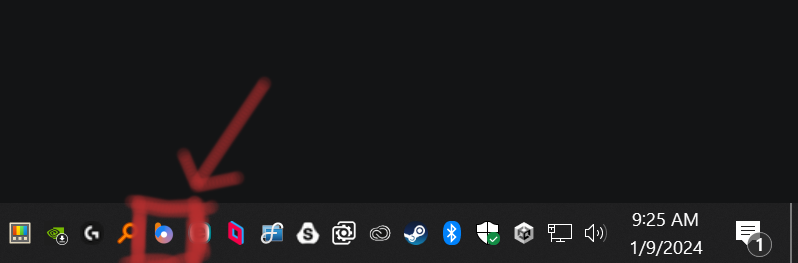
You need to close the currently running blender launcher on the bottom left
Sometimes the icon can be hidden in the arrow pointing up, after that, you can delete the old blender launcher.exe and replace it with the new one.
You will have to locate your install library after that on the first launch

 support this! I opened a discussion about it on
  Thank you, Victor. Hope you can keep it alive.