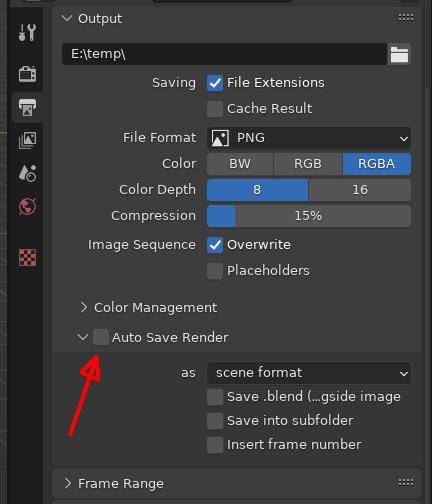
Hi Joseph,
the addon is normally in the “addons_contrib” folder and is called render_auto_save.py.
EDIT:
I just checked why you don’t have the addon.
LazyDodo gives the answer.
“…, official versions do not ship with contrib, never have. It’s just the nightly buildbot builds that have them.”
# ##### BEGIN GPL LICENSE BLOCK #####
#
#  This program is free software; you can redistribute it and/or
#  modify it under the terms of the GNU General Public License
#  as published by the Free Software Foundation; either version 2
#  of the License, or (at your option) any later version.
#
#  This program is distributed in the hope that it will be useful,
#  but WITHOUT ANY WARRANTY; without even the implied warranty of
#  MERCHANTABILITY or FITNESS FOR A PARTICULAR PURPOSE.  See the
#  GNU General Public License for more details.
#
#  You should have received a copy of the GNU General Public License
#  along with this program; if not, write to the Free Software Foundation,
#  Inc., 51 Franklin Street, Fifth Floor, Boston, MA 02110-1301, USA.
#
# ##### END GPL LICENSE BLOCK #####

bl_info = {
    "name": "Auto Save Render",
    "author": "tstscr(florianfelix)",
    "version": (2, 1),
    "blender": (2, 80, 0),
    "location": "Rendertab -> Output Panel -> Subpanel",
    "description": "Automatically save the image after rendering",
    "warning": "",
    "doc_url": "http://wiki.blender.org/index.php/Extensions:2.6/Py/Scripts/Render/Auto_Save",
    "tracker_url": "https://developer.blender.org/maniphest/task/edit/form/2/",
    "category": "Render"}


import bpy
from bpy.types import Panel
from bpy.props import BoolProperty, EnumProperty
from bpy.app.handlers import persistent
from os.path import dirname, exists, join
from bpy.path import basename
from os import mkdir, listdir
from re import findall, search

IMAGE_FORMATS = (
    'BMP',
    'IRIS',
    'PNG',
    'JPEG',
    'JPEG2000',
    'TARGA',
    'TARGA_RAW',
    'CINEON',
    'DPX',
    'OPEN_EXR_MULTILAYER',
    'OPEN_EXR',
    'HDR',
    'TIFF')
IMAGE_EXTENSIONS = (
    'bmp',
    'rgb',
    'png',
    'jpg',
    'jp2',
    'tga',
    'cin',
    'dpx',
    'exr',
    'hdr',
    'tif'
)


@persistent
def auto_save_render(scene):
    if not scene.auto_save_after_render or not bpy.data.filepath:
        return
    rndr = scene.render
    original_format = rndr.image_settings.file_format

    if scene.auto_save_format == 'SCENE':
        if original_format not in IMAGE_FORMATS:
            print('{} Format is not an image format. Not Saving'.format(
                original_format))
            return
    elif scene.auto_save_format == 'PNG':
        rndr.image_settings.file_format = 'PNG'
    elif scene.auto_save_format == 'OPEN_EXR_MULTILAYER':
        rndr.image_settings.file_format = 'OPEN_EXR_MULTILAYER'
    elif scene.auto_save_format == 'JPEG':
        rndr.image_settings.file_format = 'JPEG'

    frame_current = bpy.context.scene.frame_current
    extension = rndr.file_extension
    blendname = basename(bpy.data.filepath).rpartition('.')[0]
    filepath = dirname(bpy.data.filepath) + '/auto_saves'

    if not exists(filepath):
        mkdir(filepath)

    if scene.auto_save_subfolders:
        filepath = join(filepath, blendname)
        if not exists(filepath):
            mkdir(filepath)

    # imagefiles starting with the blendname
    files = [f for f in listdir(filepath)
             if f.startswith(blendname)
             and f.lower().endswith(IMAGE_EXTENSIONS)]

    def save_number_from_files(files):
        '''
        Returns the new highest count number from file names
        as 3 digit string.
        '''
        highest = 0
        if files:
            for f in files:
                # find last numbers in the filename
                suffix = findall(r'\d+', f.split(blendname)[-1])
                if suffix:
                    if int(suffix[-1]) > highest:
                        highest = int(suffix[-1])
        return str(highest+1).zfill(3)

    def this_frame_files(files):
        '''
        Filters out files which have the current frame number in the file name
        '''
        match_files = []
        frame_pattern = r'_f[0-9]{4}_'
        for file in files:
            res = search(frame_pattern, file)
            if res:
                if int(res[0][2:-1]) == frame_current:
                    match_files.append(file)
        return match_files

    if scene.auto_save_use_framenumber:
        if scene.auto_save_use_continuous:
            save_number = save_number_from_files(files)
        else:
            frame_files = this_frame_files(files)
            save_number = save_number_from_files(frame_files)
        frame_number = 'f' + str(frame_current).zfill(4)
        save_name = '_'.join([blendname, frame_number, save_number])
    else:
        save_number = save_number_from_files(files)
        save_name = '_'.join([blendname, save_number])
    save_name += extension
    save_name = join(filepath, save_name)

    image = bpy.data.images['Render Result']
    if not image:
        print('Auto Save: Render Result not found. Image not saved')
        return

    print('Auto_Save:', save_name)
    image.save_render(save_name, scene=None)

    if scene.auto_save_blend:
        save_name_blend = join(filepath, save_name) + '.blend'
        print('Blend_Save:', save_name_blend)
        bpy.ops.wm.save_as_mainfile(filepath=save_name_blend, copy=True)

    rndr.image_settings.file_format = original_format

###########################################################################


class RENDER_PT_render_auto_save(Panel):
    bl_space_type = 'PROPERTIES'
    bl_region_type = 'WINDOW'
    bl_context = "render"
    bl_label = "Auto Save Render"
    bl_parent_id = "RENDER_PT_output"
    bl_options = {'DEFAULT_CLOSED'}
    COMPAT_ENGINES = {'CYCLES', 'BLENDER_RENDER',
                      'BLENDER_EEVEE', 'BLENDER_OPENGL'}

    @classmethod
    def poll(cls, context):
        return (context.engine in cls.COMPAT_ENGINES)

    def draw_header(self, context):
        self.layout.prop(context.scene, 'auto_save_after_render', text="")

    def draw(self, context):
        layout = self.layout
        layout.use_property_split = True
        layout.use_property_decorate = False  # No animation.

        col = layout.column(align=True)
        col.prop(context.scene, 'auto_save_format', text='as', expand=False)
        col.prop(context.scene, 'auto_save_blend', toggle=False)
        col.prop(context.scene, 'auto_save_subfolders', toggle=False)
        col.prop(context.scene, 'auto_save_use_framenumber', toggle=False)
        # subcol = col.column()
        # subcol.active = context.scene.auto_save_use_framenumber
        # subcol.prop(context.scene, 'auto_save_use_continuous', toggle=False)


classes = [
    RENDER_PT_render_auto_save,
]


def register():
    from bpy.utils import register_class
    for cls in classes:
        register_class(cls)

    bpy.types.Scene.auto_save_after_render = BoolProperty(
        name='Save after render',
        default=False,
        description='Automatically save rendered images into: //auto_save/')
    bpy.types.Scene.auto_save_blend = BoolProperty(
        name='Save .blend (copy) alongside image',
        default=False,
        description='Also save .blend (copy) file into: //auto_save/')
    bpy.types.Scene.auto_save_format = EnumProperty(
        name='Auto Save File Format',
        description='File Format for the auto saves',
        items=[
            ('SCENE', 'scene format', 'Format set in output panel'),
            ('PNG', 'png', 'Save as png'),
            ('JPEG', 'jpg', 'Save as jpg'),
            ('OPEN_EXR_MULTILAYER', 'exr', 'Save as multilayer exr'),
            ],
        default='SCENE')
    bpy.types.Scene.auto_save_subfolders = BoolProperty(
        name='Save into subfolder',
        default=False,
        description='Save into individual subfolders per blend name')
    bpy.types.Scene.auto_save_use_framenumber = BoolProperty(
        name='Insert frame number',
        default=False,
        description='Insert frame number into file name'
    )
    bpy.types.Scene.auto_save_use_continuous = BoolProperty(
        name='Continuous numbering',
        default=False,
        description='Use continuous numbering when inserting frame numbers'
    )
    bpy.app.handlers.render_post.append(auto_save_render)


def unregister():
    from bpy.utils import unregister_class
    for cls in reversed(classes):
        unregister_class(cls)

    del(bpy.types.Scene.auto_save_after_render)
    del(bpy.types.Scene.auto_save_format)
    del(bpy.types.Scene.auto_save_subfolders)
    del(bpy.types.Scene.auto_save_use_framenumber)
    del(bpy.types.Scene.auto_save_use_continuous)
    bpy.app.handlers.render_post.remove(auto_save_render)


if __name__ == "__main__":
    register()