That looks correct… Which makes the problem a bit more difficult to solve (and haven’t found a way to reproduce this).
And even more strange is that it’s affecting more than one version, so I would start looking at your keyboard (maybe the Alt key is stuck), or even some OS program that replaces shortcuts (like Powertoys/KeyboardManager). It could also be some setting in your cloud management.
I don’t think it is my keyboard since I think this started before I replaced my keyboard, and is still happening on my new mechanical one.
It might be Power Toys, I do use that to remap a few keys, so I will have a check.
The reply to this might be:
It is NOT the normal behaviour of Ctrl + S. Blender could be getting an alternate shortcut (for example, Ctrl + Shift + S) or there could be an add-on/keymap interfering with the default save shortcut. I would check the shortcut under ‘Edit → Preferences → Keymap’ to make sure it is correct, have a look to see if Blender opens with the shortcut in ‘Factory Settings’ to eliminate problems with Blender settings, and disable any add-ons temporarily. Also, try using a different keyboard in case it is occasionally sensing a stuck Shift key. If it still occurs with the factory settings and with no add-on installed then it is worth reporting as a bug.
I think we all have access to AI chatbots… People probably post on these forums to talk to other people…
When your keyboard breaks, you might not have another one at hand, but there are plenty of tools like this one for example to check if keyboard keys work fine.
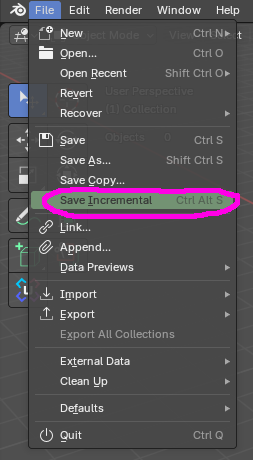
Is the folder you are saving to a Cloud folder by any chance ? An Icloud or Dropbox folder ?
It looks like it is due to the cloud and circling icon - meaning the folder is being synced.
I think it happens to me when I save - but if the .blend file is being synced in any way - it will iterate the save name as this file is ‘in use’ - due to syncing and uploading to the cloud.
Your cloud does it nicer.  Mine just does this:

But it’s a good idea. It would explain why it only happens on some bigger projects. Bigger file - longer sync.

Yes it is, I save to OneDrive, that might be the issue, I will try pausing syncing next time I use Blender.
I already tried doing that, since I replaced my keyboard for a different reason whilst this has been happening, the issue occurs on both.
Better try saving 3 GB file and then saving again while it’s syncing. At least the mystery will be solved.