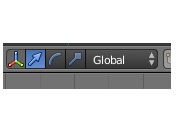
I just shifted from 3Dsmax to Blender, now it is taking me a while to get used to it, from the Artist perspective this is not a good thing.
Standard key for all 3D application translate, scale rotate even in game engine like Unity use the key W,E,R
I dont even know how to access those keys in Blender. Clicking the button every time I need to change axis is very inconvenient.
My question is how do I select those buttons with a shortcut key ? I havent started animating yet but I would need those if im going to animate.
Blender modeling is fast and efficient but I think moving away too much from other standard 3d applications is not a very good move. Today is just the third day on spending time with Blender tutorial… So far I do not regret, but some inconvenience which I would like to express. Thank you
It really is worth sticking with. I’ve found the speed comfort and efficiently of Blender to be a breath of fresh air.
And you wont forget how to use Max either.
These days I jump between Maya, Blender ,ZBrush no problems. But no other 3D interface I know has Blenders speed and ease of use once grasped.
Blender 2.8 is getting some major UI changes with workflow changes to match (the goal is to make the app. easier to use without throwing power users under the bus). You will have things like an icon-based toolbar, a top bar, viewport tool widgets, and much more.
That doesn’t mean it’s not a good idea to learn 2.79b though, as many things should carry over and there will likely be a way to convert files.
You actually dont need to do that like in max or maya,
let’s say you want to translate a cube in the x axis,
you select your cube, press ‘g’ ( Get ) and then press ‘x’ and move your mouse,
if you want to rotate in the x axis you have to slect the cube, then ‘r’ ( Rotate ) then x,
if you want to scale you’ll have to press ‘s’ then ‘x’.
the pattern is, you press ‘g’ for translate, ‘r’ to rotate, ‘s’ to scale and then you press the axes you want to do the action, you got ‘x’ or ‘y’ or ‘z’ .
let’s say you want to move a cube in the x and y axis only, you press ‘g’ then shift + ‘z’, it will remove moving the cube from the z axis
I’ll have to say that theres a common thread with all the users who come to blender from other apps. They try to make blender behave like what they were used to and struggle because of it. The best thing to do is learn blender’s way of doing things, you’ll find that its workflow is really fast and the short cuts aren’t too hard to remember. S for scale, G for grab, R for rotate, E for extrude, and use the search command (Spacebar) for anything you forget/dont know how to find.
Now with that said I should mention that there are things you can do to customize blender to be more like the other 3D apps. On the splash menu when blender starts is a drop down box that sets the default shortcuts to be mostly like those in 3DS Max. Theres also an addon called Blender Sensei format that changes the defaults and adds some new features. Finally I dont really recommend this version but theres a fork of blender called bforartists that was started by an ex member of this forum. One of the changes there is the use of the WER keyboard commands that autodesk apps use. I dont recommend it because its not fully compatible with some of the addons for blender out there (like https://prism-pipeline.com/) and I bet the only changes youll like are the ones that can be done in the default version of blender. Its mostly just a fork because he removed what he calls “double menu entries.” I personally find it a bit harder to work with because of that.
I changed from right to left select, changed viewport navigation to Maya/Substance/Unity style. It was a lot of work but I’m at a much happier place now. Blender defaults are just stupid and counterproductive (IMO). Blender is a great piece of software but its default settings are very far from optimal.
Switch to left mouse button select, as I did, that way you’ll still be able to use the other 3d apps too without too many hassle…
Relearn the RMB select is a no go, it will just get in the way since we are constantly dealing with several apps nowadays…