Anyone know why this would happen and how to avoid it?
If I switch from local space to local with parent, the same thing keeps happening, just a few frames earlier. I’ve tried most combinations.
Anyone know why this would happen and how to avoid it?
If I switch from local space to local with parent, the same thing keeps happening, just a few frames earlier. I’ve tried most combinations.
Imagine what happens when the target bone rotates through 180 degrees Y rotation. At 180 degrees, your target is adding 108 degrees to your constrained bone’s Y rotation. At 181 degrees, that converts to -179 degrees, and your constrained bone is now getting about -108 degrees. Of course, those two angles are very different, nearly a half-circle different. That’s why it’s discontinuous, and that’s the short answer.
Now, in practice, it happens even earlier than 180 degrees. Euler values are “aliased”: there’s more than one XYZ Euler triplet to correspond to one orientation. Because of the way Blender decoposes matrices to Eulers, that can start happening at any Y rotation on the target greater than 90 degrees. This is part of the long answer, which I could go into more detail on if desired.
Local->local is the right space, but a copy rotation just doesn’t do what you want it to do. But without knowing more about your rig and goals, I can’t make recommendations about what you should do instead.
Thank you for the explanation. It’s unfortunate that there doesn’t seem to be a setting to avoid this issue, since I seem to remember some rotations can go way over 360 and it’s fine so it shouldn’t have to happen just because it crosses that threshold.
All I want is that the wrist rotates a little bit along with the hand, to avoid the stretching of polygons where they meet, which you can see at the end of the video when I turn off the constraint.
Usually the answer to “It looks ugly when I pose my model like this” is, “Then don’t pose your model like that.” Rigs are designed to make a limited range of motion possible. If you rotate your own hand, you’ll find that it describes a little more than 180 degrees-- properly modelled, ± 90 degrees-- and that some of that rotation occurs in the upper arm and even shoulder. Your hand shouldn’t be at 90 degrees rotation relative to the wrist’s parent.
However, should you desire, you can do things differently by using a driver:
This driver uses the actual, keyframed number for the Y rotation of a YXZ Euler bone, and copies 0.6 of it to the Y rotation of another YXZ Euler bone. Because I believe you want this to occur after the IK, and drivers can never occur after IK, I’ve sandwiched in a parent for the IK constraint.
noaliascopyY.blend (113.2 KB)
This time I made both the model and rig myself, yet this issue keeps popping up:
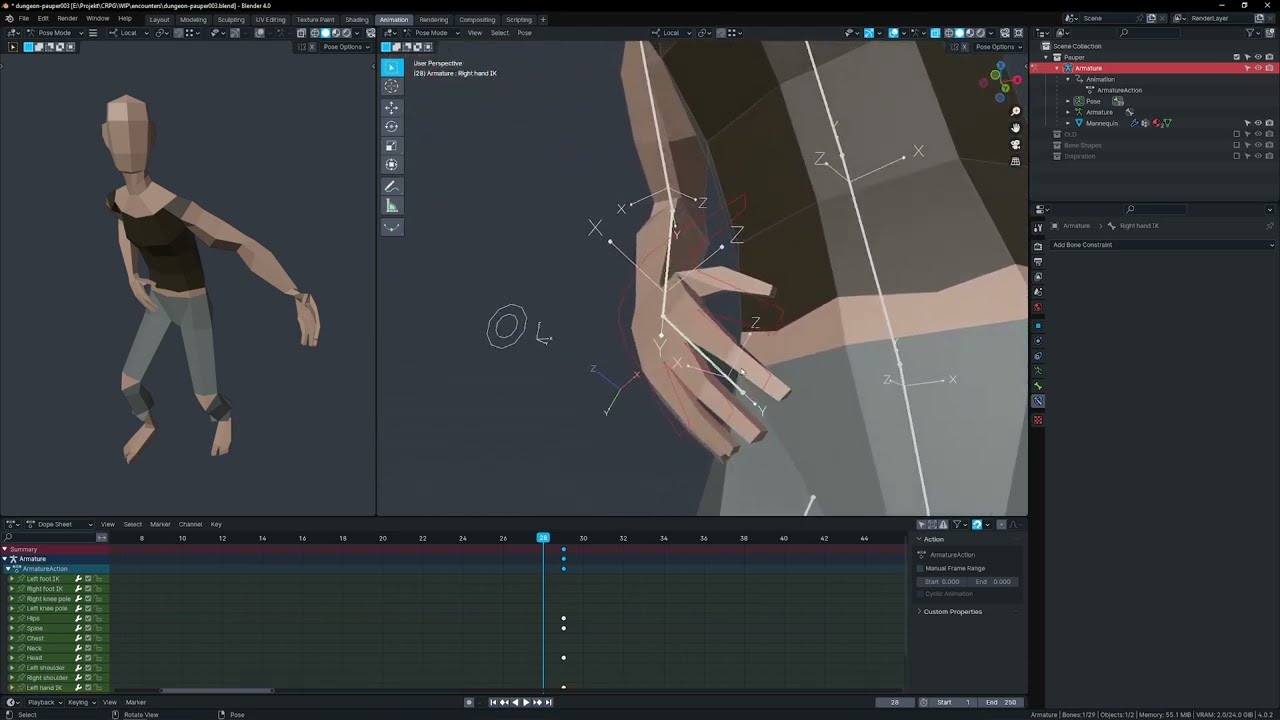
Oh, and weirdly, adding another copy rotation to the upper arm to try to get some lower arm influence chain going doesn’t work at all… that new constraint on the upper arm weirdly only makes the lower arm rotate even more!
Yeah, single axis copy rotation is rarely a good idea.
There are actually three different problems interacting here.
You’re combining an IK and a copy rotation on the same bone. Regardless of constraint order, your copy rotation will always be evaluated before the IK, and the IK will override that rotation if it feels it necessary.
By doing a copy rotation in default order, you’re evaluating the bone angles as an XYZ Euler, and these axes aren’t actually distinct, not after 90 degrees rotation. (Think about a world map, with ±180 degrees of longitude but only ± 90 degrees of latitude. If you had ±180 degrees of latitude, it’d be redundant with longitude-- the two axes blend together.) If you want to see the numbers Blender is using to copy rotation, make the forearm an XYZ Euler and then apply visual transform-- with and without the copy rotation. The difference in Y rotation is what it’s reading. But, these aren’t necessarily continuous values. After 90 degrees rotation, they’re basically mathematical artifacts of reading things as Eulers.
After 180 degrees rotation (even without rotation in any other axis) the direction of rotation is going to jump. It doesn’t go from 180 to 190, it can’t read that: it goes from 180 to -170 instead. When it goes from 180 to -180, .4 influence means your constraint applies 72 degrees rotation, then all of a sudden, -72 degrees of rotation.
The solution to the first problem is to sandwich another bone in on the forearm, so that you can do IK then copy rotation (parent has IK, child has copy rotation.) The solution to the second problem is add more bones to the hand, which is designed such that it only ever rotates in local Y (can parent to your new forearm parent, damped track hand tail, and then have a child of it copy rotation as an XZY Euler to only ever get local Y rotation.)
The solution to the third problem is the same as I described earlier: use a driver instead of a constraint. But that overrides the other two solutions. Once you do that, you’re beholding to use proper Eulers that properly represent the Y value you want it to copy. And you can’t be copying from the transforms of a constrained bone at that point, only your raw transform values, because a constraint can’t tell the difference between 0 degrees or 360 degrees or 720 degrees.
Thanks, I’ll see where I’ll end up but wow… this entire thing feels way more complicated than it has to be if only the constraints were evaluated in order and could go above 180! 
(Again, technical explanations are fine, but computers are supposed to help humans solve these things.)
While some of this stuff is solvable by computers (eventually, that IK ordering thing will get sorted out, probably via rigging nodes), some of it isn’t-- some of it is just down to the fact that 3D doesn’t work the way we intuit it should. Constraints don’t work past 180 degrees because if they did, they’d just be drivers, unable to convert between different spaces like world and local.
The easy solution is, if it looks bad, don’t pose it that way.

