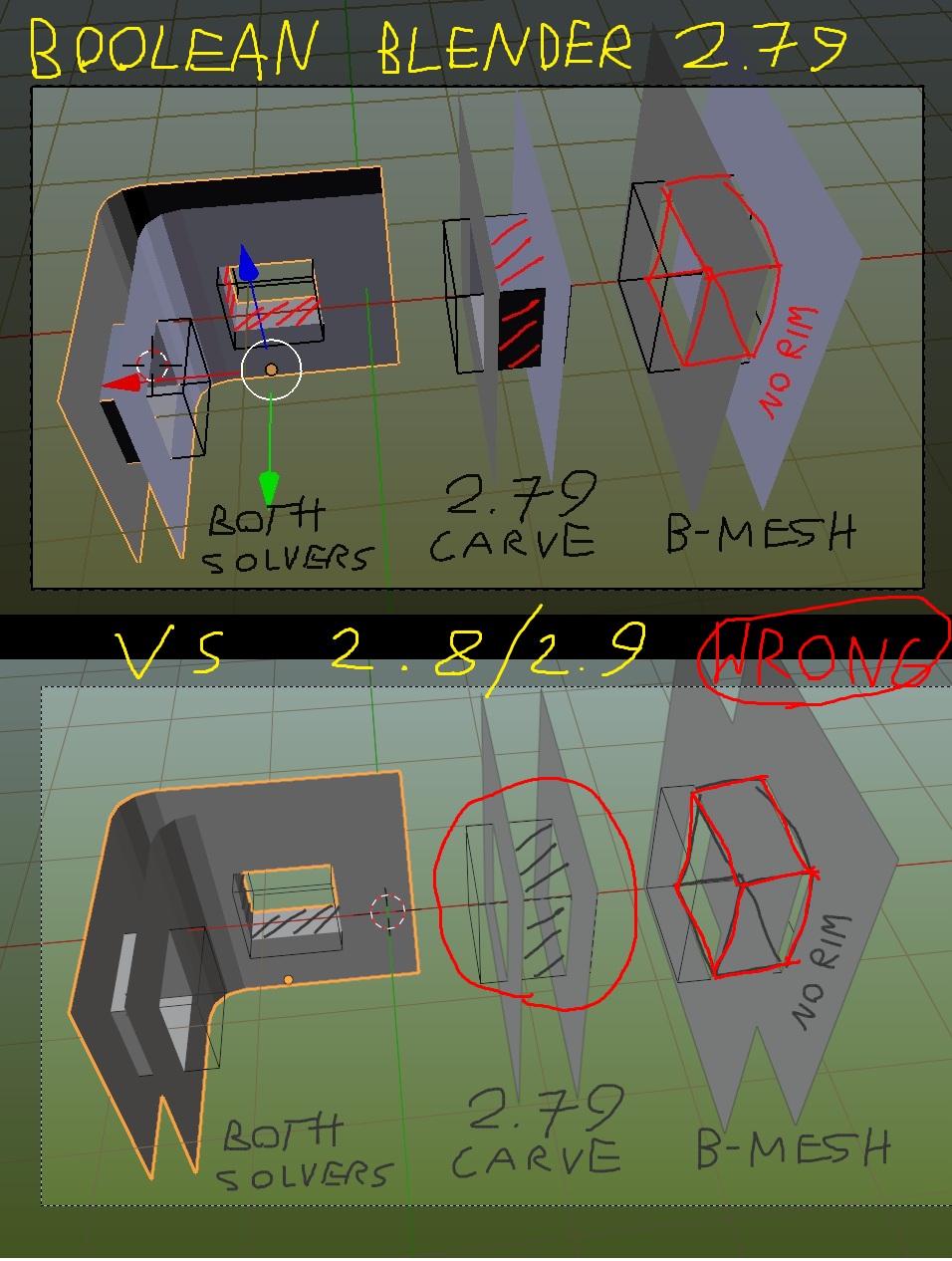
There is something wrong with boolean modifier on 2.8/2.9
I also discovered that it has no solver selection (Carve/ B-Mesh)
Just look at this image, please:
I tested it on 2.79 , 2.83 & 2.93 and I can’t make all meshes to be similar
(all with rims or all without rims).
Only solution, I found, is to enable solidify Fill Rim, but I don’t want to fill outside rims because I’m doing modular walls and it will create too many unnecessary geometry
Maybe someone else knows better than I do, but as far as i know, booleans are meant to be used on enclosed, manifold meshes and were never intended or programmed to be used like you are doing here. Actually, I am somewhat surprised if you ever managed to make them work this way without getting weird results.
Also, the boolean solvers have changed in the newer versions of Blender (we now have “fast” and “exact” solvers) and I don’t think the new ones are intended for open meshes either.
I was experimenting a little with modifiers before. I sometimes use boolean for creating doors & windows holes if I’m not sure their final shape and dimensions.
So I think the only way will be to manually delete existing or fill missing rims after apply modifiers.