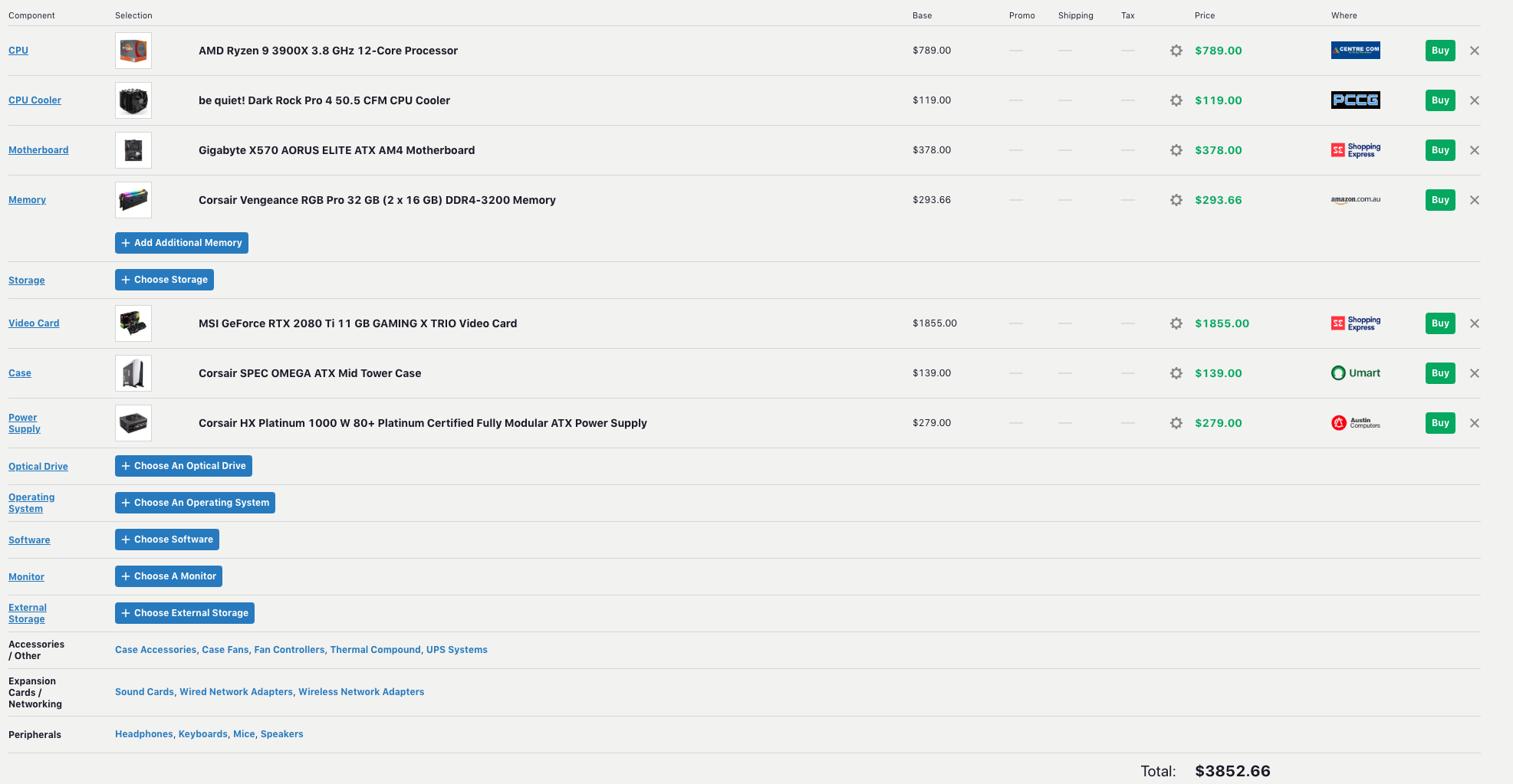
Here’s my suggestion, went with what I though is the best GPU rendering performance you can get now with $4k, includes the system assembly but no OS. Does have 2 x RTX 2070 Supers
Definitely think birdnamnam’s build is perfect for long term if you want to get a second 2080Ti later, although I prefer air-cooling myself, given the TDP of these CPUs
I was thinking. The rtx 2080 is getting dangerously close to half the price of the 2080Ti.
What would be the pros & cons of getting 2x 2080 connected via NVlink vs. getting single 2080Ti in terms of performance? What would you choose and for which scenario?
Btw. for the threadripper vs ryzen dilemma, I will probably wait till the Q3/Q4 of this year for the new threadrippers, and then make my decision.
Didn’t know that about nvlink not working. Thanks for the heads up.
So, i.e. if I get 2x 2080 I can use them both for rendering but I only get 8gb of ram?
And what about 8gb vs 11gb on Ti version? Is there a scenario where it makes a difference?
EDIT: Interesting. On Evermotion I stumbled upon an article about new intel image denoising algorithm. It says, and I quote:
GPU and memory
Modern GPUs give a big boost to rendering speeds when it comes to path tracing. At first I thought that my RTX 2080 Ti will not have enough memory for rendering such a scene, but luckily, cycles can render out-of-core memory - it can sum up system and VRAM and use it for rendering. My 2080 Ti is equipped with 11 GB of VRAM, my system has 16 GB of RAM. The scene requires 13,9 GB of RAM to render. So I am covered by a big extend.
Is the a reason or reasons you feel the 570 is more suited? Just in terms of budget assessing the need to go with 570 vs 470. Just seeing a large range of each it’s becoming a bit mind bending to try and grasp what I need and what I can allow myself to save on, sorry for all the questions.
Haven’t looked that thoroughly. But I guess I would take something with at least two fans and 3 years warranty. And watch for those dimension if it fits in the case.
There is no need to compare what fits with CPU, because everything will work fine.
No problem with the questions. Always go for the newest chipset, that’s my principle on that. If you already had a good X470 motherboard, then I would say stick with it in order to avoid the extra cost. But since you’re building this rig from scratch, go for X570. It’s better suited for the new processors and in general motherboard manufacturers have put a lot of work on them to have them fully prepared for the new cpus, i.e. better vrms and chipset cooling etc.
If you don’t mind, I’d like to say something about your next questions too. I’d definitely go for a good aftermarket cooler for the 3900X. I’m following along new Ryzen users in other forums, and the temps I see with the Wraith cooler are underwhelming for long term use, and especially with the 3900X.
Ok understood, being so new it’s extremely confusing to try and get a grasp on all the differences between the different X570 motherboards, what brands are generally better, what features they hold, and why some are in the hundreds and some are well over a thousand.
Also struggling quite a bit to try and figure out what the differences are between all the RTX 2080Ti brands, and the different fans and coolers they come with.
Hoping to start comprehending something sometime soon…
The Wraith cooler is indeed an “OK” cooler that will pemit the CPU to run. but it will NOT turbo to its maximum speeds, let alone any overclocking.
So if you do NOT plan to overlcock right now, and the rest of the case has good ventilation/fan setup, then it will be sufficient for start. Still eventualy I would highly recommend getting a larger air cooler (or water cooling setup)
Most of the X570 motherboards are very well equipped, even relatively cheap ones. Don’t get anxious about that. A mid range board (~400$ AUD) like this one would be more than enough for your needs. The biggest difference with previous chipsets (X470 or X370) is of course the pcie gen 4.0 connectivity, which will shine when real gen 4.0 nvme ssds are released (2 or 3 models are already in the market, but none of them has really mind-blowing performance, it’s too early), and the better thermal design to host the new 3000 series processors.
About the gpu now, I traditionally go with Asus in gpus, even though EVGA, MSI and Gigabyte also offer nice implementations in terms of thermal and acoustic behavior.
Check these 3 models imo: Asus RTX 2080 ti STRIX OC MSI RTX 2080 ti Gaming Trio EVGA RTX 280 ti FTW3
You can’t fault with any of these.
Ahh, ok so the X570 was more in the line of future proofing - thank you.
So this is what I am running with at the moment, still not quite the level of understanding I wanted so I know exactly what I’m buying but hopefully it will come with time. Still trying to research on what makes a solid SSD Any feedback on the current state of the build in the link below?
This would need to be the place I get it from as they can build it for me:
What is your view on having a separate OS drive and storage drive rather than 1 on everything?
You can bet your ass that if I was spending four grand on a new workstation, it would have a four-gpu workstation mobo, like the one I currently have (even if that meant going one gen back), because even though I have three GPUs, it is nice knowing that I could have four if I needed to, and is worth the extra dough.
And I would not be slapping in a p-o-s Corsair 850W PSU. I was burned twice by Corsair with coil whine both times… they’ll never get a chance to screw me a third time. Listen carefully folks: SuperFlower makes the best high-end PSUs. If you can get SuperFlower Leadex in your country, get it. If not, then EVGA likely is available, and you would want EVGA SuperNova, which are OEM’d by SuperFlower. Don’t be fooled by the name Super Flower, or the fact that their logo is a butterfly. Their PSUs are the most badass effing PSUs on planet Earth.
And you should know that having a PSU that is Gold, Platinum, or Titanium, and well over 1000W, even for three GPUs, is smart any way you cut it. Having more power than you need only means that the PSU won’t be bumping up against the red line… and will be much more efficient (use less juice) and quiet, and possibly the fan will never even need to spin up. Bottom Line: I would have nothing but SuperFlower Leadex or EVGA SuperNova PSU in any GPU workstation I built, with 1300W for three GPUs, and 1600W if I was definitely planning on four.
Sorry bro, but maybe you weren’t listening above, or are clairvoyant and know that you’ll never, ever need more than two GPUs… but imo you’d be a complete fool to get ANY mobo that is limited to a measly two GPUs, if you are indeed building a GPU workstation…
Funnily enough, if you read my post, you would have seen that my suggestion was for maximising rendering performance with a $4k AUD PC now. Not when adding a second extra $1.5k GPU later, but forgoing 2 GPU’s now.
Speccing out a system with a motherboard and PSU that can support 4 GPU’s would reduce the available performance of the system when purchased, given the $4k budget.
Not that I said there is anything wrong with doing that, but I had already said that @birdnamnam’s build would be a great for adding more GPU’s to later, it would be a waste to propose the same kind of system.
All I did was provide an alternative suggestion that OP could consider if they wanted to get the maximum (or close to) rendering performance with their budget when they receive the system. Nowhere did I state that it is the best or only way to go
Fair enough. I should try to keep in mind that not everyone is a professional 3D artist like myself. Maybe the OP is strictly a hobbyist. I work with deadlines and my ws does indeed need to be a beast…
I will just add a couple things, then I need to head back to the salt mines: [1] PSUs are way the hell more important than noobs think, and if they really care about their system they are about to build, they should really take my advice and try to get a SuperFlower/SuperNova if they can swing it. I would have no hesitation whatsoever about putting one in a submarine, satellite, or deep space probe, if they needed a PSU for on-board computers… [2] I am not crazy about Asus mobos. I’ve had two. Never again with them as well, if I can avoid them. I very highly recommend ASRock or Gigabyte mobos.