TempCAP.7z (1.2 MB)
I’ve attached a sample model. I did a boolean intersect with a cube so that it’s not the whole piece. But there is Plenty there to show the issue.
When I import from Rhino, a Ton of pieces are segmented up. I merged vertices by distance and did .00001 just to be sure it was only the overlapping ones. Great, that solves the issues where you have a nice Gentle bevel. If you leave them alone, as a reflection moves over it, you see a clear and ugly break.
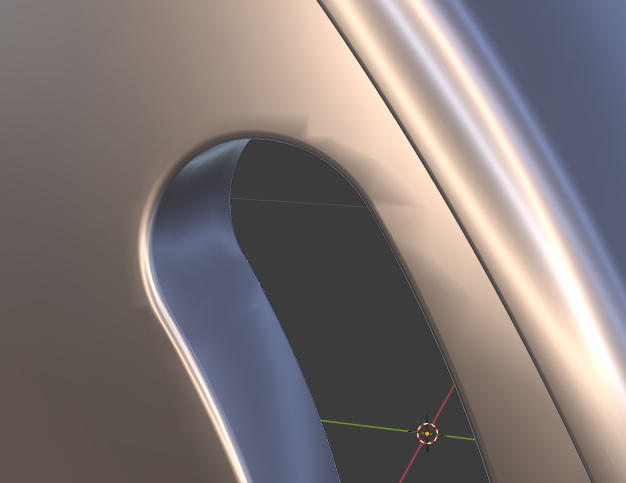
But doing that causes bevels next to flat faces to look like that image.
I’ve rebuilt normals. I’ve tried a bunch of settings with the weighted normals modifier.
The only way I can get it to look ok is to select the flat surface’s boundary edge and mark sharp. But it shouldn’t be sharp. That kills the reflections also.
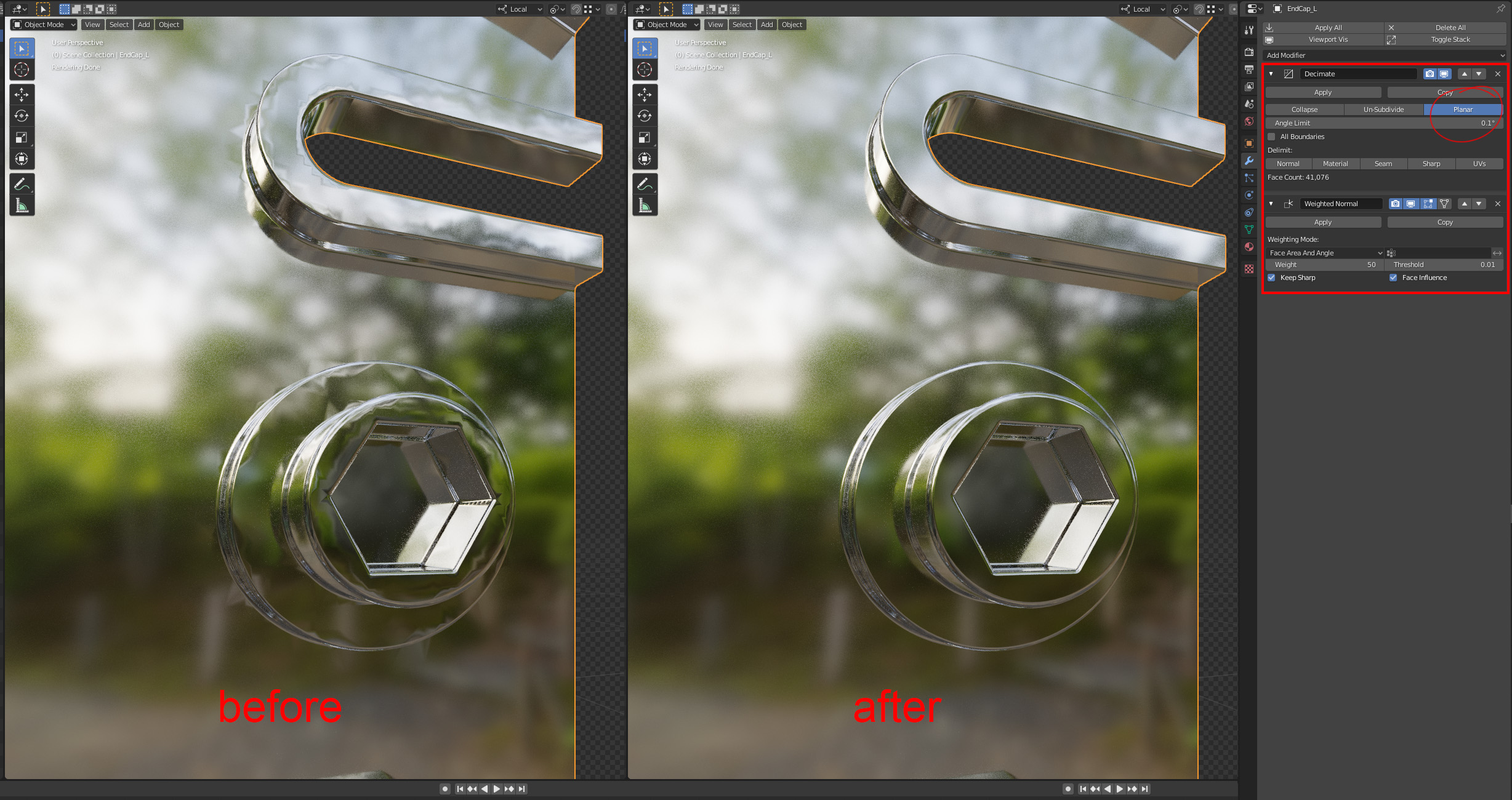
A basic solution - using a Decimate and a Weighted-Normals modifier, and although I wouldn’t say this was an ideal solution under every circumstance ( extreme close-ups of tight curves) - it may be suitable for your purposes. The hard surface modellers out there may have a more robust solution depending how critical your renders have to be.
That’s awesome. I didn’t think about the modifier. I tried limited dissolve, but it took way too much away since the flat area has so many, essentially, boolean objects taken out of it.
I wouldn’t mind purchasing an add-on if it actually works for examples like this. I’d like to move to blender, but things like this hold me back a bit. This area isn’t actually “mission critical” but we are generally very discerning. Don’t want to see Any tessellation without Really trying. I’ve got some renderings on packaging in stores. I just saw a new one this weekend and was pretty excited to see them.
You can shell out 10 bucks for the openVDB remesh add-on. You could also just use the default remesh modifier, switch the mode to voxel and increase the density, then add a smooth modifier and increase the iterations until it looks good.
I like the idea, but you still have to go back and clean things up after that. It’s a nice bandaid when you need something fast. But seriously, these folks are discerning as hell. Voxel size at .001 was almost good enough. I tried .0005 and instant crash.
I think blender might be integrating the OpenVDB remesh? Maybe I’ll download 2.9 and see if it’s made it in there yet. It’s always nice to know what’s coming. Either way, 10 bucks isn’t bad. I think I might just give myself something like a $15 personal allowance for blender stuff, even though it’s for work mostly. But I am trying to keep mesh to a reasonable level. So there’s always a balance with that.
So far I’ve been fairly happy with using the decimate modifier with usually 1 degree, and checking planar. Then adding the weighted normal modifier. Then I apply them after it looks good. But it definitely doesn’t work for Everything. This method actually reduces the file’s weight a bit, and improves appearance…in most cases.
Thanks for the suggestion DaminaJ. You selected it, but didn’t mention it either, that “keep sharp” option is definitely needed.
Any app is going to have issues converting CAD models but If you need it to have less geometry and need it to be perfect, you should also look into retopoflow which will allow you to quickly (though not automatically) trace a new mesh with good topology.
Yeah, that’s a pretty good idea. I’m sure there’s a hefty learning curve on how to utilize that with hard surface modeling, but it’s probably not too bad. Most of the things we do are just bent sheet metal. So those parts would be pretty quick to model, if needed. The holes are always the trouble. And then the more complex plastic, or machined metal, pieces like I posted here are a little more complex, but still pretty basic. I suppose if I get good at just modeling them in place in a way that I can snap things well, then I should be in good shape.
I actually don’t need the inside of that particular piece, with all those details. I do, to a degree, but they are tertiary elements that no one would notice if they were slightly “off”. So as long as I got the main chamfer and fillets correct then I’d be good.
The issue is, “final” data is never final. So I’m looking for fast ways of doing things. I’m also trying to figure out good ways to avoid keyshot. I’m using keyshot for packaging renderings for clients. In terms of cost, I need to completely finish 2 renderings per day for each project, start to finish. It sounds impossible, but when we have to do 12 renders it’s not so bad. That gives me 5-6 days to do 12 renders start to finish. I just can’t do that cost if someone gives me one complex model, and only needs a single render.
I’ll look into retopo. Someone also has a step importer. It isn’t expensive, but I’d like to see how the model comes out. If it’s significantly better than the rhino importer then that could save some time. It’s called STEPper. Oh, it’s the same guy that makes the openVDB remesher (which he says not to buy any longer because it might be working it’s way into blender).
Ah, I saw some promising things from Mio. I didn’t realize they did that in Rhino beta. I’ll definitely give that a look. Because that mesh looked great, from what I could tell. I run most everything through Rhino even if it isn’t native, just for organization, and a little cleanup where it’s needed.